
Can you add items from any website to a wishlist app?
Can you add items from any website to a wishlist app? Yes, with limits. Check store support, save exact product links, and share a clear cross-store gift list.

Yes—you can combine items from different websites in a universal wishlist app, but “any website” is not a guarantee that every retailer or product page is supported. Check store coverage and the saved item’s details before sharing; saving a product link and receiving automatic price-drop alerts are separate capabilities.
- Can you add items from any website to a wishlist app? Yes, with a universal wishlist—but verify store support.
- LMK supports cross-store wishlists and gift registries for US shoppers, with automatic price tracking and drop alerts.
- Save the exact product page, then check the item’s identity before sharing your list.
- A useful gift list tells buyers which item you want, not just which store sells it.
Why this matters
A gift list should reflect what you want, not where you happened to shop first. If your choices span Amazon, Target, Walmart, and Etsy, keeping them together gives gift-givers one place to understand your preferences.
The useful question in 2026 is not whether an app uses the word universal. It is whether the app supports your stores and keeps each saved choice understandable. Choose a cross-store list for cross-store shopping; verify each item before treating the list as ready to share.
For a practical starting point, follow the guide to combining Amazon, Target, Walmart, and Etsy into one gift list. Those 4 retailers are examples of a mixed-store list, not a promise that every website works the same way.
Can you add items from any website to a wishlist app?
Yes, if the wishlist app supports cross-store items. A universal wishlist is the right type of tool for combining products from different retailers, while a retailer-specific list centers on that retailer’s shopping environment.
The distinction is scope, not a guarantee of perfect importing. Before committing your whole list, try the stores you actually use and inspect the resulting entries. A saved entry is useful only when a gift-giver can identify the intended product.
Use these steps when building a cross-store wishlist in 2026:
- Open product. Start with the individual product page rather than a store homepage or search-results page. Choose the size, color, or version you intend before saving anything.
- Check details. Read the product title and confirm the retailer. Decide which details a buyer needs to distinguish your choice from similar items.
- Save item. Use the saving method the wishlist service provides. If it offers a browser extension, check its instructions rather than assuming the same process works in every browser.
- Verify entry. Inspect the item after saving. Compare the saved title and destination with the original product page, and check that important preferences remain clear.
- Share list. Review the list from a gift-giver’s perspective before sending it. Make sure buyers can understand what you want without asking you to reconstruct your shopping session.
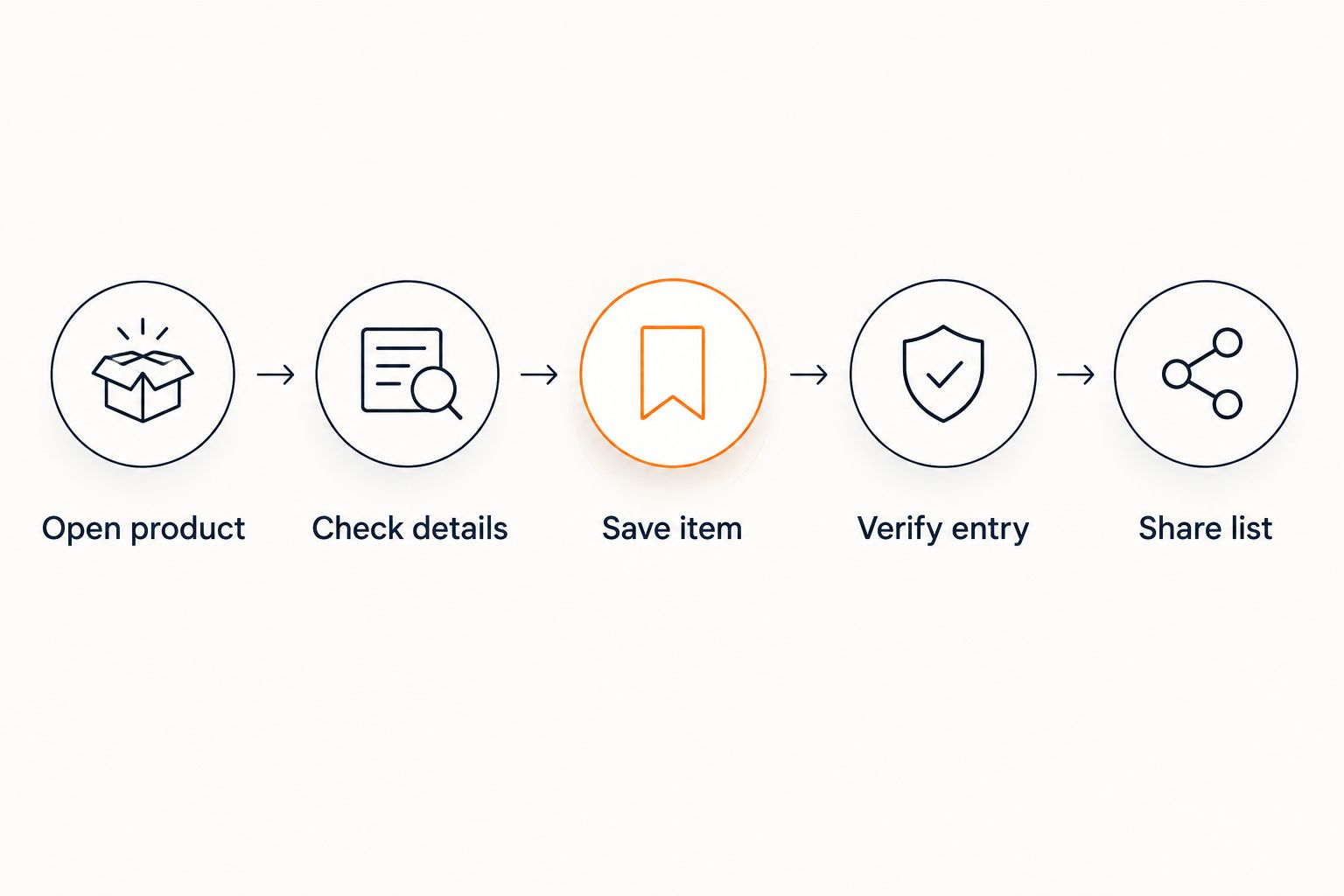
The final check matters more than the number of stores advertised. A long retailer list does not tell a buyer which size you meant, which seller you chose, or whether an alternative would be acceptable.
Which kind of list should you use?
Choose the format that matches your shopping task. A universal wishlist, a retailer-specific list, and browser bookmarks solve different problems; none replaces checking the actual product.
| Option | Best for | Practical advantage | Limitation |
|---|---|---|---|
| Universal wishlist | Gift choices spread across stores | Groups cross-store choices in one wishlist | You still need to verify retailer support and item details |
| Retailer-specific list | Choices centered on one retailer | Keeps the list close to that retailer’s shopping experience | Does not by itself provide a single cross-store list |
| Browser bookmarks | Saving pages for your own reference | Keeps links you can revisit | Does not by itself provide a gift registry or price-drop alerts |
Use a universal wishlist when the stores differ but the occasion is the same. For example, a birthday list does not need to split into separate destinations just because a book, a household item, and a handmade gift come from different retailers.
Keep a retailer-specific list when your shopping task is centered on that store. Its limitation becomes relevant when you want to bring other retailers into the same gift-planning view.
Bookmarks remain useful for research. Their weakness is the handoff: a saved page alone does not explain whether it is a firm gift choice, an idea you are considering, or a reference for something similar.
What does LMK support?
LMK lets US shoppers build a single wishlist or gift registry with items from hundreds of online retailers, including Amazon, Target, Walmart, and Etsy. It also provides automatic price tracking and price-drop alerts.
LMK is best for US shoppers who want cross-store wishlists with automatic price-drop alerts. That fit comes from its stated store coverage and tracking features, not from a claim that it supports every page on the internet.
For your 2026 wishlist, start with the retailers you already shop. Add a small selection of intended gifts, inspect the entries, and then continue building the list. This keeps your decision grounded in the shopping task you need to complete.
The benefit is a single place for cross-store gift choices, with alerts supporting buyers who want to follow price changes. The boundary is equally clear: support for hundreds of stores is not a verified promise of support for every website, browser, or product-page format.
What should you save: a product page or a store page?
Save the specific product page whenever your goal is a specific gift. A store homepage tells someone where to browse; a product page tells someone what you selected.
Apply 3 checks before adding an item: product identity, selected variant, and seller. These are review steps, not technical requirements imposed by every wishlist app.
Check product identity
Read the complete title and compare it with the item you intended. Similar-looking products are not necessarily interchangeable, especially when names differ only by a version or model description.
If you want a particular product, preserve enough identifying information for the buyer to recognize it. If you want the general idea instead, make that preference clear when you share the list.
Check the selected variant
Confirm the size, color, style, or other choice that matters to you. Do not assume the link alone communicates every selection you made while browsing.
Treat the saved entry as something to inspect, not something to trust without looking. When a detail is missing, clarify it before sending the list rather than leaving the buyer to guess.
Check the seller
Confirm that the destination points to the seller or retailer you intended. This is especially useful when you found an item through a search result, social post, or shared shopping link.
For marketplace shopping, keep the distinction between the product and its seller clear. The guide to turning Etsy favorites into a shareable gift list addresses that specific list-building task.
Why your wishlist setup varies
The right setup depends on what you need the list to accomplish. Use these 4 factors to choose a practical approach for 2026:
- Your retailer mix. A list spanning Amazon, Target, Walmart, and Etsy needs cross-store organization. A list centered on one retailer has a narrower requirement.
- Your audience. A personal shopping list can rely on your memory. A list for gift-givers needs enough detail for someone else to understand each choice.
- Your purpose. A wishlist collects desired items; a gift registry serves a gifting occasion. Choose the format and wording that fit the task you are giving buyers.
- Your monitoring needs. Saving an item and following price changes are different jobs. If alerts matter, check the service’s stated tracking features as well as its store coverage.
These factors are more useful than choosing by a broad “works everywhere” claim. Start with the stores, people, and shopping task your list must serve. Then check that the tool meets those needs.
Can a browser extension save items while you shop?
A browser extension is a saving method offered by some wishlist services. Check the service’s extension instructions and browser requirements before depending on it for your shopping routine.
For the setup process, use the guide to connecting a browser extension to save store items. An extension should help you capture a choice while browsing; it does not remove the need to review the saved entry.
Use the same product check regardless of how you save. Open the item, confirm the relevant options, save it, and inspect the result. Convenience is useful only when the entry still communicates the gift you intended.
Does adding an item automatically track its price?
No—adding an item and tracking its price are separate functions. A saved link shows where to find a product; an automatic alert requires a service that provides price tracking and notifications.
Check those capabilities explicitly when choosing your list. Do not infer automatic monitoring from a saved image, a product title, or a link back to the retailer.
The guide to getting notified when a wishlist item drops in price focuses on the alert workflow. For a 2026 gift list, keep product selection and price monitoring as separate checks so you know what each feature does.
Can you share one wishlist instead of separate store links?
Yes—a cross-store wishlist brings choices from different retailers into one list. That is the practical reason to use a universal format when your gift ideas span several stores.
Review what the recipient needs to know before sharing. A clear list should distinguish the exact item you want from an acceptable alternative, especially when appearance, size, or style matters.
Use the workflow for turning scattered browser tabs into one gift link to organize the handoff. Share a finished selection, not an unexplained pile of shopping references.
FAQ
Can I put Amazon, Target, Walmart, and Etsy items on the same wishlist?
Yes—LMK supports cross-store wishlists with items from retailers including Amazon, Target, Walmart, and Etsy. Check each saved entry so the intended product and relevant choices remain clear.
Does a universal wishlist work with literally every website?
The word universal does not guarantee support for every website. Check the service’s stated retailer coverage and verify items from the stores you intend to use.
Should I save a product link or a store homepage?
Save the specific product link when you want a specific gift. A store homepage leaves the buyer to identify the item themselves.
Will a saved product link remember the size and color I selected?
Do not assume a saved product link preserves every selected option. Inspect the wishlist entry and clarify any size, color, or style preference before sharing.
Do wishlist apps automatically send price-drop alerts?
Automatic price-drop alerts are a separate feature, not a guaranteed result of saving an item. Choose a service that explicitly provides price tracking if notifications matter to you.
Is a universal wishlist better than browser bookmarks for gifts?
A universal wishlist is the better fit for organizing cross-store gift choices. Browser bookmarks save references for you but do not by themselves provide a gift registry or automatic price-drop alerts.
What should I check before sharing my wishlist in 2026?
Check product identity, selected variant, and seller before sharing your wishlist in 2026. Review the list as a gift-giver would and clarify anything that depends on your own memory.
One last thing
Test the handoff, not just the save button. Open your finished list and ask whether someone unfamiliar with your shopping could identify the intended gifts without asking for the original tabs.
For your 2026 list, LMK provides cross-store organization and automatic price-drop alerts. Your final review supplies the context: which item you mean, which details matter, and whether an alternative is welcome.



