Can you add gift cards to a universal wishlist?
Can you add gift cards to a wishlist? Yes, when the list supports the retailer's link. Check delivery, redemption rules, and privacy before sharing.

Yes, you can add gift cards to a wishlist when the wishlist accepts the retailer’s gift-card page or provides another supported way to describe the request. Adding a card to a list does not buy it, deliver it, or turn the wishlist into a cash fund; the giver still needs to complete the purchase through the seller.
- Can you add gift cards to a wishlist? Yes, when the wishlist supports the retailer’s gift-card link or request format.
- Link to a gift-card purchase page, never a card number, redemption code, or account balance.
- Choose digital or physical delivery explicitly; the purchaser must follow the seller’s delivery instructions.
- LMK combines cross-store wishlists and price-drop alerts; check gift-card compatibility before relying on a saved entry.
Why this matters
A gift-card request needs more explanation than a picture of a product. Your giver needs to know which retailer you mean, whether you want digital or physical delivery, and whether the card works where you shop.
Treat a gift-card entry as a buying instruction, not a payment feature. For a 2026 wishlist, the useful test is whether someone opening your shared list can reach the right purchase page without guessing. The guide to checking whether a store is supported by a wishlist app explains the broader compatibility question.
Can you add gift cards to a universal wishlist?
Yes, provided the universal wishlist supports the gift-card page or another suitable request format. Universal means a list can bring together items from different stores; it does not establish that every page, delivery method, or checkout option works.
Use this comparison to decide what you are actually asking someone to give. These are gift formats, not claims about features available in a particular wishlist service.
| Gift format | Best for | What to make clear | Main limitation |
|---|---|---|---|
| Digital gift card | Someone who wants electronic delivery | Retailer, recipient delivery details, and redemption region | Sending the list link does not send the gift card |
| Physical gift card | Someone who wants a card to hand over or unwrap | Retailer and physical-card format | Purchase and delivery happen outside the wishlist |
| Specific product | Someone who knows the exact item they want | Product, size, color, or other relevant choices | The giver needs the correct product variant |
| Cash contribution | Someone seeking money rather than store credit | A separately supported contribution method | A gift-card link does not create a cash fund |
A gift card offers choice within its redemption terms. A specific product removes more of the recipient’s shopping work. Neither is automatically better: recommend the format that matches what the recipient actually wants.
How do you check whether the entry works?
Open the retailer’s public gift-card purchase page, then try adding that page through your wishlist’s supported process. Inspect the result rather than assuming that a successful save means the whole purchase is configured.
Check these 3 details before sharing:
- Destination: The entry opens the intended gift-card purchase page.
- Format: The entry identifies digital or physical delivery correctly.
- Instructions: The giver can tell what to buy without seeing private redemption information.
If the saved entry points to a general store page or loses an essential choice, clarify the request using whatever editing features your service actually provides. If you cannot make the request clear, leave the entry off the list and explain your preference directly.
Digital gift cards: best for electronic delivery
A digital gift card is the right request when you want the gift delivered electronically rather than as a physical card. Link to the seller’s public purchase page, not to a message containing an already-issued gift card.
The benefit is straightforward: you can ask for retailer credit without specifying a particular product. The drawback is that the purchaser still has to handle delivery details correctly at checkout.
Do not assume the wishlist supplies the recipient’s email address to the seller. Agree on how the giver will deliver the gift, and keep personal contact information out of any list you intend to share publicly.
For a 2026 event, check the seller’s current delivery instructions before circulating the list. Your wishlist description should explain your preference; it should not promise a delivery schedule that the seller has not confirmed.
Physical gift cards: best for gifts you can hand over
A physical gift card fits an occasion where the giver wants something tangible to present. Make the format explicit so the giver does not accidentally choose electronic delivery instead.
The benefit is a physical gift that can accompany a note. The limitation is the extra delivery or handover arrangement: saving a card to a wishlist does not arrange either one.
Keep the request focused on the card itself. Share an address privately when needed rather than placing it in the public-facing description. For more detail on that decision, see address privacy on a gift registry.
How to add a gift-card request without creating confusion
Follow this sequence when preparing a gift-card entry. These are checks you perform, not a promise that every wishlist has the same buttons or editing controls.
- Choose retailer. Start with a seller the recipient actually uses. Check where the card can be redeemed instead of assuming that a familiar store name guarantees compatibility.
- Choose format. Decide whether the request is for digital or physical delivery. Use the relevant purchase page when the seller separates those formats.
- Save purchase page. Add the public page using your wishlist’s supported method. Never substitute a balance-check page, account page, or issued-card message.
- Review entry. Check the destination and visible description. Confirm that essential choices have not disappeared from the saved request.
- Share list. Open the shareable version and inspect what a giver will see. Send private delivery details separately when necessary.
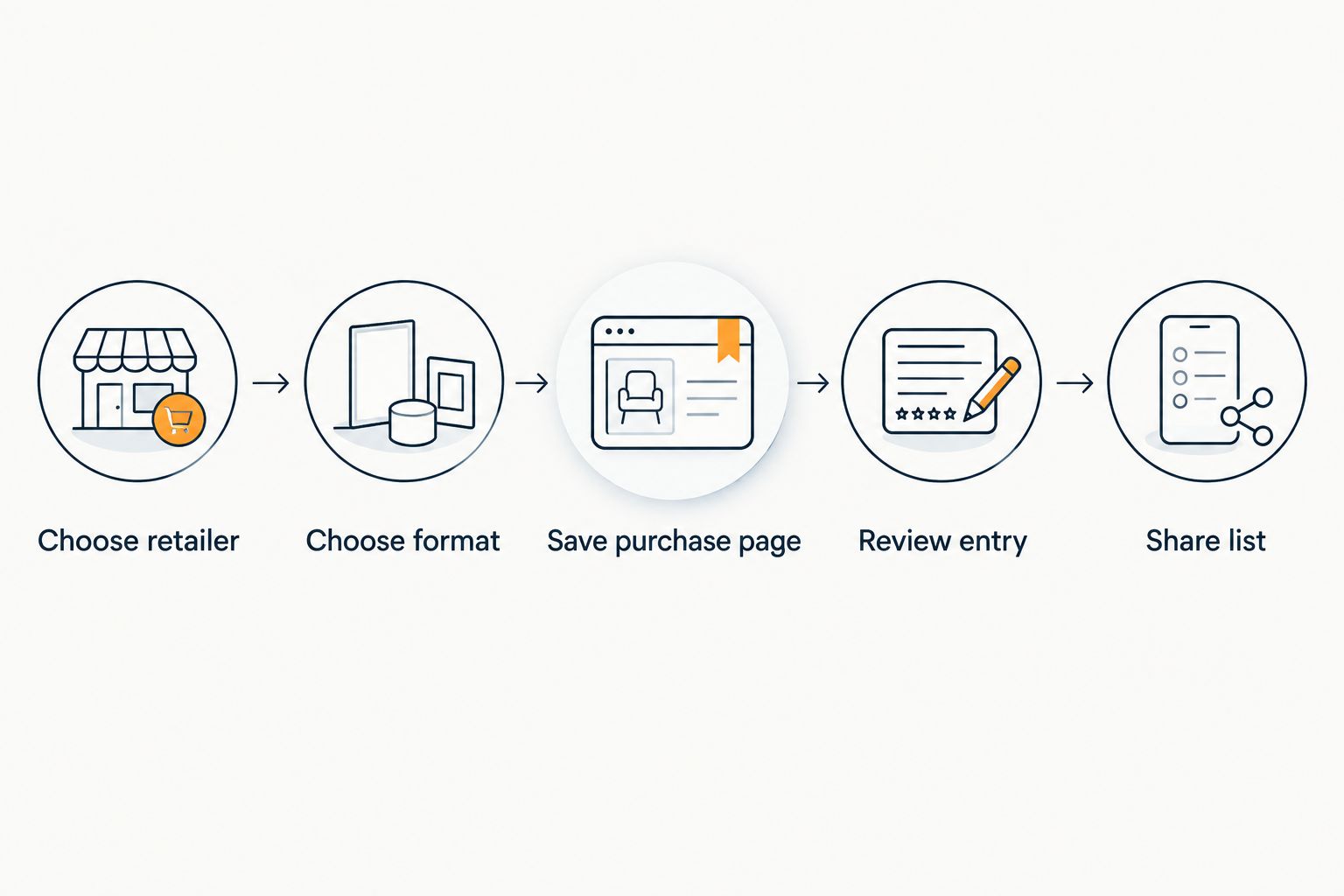
The purchase page is the request; the redemption code is the gift. Keep them separate. That distinction prevents you from sharing sensitive card information when you only meant to share a shopping idea.
If your list also includes ordinary products, the same review habit helps. The guide to adding items from different websites to a wishlist covers the wider cross-store question.
Why gift-card compatibility varies
Gift-card compatibility depends on both the wishlist’s supported features and the seller’s purchase process. A page appearing on a list is only part of the task.
- Supported entry methods. A service that accepts a product link does not necessarily support every kind of request or contribution.
- Delivery format. Digital and physical cards require different delivery instructions. Your entry needs to identify the intended format.
- Checkout choices. The purchaser must confirm the seller’s required selections rather than treating the saved entry as a completed order.
- Redemption terms. Check eligible locations, currencies, and uses in the seller’s terms. Do not infer them from the retailer’s name.
- Shared information. A public purchase link is different from a private card code, account detail, or delivery address.
For your 2026 list, resolve those questions before sending the link. A clear request saves the giver from having to ask which card you meant after they have already started shopping.
Where LMK fits in a mixed gift list
LMK is a fit for US shoppers who want cross-store wishlists with automatic price-drop alerts. It brings together items from hundreds of stores, which is useful when your gift ideas do not belong to a single retailer.
The limitation is scope: cross-store wishlist support does not, by itself, confirm that a particular gift-card page will save correctly or that the service handles gift-card delivery. Test the request before treating it as ready to share.
Use an LMK wishlist to organize supported requests, not as evidence of a seller’s redemption terms. Likewise, LMK price-drop alerts do not establish that a particular gift card qualifies for tracking or will change in price.
Can you put gift cards and regular gifts on the same list?
Yes, when your wishlist supports both entry types. Keep each request clear enough that a giver can distinguish a specific item from a request for retailer credit.
A mixed list gives the giver a choice between selecting a product and letting you choose later. Its drawback is ambiguity if the entries are vague: a retailer’s name alone does not explain which gift-card format you want.
For a 2026 celebration, review the whole list for clarity rather than adding several near-identical requests. Explain whether gift cards are alternatives to the listed products, not extra gifts you expect someone to purchase.
Does adding a gift card mean people can contribute money?
No, adding a gift-card purchase link does not create a contribution feature. A list entry directs someone toward a purchase; collecting money requires a separately supported method.
Make that distinction explicit when several people want to give together. Do not ask contributors to assume that the wishlist combines their payments or sends a pooled gift. The guide to splitting the cost of a gift with a group addresses that separate coordination task.
Should you include a gift-card number on your wishlist?
No, never include a gift-card number, PIN, or redemption code in a shared wishlist entry. Share the seller’s public purchase page instead.
An issued card contains information needed to use the gift. A wishlist should explain what someone can buy for you, not expose a gift you already own. If you need help with an existing card, use the seller’s official support process privately.
FAQ
Can you add gift cards to a wishlist from any store?
Only when the wishlist supports the store’s gift-card page or another suitable request format. Universal wishlist support does not guarantee that every retailer or checkout process works.
Can I put an electronic gift card on a universal wishlist?
Yes, if the wishlist accepts the seller’s electronic gift-card purchase page or another supported request format. Check that the entry identifies digital delivery, and arrange recipient delivery details separately.
Can I request a physical gift card instead of a digital one?
Yes, when the wishlist supports the relevant purchase page or request format. State that you want a physical card so the giver does not choose electronic delivery by mistake.
Does adding a gift card to my wishlist buy it automatically?
No, saving a gift-card request does not buy or deliver the card. The giver still needs to complete the seller’s purchase process.
Can several people contribute to one gift card through my wishlist?
A gift-card link alone does not let several people pool payments. Check for a separately supported contribution method rather than assuming the wishlist collects money.
Will a wishlist price alert work on gift cards?
Do not assume a gift card qualifies for price tracking because ordinary products do. Check the service’s support for the specific entry before relying on an alert.
Is it safe to share a gift-card redemption code on a wishlist?
No, keep gift-card redemption codes, PINs, and card numbers off shared wishlists. Use a public purchase page to show the giver what you want.
One last thing
The strongest final check is to read the entry as if you were the buyer. For your 2026 wishlist, ask: can someone identify the retailer, choose the intended format, and understand delivery without asking you to explain the request?
If not, fix the entry before sharing. Then use the guide to sharing a wishlist link on social media to think through where that link belongs. Share the request broadly only when its contents are suitable for that audience; keep delivery details and redemption information private.