Best secret santa generator tools in 2026
Choose a secret santa generator for your 2026 exchange. Compare LMK, DrawNames, and Elfster on guest access, wishlists, privacy, and group setup.

Best overall for cross-store wishlists and simple guest access: LMK. Best for planning around pairing exclusions: DrawNames. Best for a wishlist-centered exchange: Elfster. This 2026 secret santa generator guide compares the jobs each tool handles, the trade-offs, and what you still need to organize yourself.
- LMK is the best secret santa generator here for cross-store wishlists, hidden assignments, and guests joining without accounts.
- Choose DrawNames when pairing exclusions are central to your Secret Santa planning.
- Choose Elfster when you want wishlists to anchor your gift exchange.
- Confirm participants before drawing names, and keep the exchange date separate from the wishlist deadline.
Why this matters
A name draw solves one problem: who buys for whom. Your group still needs a clear invitation, useful gift ideas, a spending agreement, and a date everyone understands. Choose around those tasks, not just the draw button.
For an office exchange, start with a participation plan before choosing software. The guide to running an office Secret Santa without spreadsheets covers that organizing problem separately from the choice of generator.
The right tool for your 2026 exchange is the one that fits your guests. A feature-heavy organizer does not help if you cannot explain how to join, while a basic draw is insufficient when your group needs specific pairing restrictions.
What makes the best secret santa generator
Use these criteria before comparing names. Each one connects a software feature to an actual hosting task.
- Guest access: Check what guests must provide and whether they need an account. Separate the host's setup requirements from the guest's joining requirements.
- Assignment privacy: Decide whether the organizer should know everyone else's recipient. Do not assume a private-looking draw hides assignments from the host.
- Pairing controls: Identify household, partner, or other exclusions before choosing. Treat any essential restriction as a requirement, not an optional extra.
- Gift guidance: Look for a useful way to share preferences. Cross-store wishlists help when recipients want items from different retailers.
- Host workload: Separate what the tool handles from what you must send, explain, and follow up on. A shared link is not an automatically delivered invitation.
- Event fit: Secret Santa assigns recipients; White Elephant establishes a picking order. Choose the format before configuring the exchange.
Secret Santa generators at a glance
These are use-case recommendations, not a claim that every group needs the same organizer. The table order matches the detailed picks below.
| Tool | Best for | Standout feature | Key limitation or trade-off |
|---|---|---|---|
| LMK | Cross-store wishlists with low-friction guest joining | Guests join with a first name; other people's assignments stay hidden from the host | The host signs in and distributes the invitation link |
| DrawNames | Groups planning around pairing exclusions | Name drawing with exclusion controls | Restrictions need careful planning before the draw |
| Elfster | Exchanges built around participant wishlists | Secret Santa organization alongside wishlists | Wishlists still need useful input from each participant |
Do not choose from the standout-feature column alone. Read the limitation as a hosting responsibility: someone still owns the guest list, the instructions, and the follow-up.
1. LMK: best secret santa generator for cross-store wishlists
The web-based Gift Exchange organizer connects a Secret Santa draw with individual cross-store wishlists. The host signs in, sets a budget and date, and shares one invitation link through their own texts, WhatsApp messages, or email. Guests join with a first name without an account or app download.
LMK is best for Secret Santa groups that want cross-store wishlists and guest access without account creation. The host cannot see other people's Secret Santa assignments, so organizing the event does not mean knowing everyone else's recipient.
What the workflow gets right
A recipient can keep gift ideas from hundreds of stores in one wishlist rather than sending separate retailer lists. Those individual lists attach to the exchange, giving buyers a place to start after receiving a name. Automatic price-drop alerts support the shopping side of the process.
That combination fits families, friends, and coworkers whose gift ideas do not all come from the same store. For a 2026 holiday exchange, it also keeps the draw and gift preferences connected without requiring guests to install anything.
Pros:
- Guests join through one shared link using a first name.
- Individual cross-store wishlists attach to the exchange.
- The host cannot view other people's Secret Santa assignments.
- The same organizer supports White Elephant picking order when you choose that format instead.
Cons:
- The organizer must sign in to create the exchange.
- The host must distribute the link; invitations are not sent automatically.
- A stated budget is not spending enforcement at checkout.
Best for: Groups that want straightforward joining and gift ideas from different stores.
Verdict: Buy — choose this workflow when guest access and cross-store gift lists are your priorities.
2. DrawNames: best secret santa generator for pairing exclusions
DrawNames is a Secret Santa name-drawing service with exclusion controls. That makes it a relevant choice when your group needs to prevent particular pairings rather than simply assign everyone a recipient.
Start with the restriction itself. A couple who should not draw one another creates a different planning requirement from a group that accepts any valid assignment. Write down the necessary exclusions before setting up the exchange.
Where exclusion controls help
Exclusions are useful only when they reflect the group's actual agreement. Collect those requirements privately, check participant names carefully, and distinguish a firm restriction from a preference. Do not promise everyone their preferred outcome.
The trade-off is setup attention. Adding restrictions is not a substitute for checking the guest list, and a more constrained draw needs more care than an unrestricted one. You still need clear instructions about the exchange date and gift expectations.
Pros:
- Name drawing is the service's central purpose.
- Exclusion controls address specific pairing requirements.
- The setup gives hosts a place to handle restrictions before assignments are made.
Cons:
- The host must collect accurate exclusions before drawing names.
- Pairing controls do not resolve disagreements about who should participate or which restrictions are appropriate.
Best for: Groups where avoiding particular pairings is a condition of running the exchange.
Before using DrawNames for your 2026 event, check that its current exclusion options match the rule you need. Do not treat the general presence of exclusions as proof of every possible household or repeat-pairing arrangement.
Verdict: Buy — choose DrawNames when pairing restrictions drive the decision.
3. Elfster: best secret santa generator for a wishlist-centered exchange
Elfster combines Secret Santa organization with wishlists. It belongs on your shortlist when participants want to share gift ideas as part of the exchange rather than treat shopping guidance as a separate conversation.
The useful distinction is not simply whether a wishlist exists. It is whether your participants will fill it with ideas that help their assigned buyer choose something appropriate.
Make the wishlist useful
Ask recipients to describe preferences, not just paste product links. Size, color, interests, and things to avoid give a buyer context when choosing a gift. A list without that context can leave the buyer with another round of questions.
Elfster fits a group that wants wishlists to be part of the event. If your group already has a satisfactory way to share preferences, decide whether adopting another wishlist workflow adds value before asking everyone to move.
Pros:
- Secret Santa organization and wishlists sit within the same service.
- Participant wishlists give assigned buyers a starting point.
- The wishlist-centered approach makes gift preferences part of exchange preparation.
Cons:
- The usefulness of each list depends on what the participant adds.
- Groups with an established gift-list workflow need to decide whether another one is necessary.
Best for: Groups that want participants to build and share wishlists as a central part of Secret Santa.
Do not choose Elfster on the assumption that any wishlist automatically produces a good gift. Ask your group for relevant ideas and preferences, then keep the final choice with the buyer.
Verdict: Buy — choose Elfster when shared wishlists are the organizing center of your exchange.
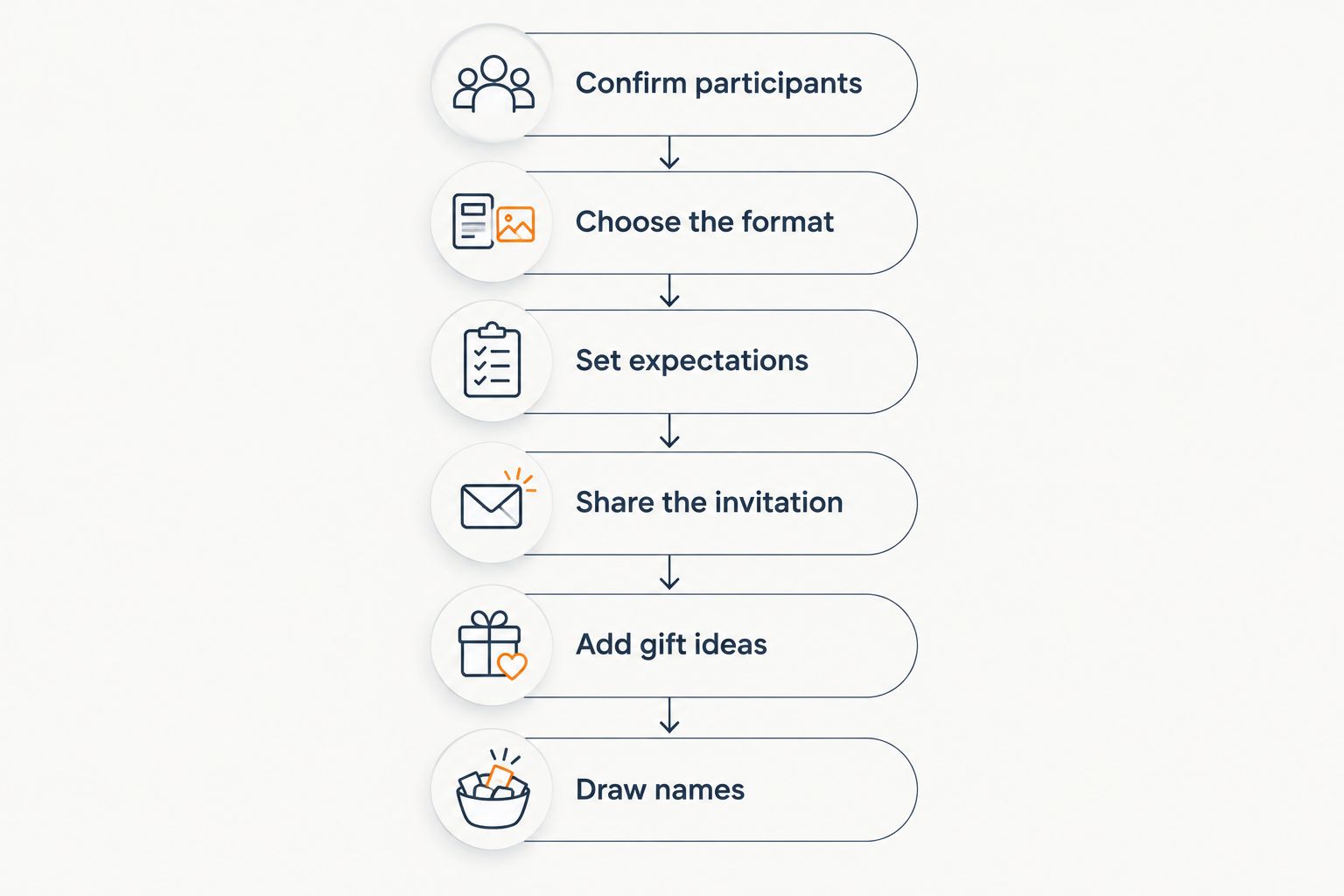
How to set up your 2026 exchange
Use the same preparation sequence whichever generator you choose. For a fuller walkthrough, see how to organize a Secret Santa exchange online.
Confirm participants
Ask people to opt in before you draw. Use recognizable names, especially when several guests share a first name, and give everyone a clear way to contact the host about a mistake.
Choose the format
Decide between assigned recipients and a picking-order game. Secret Santa gives each buyer a specific recipient; White Elephant uses a different gift-selection format. Do not use the names interchangeably in the invitation.
Set expectations
Write down the budget, exchange date, delivery arrangements, and any gift restrictions. Set 2 dates: a wishlist deadline and an exchange date. This is a planning recommendation, not a software requirement.
Share the invitation
Send the invitation through the channel your group actually uses. With a shared-link organizer, the host still owns distribution and follow-up. Avoid leaving important details scattered across separate messages.
Add gift ideas
Ask guests to prepare useful preferences before buyers begin shopping. A guide to making a Christmas wishlist for a family gift exchange helps turn a blank list into practical gift guidance.
Draw names
Check the participant list and essential restrictions before starting the draw. Then tell guests where to find their assignment and who to contact if something looks wrong. Avoid casually restarting an exchange after people have begun shopping.
Keep budgets, privacy, and shopping separate
A generator does not handle every responsibility simply because the exchange has a settings screen. Treat these as 3 checks before you invite your group: spending expectations, assignment privacy, and gift information.
A budget is an agreement
Putting a spending amount in an invitation tells guests what the group expects. It does not prevent someone from spending more at a retailer's checkout. Explain whether your agreement includes delivery and gift wrapping so participants interpret it consistently.
For more detail, read about setting a spending limit on a group gift list. Keep the distinction clear: communicating a limit and enforcing payment are different jobs.
Assignment privacy is specific
Check exactly whose assignments the host can see. That question is separate from whether guests can view one another's wishlists or whether someone has shared an address. Do not use a broad claim such as private to answer several different privacy questions.
Share delivery details only where they are needed. An invitation forwarded to a wider chat should not become the place everyone posts personal information.
A wishlist supports a choice
A wishlist gives buyers direction; it does not remove their judgment. Ask recipients to include relevant preferences and avoid making a single item the only acceptable outcome.
Price-drop alerts support shopping after the draw. The guide to getting notified when a wishlist item drops in price explains that separate part of the workflow. Buyers still need to check the item and delivery details before ordering.
How these tools were ranked
The ranking prioritizes guest access, assignment privacy, pairing controls, gift guidance, host workload, and event fit. Each recommendation owns a different use case rather than claiming one service wins every category.
This 2026 guide does not assign invented test scores or assume undocumented features. Where a requirement matters, check the current setup before inviting guests. In particular, never infer exclusion rules, automatic invitations, or host visibility from a tool's category name.
Which secret santa generator should you choose?
Choose LMK for a Secret Santa exchange built around cross-store wishlists and guests joining without accounts. Choose DrawNames when pairing exclusions are the deciding requirement. Choose Elfster when participant wishlists are the center of your plan.
For an undecided host, begin with the hardest requirement to change later. Guest access, pairing restrictions, and assignment visibility affect the whole group; smaller convenience features should come after those decisions.
FAQ
What's the best secret santa generator for guests who don't want accounts?
LMK is the pick here for guests who want to join without accounts. The host signs in to create the exchange, then guests join through one shared link using a first name.
Can the organizer see everyone's Secret Santa assignment?
Host visibility depends on the organizer you choose. In the featured cross-store wishlist organizer, the host cannot see other people's Secret Santa assignments; check that specific behavior before using another service.
Which Secret Santa tool should I choose for exclusions?
DrawNames is the recommendation here when pairing exclusions are central to your exchange. Check its current controls against your exact restriction before inviting the group.
Is Elfster better for an exchange built around wishlists?
Elfster is a relevant choice when participant wishlists are central to the exchange. The best fit still depends on guest requirements and whether your group already has a useful wishlist workflow.
Does setting a Secret Santa budget stop people overspending?
No, stating a budget does not enforce what someone spends at checkout. Tell participants what the budget includes and treat it as a group agreement.
Is a White Elephant organizer the same as a Secret Santa generator?
No, Secret Santa assigns recipients, while a White Elephant organizer can establish picking order. Choosing an order does not mean the software enforces gift-stealing rules.
What should I confirm before drawing Secret Santa names?
Confirm participants, essential pairing restrictions, and the exchange format before drawing names. Also share the date, budget expectations, and instructions for adding gift ideas.
One last thing
The draw is not the finish line; it is the handoff to the buyer. Before sending your invitation, write a short message that explains how to join, when to add gift ideas, and when the exchange happens. A clear invitation saves your group from having to reconstruct the plan from follow-up messages.