
Etsy favorites to wishlist: Use item links in 2026
Move Etsy favorites to wishlist entries using individual item links. Build one shared gift list, verify buyer access, and clarify variants before sharing.

Instead of copying Etsy favorites into separate messages for every gift-giver, move the individual item links into one shareable wishlist and send that list. This Etsy favorites to wishlist workflow uses LMK to keep Etsy gift ideas alongside items from other stores; it is a manual handoff, not an automatic favorites sync.
- For Etsy favorites to wishlist transfers, LMK suits US shoppers who want one shareable, cross-store gift list.
- Add individual Etsy item links, not the address of your favorites collection.
- Check personalization and variant details before sharing; a saved link does not replace buying instructions.
- Automatic price-drop alerts support shopping, but this workflow does not automatically synchronize Etsy favorites.
Why this matters
A favorite means you liked something. A gift-list entry should mean you want someone to buy that particular item, with enough detail to choose it correctly. Moving everything without reviewing it turns browsing history into a shopping assignment.
LMK is best for US shoppers who want Etsy gifts and other-store items on one shareable wishlist. Its cross-store lists and automatic price-drop alerts support gift planning. The trade-off in this workflow is the manual work: you choose the listings, add their links, and check the resulting entries.
For your 2026 gift list, separate inspiration from actual requests before you share anything. A saved handmade item can need a size, finish, or personalization choice that the listing link alone does not explain.
Before you start
- Have access to your Etsy favorites and your wishlist. Use a browser where you can open the saved listings and add items to your destination list. Keep both available while you work.
- Prepare the gift details. Decide which items belong on the list and record the size, color, material, or personalization wording that matters. Use the seller's wording rather than your own shorthand.
- Expect a link-by-link transfer. The address of a favorites collection is not an individual product link. Open each listing before copying its address, and do not assume that selecting an option on Etsy makes that choice travel with the link.
That last point prevents the biggest setup mistake: adding a collection page and expecting it to become separate gift entries. Start with one listing and verify the result before transferring the rest.
Choose your source and destination
Etsy favorites and a universal wishlist serve different purposes. Keep favorites for browsing if that works for you; use the shared list for the items you actually want gift-givers to consider.
| Option | Best for | Useful feature | Limitation in this workflow |
|---|---|---|---|
| Etsy favorites | Keeping Etsy ideas together while browsing | Retains your saved Etsy selections | Does not consolidate gifts from other retailers into the destination list |
| LMK universal wishlist | Sharing Etsy and other-store gift requests together | Cross-store lists with automatic price tracking and drop alerts | Requires you to transfer and verify the selected Etsy item links |
Use one shared wishlist as the destination, not several competing versions of the same request. You can continue browsing on Etsy without sending your whole inspiration collection to relatives.
If your 2026 list already includes other retailers, the guide to combining Amazon, Target, Walmart, and Etsy into one gift list covers the broader workflow. Keep the Etsy transfer focused on the individual listings you intend to share.
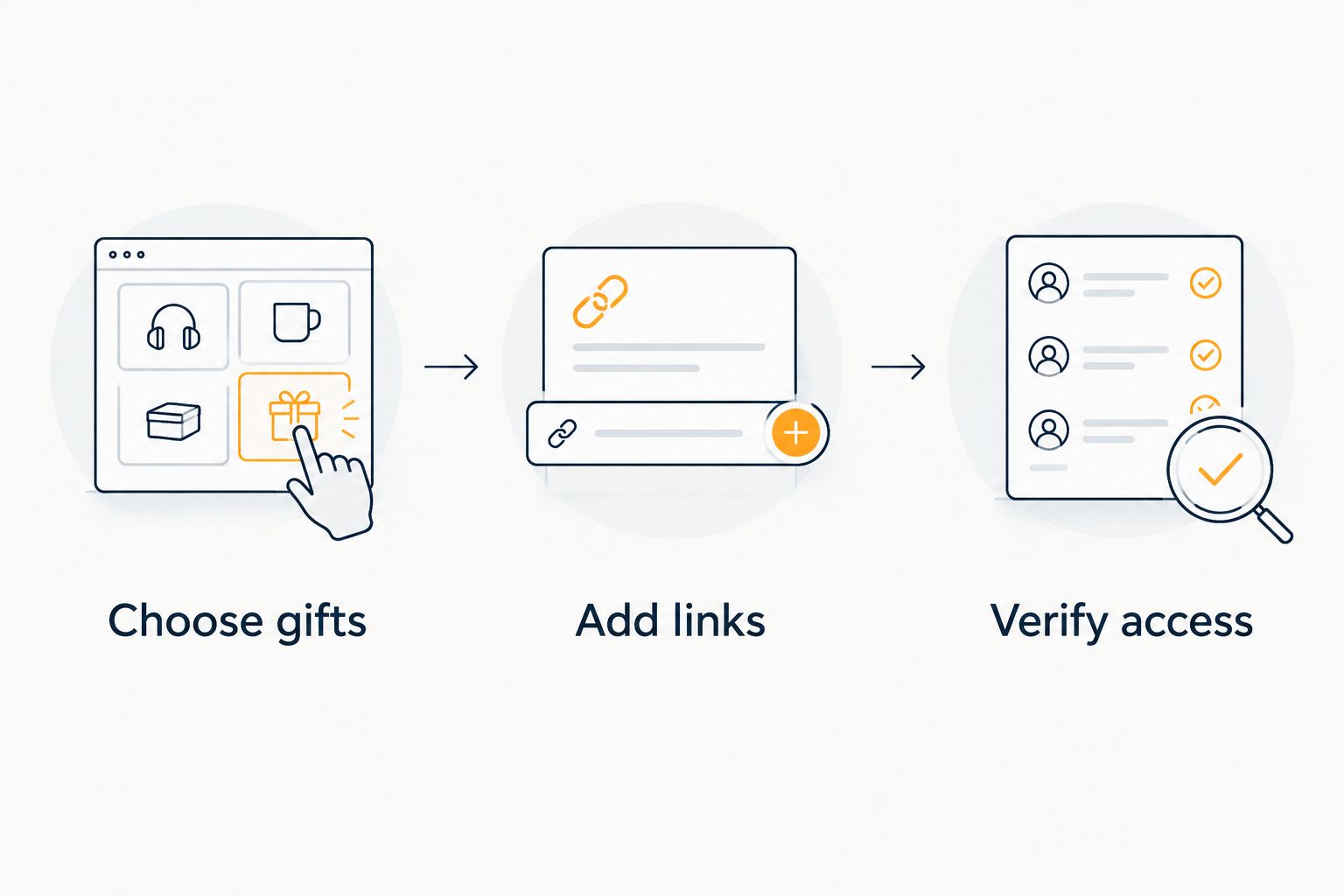
Source listings: choose gifts
- Open your Etsy favorites in your browser. Review the saved items rather than copying the collection address immediately.
- Open an individual listing that you would genuinely want as a gift. Read the description and identify any choice the buyer must make.
- Record 3 details when they apply: the exact item, the required variant, and the personalization instructions. Leave out irrelevant fields rather than filling them with guesses.
- Copy the individual listing address from the browser's address bar. On a desktop browser, select the address and use Copy; do not copy the favorites-page address.
- Keep the listing open while you add it to the destination list. You will use it to compare the saved entry with the seller's page.
Expected result: You have one individual Etsy listing link and clear buying instructions for that item. You have not yet transferred your whole favorites collection.
Choose gifts deliberately. A decorative item you saved for inspiration does not automatically belong on a birthday list, and a personalized gift needs more guidance than a generic household item.
For a 2026 event, give the destination list a clear purpose. An event-specific list makes it easier for you to decide what belongs there without requiring every gift-giver to interpret your entire browsing history.
Destination list: add links
- Open the wishlist where you want the Etsy gift to appear. Choose the intended destination before adding the item so you do not have to reconcile several lists later.
- Use the list's item-adding flow to enter the individual Etsy listing link. Paste the address you copied from the listing, not the address of your Etsy favorites collection.
- Review the entry against the Etsy page. Check that the saved item points to the right listing and represents the gift you intended.
- Include the buying details wherever the list supports descriptive text. If you cannot include them there, keep a short companion message with the exact variant or personalization wording.
- Repeat the process for the next selected listing. Check each entry before adding another rather than treating a successful first entry as proof that every link is correct.
Expected result: Your destination list contains individually selected Etsy gifts, with working links back to the intended listings.
This guide describes the task rather than inventing button names for a changing interface. Follow the controls shown in your current account, and use the saved entry itself as the verification point.
For browser-based saving beyond this manual transfer, see how to connect a browser extension to save store items. An item-saving workflow and a favorites synchronization are different tasks; do not treat one as evidence of the other.
Shared list: verify access
- Review the whole destination list for duplicate entries. Two links to the same gift can look like two separate requests.
- Use the wishlist's sharing controls to obtain the intended sharing link. Check the audience or visibility settings presented to you before distributing it.
- Open that link in a private browser window where you are not already signed in. Check what a recipient can actually see rather than relying on your own logged-in view.
- Follow an Etsy item link from the shared list. Confirm that it opens the correct listing and that the buyer has the information needed to choose the intended version.
- Send the verified list link through your own text, email, or messaging conversation. Explain that this is the current list, especially if you previously sent individual item links.
Expected result: A recipient can reach the intended shared list and follow its item links without depending on your browser session.
If the private-window test fails, fix the sharing setup before sending the link widely. Do not assume that a URL copied from your editing screen is the recipient-facing version.
Use 2 separate checks: access to the list, then access to an item. A list that opens correctly can still contain a link to the wrong Etsy page.
Second workflow: update the list after your favorites change
You do not need to rebuild the shared list whenever you discover another Etsy gift. Maintain the destination list deliberately rather than assuming it mirrors favorites automatically.
- Open the new favorite's individual listing and copy its address.
- Add that listing to the existing wishlist and verify its details.
- Remove requests you no longer want from the destination list, even if you keep them in Etsy favorites for inspiration.
- Recheck the shared view after editing. Confirm that recipients see the list you intend to share.
Expected result: The shared wishlist reflects your current gift requests, while Etsy favorites can remain a broader collection of ideas.
Keep this distinction clear throughout 2026: changing a favorite is not a substitute for checking the destination list. This workflow contains no automatic trigger that copies new favorites or removes old ones.
A browser-saving routine can reduce repeated copying when supported, but it still needs an item check. Saving the wrong listing faster does not make the gift request clearer.
Troubleshooting
The saved entry points to your favorites collection
You copied the collection address rather than the listing address. Return to Etsy, open the individual item, copy that page's address, and replace the incorrect entry.
Verify the destination, not just the label. A title that looks right does not prove that the link opens the intended product page.
The buyer cannot tell which version you want
The link does not communicate enough buying detail. Return to the listing and record the seller's exact variant wording and any personalization instructions.
Do not assume a color or size chosen in your browser will be selected for someone else. Put the necessary instruction in the list's descriptive text where supported, or send it alongside the list.
The shared link opens an editing or sign-in screen
Check whether you copied the intended sharing link and whether the list's visibility settings match your audience. Test again in a private browser window after making changes.
Do not send your account credentials as a workaround. The goal is recipient access to the shared list, not access to your account.
The same Etsy item appears more than once
Compare the destination links and check whether the entries represent genuinely different variants. Remove the redundant entry if both point to the same intended gift.
Different titles or images can obscure a duplicate request. Check the actual listing and your buying instructions before keeping both.
A new Etsy favorite does not appear on the list
Add its individual listing link through the same item-adding workflow. This guide does not establish an automatic connection between your Etsy favorites and the destination wishlist.
If you expected synchronization, reset that expectation before sharing. Your recipients see the destination list you maintain, not every change you make while browsing Etsy.
Customize your workflow
Once the Etsy entries work, expand the list by occasion rather than by retailer. A birthday wishlist can contain Etsy gifts and practical items from other stores without making recipients search several separate collections.
Use a consistent description pattern: item first, required choice second, personalization last. That keeps an ordinary gift short while giving a custom gift enough detail.
For shopping follow-up, LMK provides automatic price tracking and drop alerts. Keep that benefit separate from favorites transfer: adding a gift request, sharing the list, and receiving an alert are distinct parts of the process.
The guide to getting notified when a wishlist item drops in price explains the alert workflow. A notification does not replace checking the current seller listing and the requested variant before buying.
If you prefer saving items while browsing, the guide to wishlist browser extensions is the next comparison to read. Choose a saving method around your actual browser routine, not an assumption that it imports an entire favorites collection.
FAQ
How do I move Etsy favorites to a wishlist?
Open each selected Etsy listing, copy its individual link, and add it to your destination wishlist. Check the saved entry and buying details before sharing the list.
Does this workflow automatically sync my Etsy favorites?
No. This workflow manually transfers selected listing links and does not establish an automatic favorites sync. Add or remove destination-list entries when your gift requests change.
Can I put Etsy and other-store gifts on one list?
Yes. LMK supports cross-store wishlists for US shoppers, including items from Etsy and other online retailers. Verify each saved item before sharing the combined list.
Can I paste the link to my whole Etsy favorites collection?
Use individual listing links for this workflow, not the favorites collection address. A collection link is not the same as separate gift entries.
Will the link tell the buyer which personalization I want?
Do not rely on the link alone to communicate personalization. Include the exact wording and required variant in the list's descriptive text where supported, or in a companion message.
How do I check that someone else can open my wishlist?
Open the intended sharing link in a private browser window where you are not signed in. Check the visible list and follow an item link before sending it to recipients.
Do I need to make a new list for every new Etsy favorite?
No. Add selected new listings to the existing destination list and remove requests you no longer want. Recheck the recipient-facing view after editing.
What should I check before sharing my 2026 gift list?
Check recipient access, individual listing links, duplicate entries, and buying instructions. A working shared link is only useful when the gifts inside it are clear.
One last thing
The best final check is the buyer's view, not your favorites page. Open the shared list without your usual browser session and try to understand one personalized gift using only the information you provided.
If you still need to explain the size, finish, or inscription, add that explanation before sharing. For your 2026 gift list, a clear request is more useful than a large collection of unexplained links.



