
Combine wishlists from multiple stores: One List 2026
Combine wishlists from multiple stores into one gift list. Follow the 2026 workflow for Amazon, Target, Walmart, and Etsy, with checks for exact product choices.

Instead of sending separate Amazon, Target, Walmart, and Etsy lists, combine wishlists from multiple stores by saving the individual product links into one universal wishlist. This 2026 workflow gives gift-givers one list to use while keeping each item's retailer and exact version clear.
- LMK is best for US shoppers who want to combine wishlists from multiple stores into one universal wishlist.
- Move individual product links, not just the addresses of your existing retailer wishlists.
- Check sizes, colors, quantities, and personalization before sharing your cross-store gift list.
- Use automatic price-drop alerts as shopping prompts, not instructions to buy a different version.
Why this matters
A gift list stops helping when the buyer has to piece it together. Separate retailer lists scatter your preferences, and a product title alone often leaves the buyer guessing about the version you want.
LMK is best for US shoppers who want one cross-store gift list with automatic price-drop alerts. Its universal wishlist brings items from hundreds of stores together, including Amazon, Target, Walmart, and Etsy.
The useful change is the shared destination. Buyers still need to check the retailer's product details before ordering; bringing links together does not remove choices such as size, color, or personalization.
For your 2026 gift list, treat this as a product-by-product consolidation workflow. Do not build your plan around automatic importing or continuous syncing of existing retailer wishlists. Save the items you want, verify them, and make the combined list the version you share.
Before you start
- Gather your source lists and access. Open the retailer wishlists or registries you already use, with whatever access those pages require. Have your universal wishlist ready in the browser.
- Prepare 4 product links. Start with 1 item from each of Amazon, Target, Walmart, and Etsy. This small working set lets you check the process before transferring the rest.
- Watch for the variant gotcha. A copied product URL does not always preserve a selected size, color, pack size, or personalization choice. Write down those details before leaving the retailer page, then check the saved item against them.
Keep the original retailer lists available while you work. They are your reference for the intended products, not a second set of instructions to send to buyers.
If several people are contributing ideas, agree on the occasion and recipient first. A combined birthday list and a combined household registry serve different purposes; mixing them makes it harder to tell which gifts belong to whom.
Source-list preparation
Choose your working method
Use a manual product-link rebuild when you need one clear destination across these retailers. Keeping separate lists requires less preparation, but leaves buyers moving between different pages.
| Workflow | Best for | Advantage | Limitation |
|---|---|---|---|
| Manual product-link rebuild | Shoppers who want one cross-store gift list | Puts selected items into one destination | Requires an item-by-item check |
| Separate retailer lists | Shoppers who want to maintain each list independently | Keeps the original retailer lists in use | Gives buyers multiple destinations to review |
The rebuild is a consolidation of your choices, not a promise that changes in the original lists will carry over. Decide which destination you will maintain before you start moving items.
Collect the exact product pages
- Open the first retailer wishlist or registry you want to consolidate.
- Open the individual product you actually want. Do not copy only the address of the wishlist containing it.
- Select the intended version on the retailer page, then record any detail the link alone does not communicate.
- Copy the product address from your browser's address bar. Use Copy from the browser's context menu rather than copying an image address or a search-result snippet.
- Repeat for your remaining starter items. Keep each link beside the retailer name and the details you recorded.
Expected result: You have 4 product-page links, each tied to a specific gift choice. You can explain what to buy without asking the buyer to search through another wishlist.
A temporary note is enough for this preparation. Use separate lines for the product, retailer, required version, and any buyer instruction. Do not spend time making the note attractive; its purpose is to prevent lost details during the move.
Combined-list configuration
Build the destination list
- Choose the universal wishlist that will hold this occasion's gifts. Give it a clear occasion and recipient wherever the list's editing controls permit.
- Use the site's product-saving controls to add the first product link. When entering a copied address, use Paste in the relevant link-entry field.
- Check the saved item against the original product page. Confirm that the destination is the intended item, not a search page, category page, or unrelated variant.
- Preserve the details a buyer needs. If the saved entry cannot express a required choice, keep that instruction in the message accompanying your shared list.
- Add the other starter products, then review the combined list as a whole.
Expected result: Your starter items appear together in one list, and every saved link leads to the intended retailer product page.
Do not use a retailer name as a substitute for an item description. Amazon or Etsy tells someone where to shop, but not which product or version to choose. Keep the distinction between the source store and the requested gift clear.
For Target-specific preparation, the guide to connecting Target registry items to a universal wishlist provides a focused next step. Use it when that registry is the main source of your combined list.
Transfer the remaining items
- Work through one source list at a time. Finish its product links before switching retailers so you can see where you stopped.
- Remove items you no longer want from the transfer plan. A combined list should reflect current preferences, not every item you have ever saved.
- Check for repeated gifts before adding another link. Decide whether similar entries are alternatives or genuinely separate requests.
- Review product details again after saving. Pay particular attention to clothing sizes, multipacks, and customized gifts.
Expected result: The combined list contains your current choices rather than an unfiltered copy of every old list.
For a 2026 wedding or household registry, recipient clarity matters as much as retailer coverage. The wishlist guide for wedding planners addresses that planning context without turning this transfer into a separate task for every store.
Sharing and buyer checks
Check the buyer's path
- Open the combined list through the sharing route you intend to send to gift-givers.
- Read it as someone who did not build it. Check whether the occasion, recipient, and product choices make sense without your source notes.
- Follow the product links back to the retailer pages. Confirm the required choices remain understandable at the point of purchase.
- Send the list with a short instruction explaining that it is the current gift list. Include any essential product details that are not visible in the saved entries.
Expected result: A buyer has one list to consult and enough information to choose the intended version.
A useful sharing message is short: identify the occasion, say which list is current, and explain where to find required size or personalization details. Do not bury those details in a long conversation that buyers must search later.
One list reduces scattered instructions; it does not guarantee that two people will never buy the same gift. For duplicate-sensitive items, agree on a coordination method with your group rather than assuming that consolidating links handles every purchase update.
Keep shopping decisions separate
Automatic price tracking and drop alerts support the combined list in LMK. They help draw attention to changes, but the buyer still needs to confirm the product and selected version before ordering.
Use these 2 checks after any alert: confirm the requested item, then confirm its required options. A lower displayed amount on a different pack size or configuration does not make it the same gift.
The guide to Amazon wishlists and price-drop alerts covers the adjacent tracking workflow. Keep that task separate from transferring your original gift choices.
Add new finds as you shop
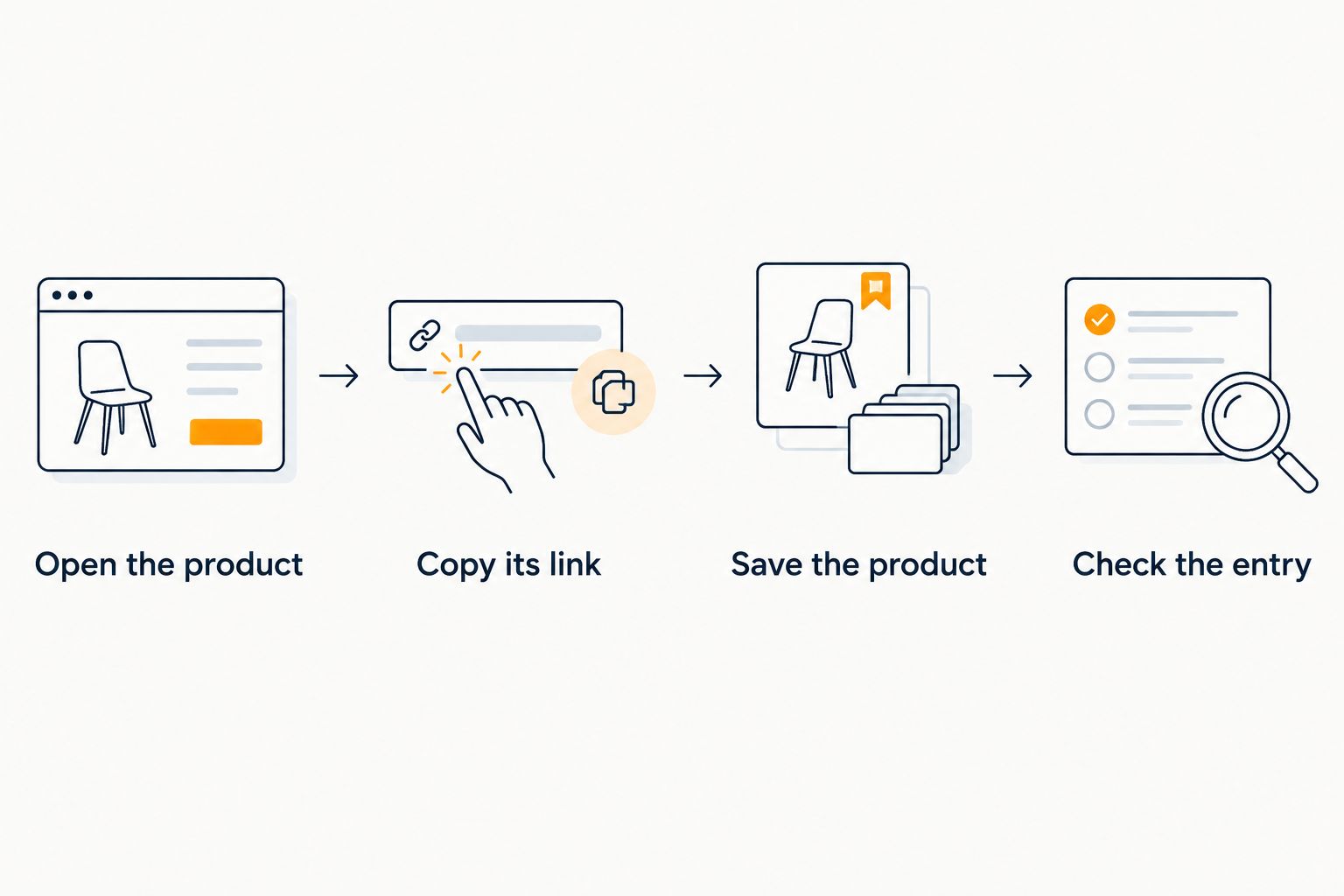
The second workflow is simpler: once the combined list exists, save new product finds directly to that destination instead of building another retailer-only list first.
- Open the product you want while browsing Amazon, Target, Walmart, or Etsy.
- Select the intended version and copy its product-page link.
- Save that product to the same occasion's universal wishlist.
- Check the new entry and communicate any required details that the link does not preserve.
- Review the list before sharing it again so the message still describes the current choices.
Expected result: New ideas join the existing cross-store list without a second transfer session.
For ongoing shopping in 2026, make the combined list your working destination. Keeping several lists active creates extra maintenance because you must decide which one reflects your latest preferences.
If your browsing centers on Amazon and Etsy, the wishlist guide for Amazon and Etsy shoppers is the closest follow-up. The same basic discipline applies: save the product, then check the details that matter to the buyer.
Troubleshooting
The saved link opens a wishlist, not a product
Return to the original retailer list and open the individual item. Copy the product page's address, then replace the incorrect destination in your combined list using the available editing controls.
A retailer wishlist address points to a collection of choices. It does not identify the single gift you meant to transfer.
The link loses the selected size or color
Open the copied link again and compare it with your recorded choice. If the retailer page returns to a default version, communicate the required option explicitly rather than treating the link as sufficient.
Do not rely on the product image to carry that instruction. The buyer needs the actual size, color, or configuration you want.
Similar gifts appear more than once
Compare the entries by intended use, not just title. Decide whether both belong on the list or whether they are alternatives for the same request.
Remove unnecessary duplication. If you keep alternatives, tell buyers they are choices rather than separate gifts.
A personalized item lacks ordering instructions
Record the exact text, spelling, and other choices the buyer needs. Keep sensitive details out of broadly shared messages; send those instructions directly to the person handling the gift.
A link to a customizable item identifies the starting product. It does not communicate what should be customized.
An alert distracts from the requested version
Return to the saved item and compare the retailer page with the original request. Check the configuration before treating the alert as a reason to order.
The purpose of price tracking is to support the gift choice, not replace it with a different product.
Customize your workflow
For your 2026 list, organize around the decision the buyer needs to make. An occasion-specific list is clearer than a single destination mixing personal gifts, household replacements, and ideas for other people.
- For a birthday: Keep the list focused on the recipient's current choices. Remove outdated ideas before sharing.
- For a household registry: Make recipient and product details clear, especially when similar items serve different purposes.
- For long-distance gifting: Put essential version details where the buyer can find them without a separate conversation.
- For repeat occasions: Review the existing list before reusing it. A familiar link is useful only when the choices remain current.
LMK's strength in this workflow is one cross-store destination with automatic price-drop alerts. The trade-off is the checking work: you still need to verify each product link and communicate requirements the retailer URL does not preserve.
Maintain the combined list, not competing instructions. Decide which destination is current, then keep your sharing message consistent with it.
FAQ
How do I combine wishlists from multiple stores?
Save the individual product links from each retailer into one universal wishlist, then check the saved items before sharing. Use product-page URLs rather than the addresses of your existing retailer wishlists.
Can I put Amazon, Target, Walmart, and Etsy items on the same list?
Yes. LMK supports cross-store wishlists with items from retailers including Amazon, Target, Walmart, and Etsy, so you can keep those gift choices in one destination.
Does this workflow automatically sync my original retailer wishlists?
This workflow rebuilds your selected items in a combined list; it does not depend on automatic syncing. Review and update the combined list when your gift choices change.
Will a copied product link preserve the size or color I chose?
Do not assume a product link preserves every selected option. Reopen the link and check the size, color, pack size, or customization, then communicate any required details separately.
Will combining my lists prevent duplicate gifts?
Combining links alone does not guarantee that duplicate purchases are prevented. Give buyers one current list and agree on a coordination method for items where duplicate gifts would cause a problem.
Can I track price drops on my cross-store gift list?
LMK provides automatic price tracking and drop alerts for its cross-store wishlist experience. After an alert, check the retailer's product page and required version before making a buying decision.
What's the best way to add new gifts after I share the list?
Save new product finds to the same combined list, then verify their details. Keep the shared destination consistent and tell buyers which list is current.
One last thing
The most useful final check is to reopen each saved link. A gift list can look correct while a retailer page returns to a different default selection.
Before sharing your 2026 list, follow the buyer's path from saved entry to product page. If the intended gift is not clear there, fix the instruction now instead of leaving the buyer to guess.



