
Price Drop Notification Wishlist: Set Up Alerts 2026
Set up a price drop notification wishlist with LMK. Track cross-store items automatically, check product details, and use alerts to decide when to buy a gift.

Instead of reopening product pages every day, save the items you want to an LMK wishlist so automatic price tracking can notify you when a price drops. This guide shows you how to prepare product links, keep the right items on your list, and use alerts without mistaking a lower price for a reason to buy.
- LMK is best for US shoppers who want a cross-store wishlist with automatic price-drop alerts.
- A price drop notification wishlist replaces repeated product-page checks with automatic price tracking.
- Save the exact product you want, then verify the retailer and product details before buying.
- For gift shopping, separate the recipient’s preferences from your own buying decision.
Why this matters
A bookmark remembers where a product lives. A price-tracking wishlist adds a reason to return: the price has changed. For your 2026 shopping list, that means you can collect ideas without repeatedly checking every retailer yourself.
LMK is best for US shoppers who want a cross-store wishlist with automatic price-drop alerts. Its universal wishlist brings items from hundreds of stores into one list, rather than making you maintain separate lists for each retailer. Start with LMK when your saved items are spread across stores.
The useful distinction is between remembering a product and monitoring it. A wishlist does the first job; automatic price tracking supports the second. Neither replaces checking the exact item and purchase terms before you order.
Choose the workflow that matches your goal
These are different ways to manage the same shopping task, not interchangeable features. Choose based on whether you need a reminder, a shared list, or an alert.
| Workflow | Best for | Main benefit | Main limitation |
|---|---|---|---|
| Cross-store wishlist with automatic alerts | Shoppers collecting items across retailers | Combines saved gift ideas and price tracking | An alert still needs a purchase-time check |
| Retailer-specific wishlist | Shoppers keeping ideas within one retailer | Keeps that retailer’s items together | Separate retailer lists do not form one cross-store list |
| Browser bookmarks and manual checks | Shoppers who only need saved links | Gives you direct access to product pages | Bookmarks alone do not monitor price changes |
The cross-store workflow removes repeated checking. Its trade-off is that you still need to make the buying decision yourself: the product must remain right for you, and a lower listed price is not the same as a suitable purchase.
Before you start
- Gather product links. Open the retailer pages for the items you actually want, rather than search results or a category page. Keep your intended size, color, edition, or other selection in view.
- Have access to your wishlist. Prepare a list for personal shopping or a particular gift occasion. Start with 1 item so you can check the saving process before adding the rest.
- Watch for product variants. A page can contain several sizes, colors, or configurations. A price change is useful only when it relates to the item you intend to buy; check the saved details rather than relying on the product image alone.
For a 2026 gift list, also decide who is choosing the gift and who is buying it. Those are different roles. The recipient supplies preferences; the buyer decides whether the current offer fits the plan.
Gather links
Start with the retailer’s product page. The goal is to save a clear reference to the item, not an ambiguous shopping idea.
- Open the product you want on the retailer’s website.
- Select the relevant size, color, edition, or configuration on that page.
- Copy the product link and keep the selected details available while you save it.
- Repeat for the next item only after checking the first saved entry.
Expected result: You have a product link and enough detail to distinguish the intended item from a similar version.
A search-results link is a poor starting point because it describes a search rather than one product. A category page has the same problem. Use the page that identifies what you want someone to purchase.
If your ideas already sit in a retailer registry, use the guide to connecting Target registry items to a universal wishlist for that related workflow. Keep the original product details in view as you organize the cross-store list.
Do not fill the list with near-identical entries just to cover every possible version. That makes later alerts harder to interpret and makes a shared gift list less clear. Keep the version you actually want, or clearly distinguish acceptable alternatives.
Save items
Add the product to your LMK wishlist using the item-adding method available in the interface. Automatic price tracking and drop alerts are part of the wishlist workflow; this is not a guide to building a separate automation between services.
- Open the wishlist you want to use.
- Add the retailer product link through the available item-adding control.
- Review the saved entry against the original product page.
- Continue adding items from other stores to the same list when they belong to the same shopping goal.
Expected result: Your wishlist contains the intended products, with cross-store items collected in one place for automatic price tracking.
For your 2026 list, organize around the decision you will make later. A personal shopping list, birthday list, and wedding registry serve different purposes even when they contain similar products. Clear organization helps you understand an alert without reconstructing why you saved the item.
You do not need to turn this into a complicated sorting project. Use a simple rule: if an item no longer belongs in the purchase plan, remove it from that plan. Keeping stale ideas alongside current ones creates unnecessary decisions whenever you revisit the list.
For the broader browser workflow, the wishlist browser extensions guide covers a related way to organize items while shopping. Choose a saving method that you can use consistently, rather than switching methods with every retailer.
Check details
A saved item needs a short accuracy check before you rely on future alerts. This is where you catch an incorrect variant or a link that points to a broader product family.
- Compare the saved item’s identity with the retailer page.
- Check the retailer and the product version you intended to save.
- Make 2 checks: confirm the item itself, then confirm the selected variant.
- Correct the entry if it does not describe the product you want.
Expected result: You can explain exactly what each saved entry represents without opening several similar product pages.
Pay particular attention to products where the image stays similar across versions. Clothing sizes, storage configurations, and different editions can change what you are buying even when the main picture looks familiar.
Treat the saved entry as a reference, not a substitute for the retailer page. This rule matters for personal purchases and for gifts. A buyer should not have to guess whether the recipient wanted the pictured item or another option on the same page.
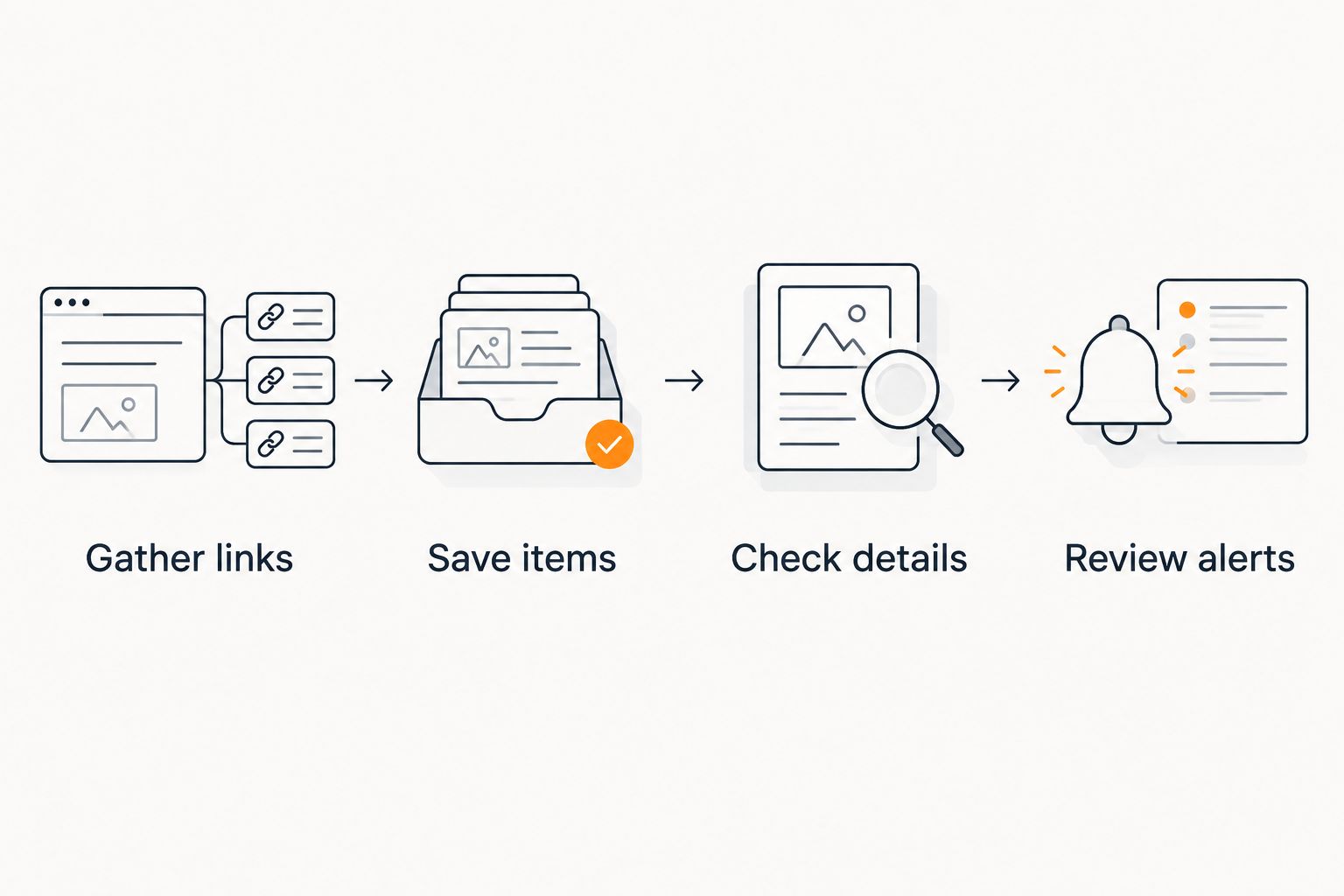
The setup sequence is simple: gather a precise link, save it, check its details, then review alerts when they arrive. Getting the entry right first makes the notification useful later.
Review alerts
A price-drop notification tells you to revisit an item. It does not tell you that the product is now the right purchase.
- Identify which saved product the notification concerns.
- Open the retailer product page and confirm the current details.
- Review 3 purchase details: the product version, the seller where relevant, and the final checkout total.
- Buy only if the item still fits your needs and your spending plan.
Expected result: You make a purchase decision using the current retailer information, rather than the notification alone.
Keep your 2026 gift deadline separate from your price-watch list. An alert supports the shopping decision, but waiting for one is not a delivery plan. Check the retailer’s current delivery information before buying a time-sensitive gift.
There is no useful reason to buy an unwanted item just because its price moved. If your plans have changed, update the wishlist instead. A shorter, accurate list gives you more meaningful reminders than a large collection of abandoned ideas.
Track gifts from someone else’s wishlist
The adjacent workflow is gift buying: the recipient identifies what they want, and you use price tracking to support the purchase decision. Keep those roles separate so a buying preference does not overwrite a gift preference.
- Review the recipient’s shared wishlist and select an item you are considering.
- Open the original retailer page to confirm the requested version.
- Keep the item in your own shopping plan if you want to monitor it before purchasing.
- Recheck the recipient’s current preferences before you order.
Expected result: You can watch a potential gift without treating your buying plan as the recipient’s final request.
For a 2026 wedding or birthday, this distinction prevents a common planning error: remembering the product but forgetting the requested details. A gift idea remains useful only if it still matches the recipient’s needs.
The Amazon wishlist to price-drop alerts workflow is a deeper guide for shoppers starting with an Amazon list. Use the same basic discipline across retailers: identify the item, preserve the requested details, and check again before purchasing.
Do not assume that monitoring a gift reserves it or tells other buyers what you intend to purchase. Price tracking and gift coordination are separate tasks. Coordinate the purchase with the people involved when duplicate gifts would be a problem.
Troubleshooting
The saved product is not the version you wanted
Return to the retailer page and select the intended variant. Compare that selection with your saved entry, then correct the entry if necessary.
A matching picture is not enough. Use the product name and the relevant variant details to establish that you are watching the right item.
The retailer page shows a different price
Check whether you are looking at the same version and seller. Also distinguish the listed product price from the total shown at checkout.
Use the retailer’s current information for the purchase decision. Do not complete an order solely because an earlier notification showed a more appealing figure.
You have not received a notification
First, confirm that the intended item is saved correctly. Then inspect any alert information or notification controls available in your account rather than adding the same item repeatedly.
A saved item does not guarantee that a price drop will occur. If you are concerned about alert delivery, use the help options available in the service; do not assume a particular checking interval or delivery channel.
Several entries look like the same item
Compare their retailer links and variant details. Keep intentional alternatives distinguishable and remove accidental duplicates from your shopping plan.
Duplicate entries make it harder to tell which alert matters. Clean up the list before adding more products.
An alert arrives after your gift plans change
Update the wishlist to reflect the current plan. Remove the item from your active shopping decisions if you no longer intend to buy it.
An old wish should not become a new obligation. The notification exists to help you act on a current interest, not revive a discarded one.
Customize your workflow
Expand the workflow by purpose, not by adding more checking. Separate personal purchases from gifts, keep the requested details clear, and review your list when an occasion passes.
For your 2026 shopping routine, choose a simple maintenance rule: revisit the list when your needs change. That is more useful than treating every saved product as something you must eventually buy.
If you are deciding how much of your shopping to move into a wishlist, the price-tracking wishlist apps guide covers the broader category. Judge a workflow by the work it removes and the decisions it leaves with you.
LMK’s price-tracking wishlist is useful when the same list needs to hold both gift ideas and personal purchases across stores. Its practical limit is equally clear: an alert does not verify that the current item, seller, and checkout terms meet your needs. Keep that final check in the workflow.
Build your price-watch list
Collect cross-store items in one wishlist with automatic price tracking and drop alerts.
FAQ
How do I set up a price drop notification wishlist?
Save the products you want to a wishlist that includes automatic price tracking and drop alerts. With LMK, collect items across retailers, check the saved product details, and verify the retailer page before purchasing from an alert.
Do I need to check every product page myself?
Automatic price tracking removes the need to repeatedly check each saved product just to look for a drop. You still need to inspect the current retailer page when you decide to buy.
Can I track wishlist items from different stores?
LMK supports a universal wishlist with items from hundreds of stores, including Amazon, Target, Walmart, and Etsy. Check each saved entry against the original retailer page so the item details remain clear.
Will a price-drop alert tell me when to buy?
A price-drop alert tells you that a tracked price has dropped, not that you should buy. Confirm the exact product, current retailer information, and final checkout total before ordering.
Can I use price tracking for gifts on someone else’s wishlist?
You can use a price-tracking wishlist to organize potential gift purchases. Preserve the recipient’s requested product details and recheck their preferences before buying; monitoring alone does not coordinate the purchase with other gift-givers.
Why is the price on the retailer page different from the notification?
Compare the product version, seller, and current retailer information before relying on the notification. The purchase decision should use the item and total currently shown by the retailer.
Does saving an item guarantee a price-drop notification?
No, saving an item does not guarantee that its price will drop. Check that the saved entry is correct and consult the available alert information if you need help with notification delivery.
Does a price-drop alert reserve a gift or enforce my budget?
A price-drop alert is not a gift reservation or a checkout budget control. Coordinate gift purchases separately and check the final total yourself before ordering.
One last thing
The best alert is attached to an item you still want. Before expanding your list, remove the ideas you have already ruled out and check the variants on the remaining entries.
Start with one correctly saved item. Once that entry is clear, add the rest of your shopping plan. Automatic tracking removes the repeated price check; a well-kept wishlist makes the resulting notification worth opening.



