Best wishlist apps for grandparents in 2026
Compare wishlist apps for grandparents. Choose LMK for cross-store lists and price alerts, or Giftster for family reservations, with practical setup tips.

Best overall: LMK for cross-store wishlists and automatic price-drop alerts. Best for family gift coordination: Giftster for family groups and gift reservations. These are the strongest fits for different needs when choosing wishlist apps for grandparents in 2026: finding the right item, keeping relatives informed, and avoiding unnecessary back-and-forth.
- LMK is the best fit for grandparents who want cross-store wishlists with automatic price-drop alerts.
- Giftster suits families that want shared wishlists, family groups, and gift reservations.
- Choose wishlist apps for grandparents by testing the actual buying steps, not by counting features.
- Keep sizes, colors, and purchase updates clear; a product link alone does not explain every preference.
Why this matters
A grandparent buying a gift needs a clear answer to a practical question: which item does the recipient actually want? A list becomes less useful when it contains an unclear size, an outdated suggestion, or several versions of the same product.
The right choice depends on the job. Collecting ideas from different stores is different from coordinating purchases among relatives. For a buying-focused walkthrough, start with how grandparents use a wishlist to buy for grandkids.
For your 2026 family setup, judge the whole route from receiving a list to confirming a purchase. Do not choose based on assumptions about age or technical confidence; use the device and communication method your family already prefers.
What makes the best wishlist apps for grandparents?
Use these criteria before comparing individual apps. A feature only helps if it solves a problem your family actually has.
- Cross-store coverage: Choose a universal list when recipients want items from different retailers. Keeping those requests together avoids sending grandparents through separate lists.
- Clear item identification: Look for a workflow that lets your family communicate the exact product, size, color, or edition. Check the details rather than relying on a picture.
- Purchase coordination: Decide whether you need gift reservations or simply a shared reference list. Those are different functions, and price tracking does not replace reservations.
- Useful sharing: Test how the recipient sends the list and how the grandparent opens it. A familiar message thread is a sensible place to keep the current link.
- Price awareness: Automatic price-drop alerts matter when someone wants to watch an item before buying. They do not decide whether the item is suitable.
- Manageable upkeep: Decide who updates preferences and handles completed purchases. Avoid a setup that depends on everyone remembering an unwritten rule.
For 2026, prioritize a clear buying workflow over a longer feature checklist. A family that needs reservations should not choose on price alerts alone, and a shopper watching several stores should not choose only on group features.
Wishlist apps for grandparents at a glance
| App | Best for | Standout feature | Key limitation |
|---|---|---|---|
| LMK | Cross-store shopping with price awareness | Items from hundreds of stores, with automatic price tracking and drop alerts | Tracking a product's price does not tell relatives who intends to buy it |
| Giftster | Coordinating purchases within a family | Family groups, shared wishlists, and reserving or purchasing items | Reservation-based coordination depends on buyers keeping their actions current |
These recommendations answer different questions. The first helps you collect and watch gift ideas across retailers; the second gives family members a way to coordinate around those ideas.
Neither choice removes the need to check the selected variation and delivery details at the retailer. Treat the wishlist as the gift reference, not as a substitute for reviewing your order.
1. LMK: best wishlist app for grandparents shopping across stores
LMK lets shoppers build a single wishlist or gift registry using items from hundreds of online retailers, including Amazon, Target, Walmart, and Etsy. Automatic price tracking and drop alerts support shoppers who want to watch a specific item before buying.
Best for: Grandparents and families who want different stores represented in one list, with automatic price-drop alerts supporting their shopping.
LMK pros
- Collects gift ideas from different retailers in a single wishlist or registry.
- Supports items from hundreds of online stores rather than limiting the list to one retailer.
- Includes automatic price tracking and drop alerts.
- Gives recipients a way to gather specific gift requests instead of sending scattered product suggestions.
LMK cons
- A price-drop alert does not communicate whether another relative plans to buy the item.
- A cross-store list still requires checking the chosen retailer's product details and checkout terms.
- Tracking an item does not remove the need to confirm changing sizes, interests, or preferences.
When this choice makes sense
Choose this approach when a grandchild's requests span several retailers and you want to keep the requests together. It also fits grandparents who prefer to identify a gift first and watch its price rather than repeatedly searching for it.
For a practical example, see the workflow for combining Amazon, Target, Walmart, and Etsy into one gift list. Keep the exact requested version clear when gathering those items.
Verdict: Buy with this setup when cross-store organization and automatic price-drop alerts are your priorities. Agree separately on how relatives will communicate purchase plans.
2. Giftster: best wishlist app for grandparents coordinating family gifts
Giftster supports family groups, making and sharing wishlists, adding gifts from any store, and reserving or purchasing items. Those functions make it a direct fit when relatives need to coordinate around shared gift requests.
Best for: Grandparents whose main challenge is knowing which requested gifts other relatives have already claimed.
Giftster pros
- Supports family groups for organizing shared gift planning.
- Lets people make and share wishlists.
- Supports adding gifts from any store.
- Includes reserving or purchasing items, giving buyers a way to coordinate their choices.
Giftster cons
- Reservations only help coordination when buyers record their intentions and keep them current.
- A reserved item is not proof that an order has been completed or delivered.
- Families still need to communicate exact sizes, colors, and other preferences.
When this choice makes sense
Choose Giftster when several relatives buy from the same lists and purchase overlap is the main concern. Its reservation functions directly address that coordination task.
Before adopting any reservation workflow, agree on what each action means. If someone claims a gift and later changes plans, that person should update the reservation rather than assume the rest of the family knows.
Keep delivery updates separate from gift claims, too. A relative saying they intend to buy something is different from confirming that it has arrived at the right address.
Verdict: Buy with this setup when family groups and gift reservations matter more to your decision than price tracking. Make updating reservations part of the family routine.
Set up a wishlist grandparents will actually use
For your 2026 setup, start with the simplest complete buying task. Do not ask everyone to build a large list before checking whether a grandparent can find the right item and understand what to do next.
Choose an owner
Pick the person responsible for keeping the recipient's requests accurate. For a young child, that will usually be a parent or caregiver; for an adult recipient, let that person manage their own preferences.
The owner should remove unwanted suggestions and clarify ambiguous ones. Avoid having several relatives circulate conflicting versions of the same list.
Add exact items
Use specific products rather than broad requests whenever the recipient has a firm preference. A request for a book should identify the intended title and edition; clothing needs an up-to-date size and preferred color.
If an alternative is acceptable, say so in the accompanying message. Do not make the buyer guess whether a different version would work.
Share one link
Put the current list link in the conversation your family already uses. Explain whose list it is and whether it replaces an older one.
Avoid sending a fresh assortment of screenshots every time someone asks for ideas. Screenshots separate the request from the original product page and make later changes harder to communicate.
Test a purchase
Ask a grandparent to open the list on their usual device and find a requested item. Have them explain which size or variation they would choose before placing an order.
If anything is unclear, fix the list or instructions. Do not solve every obstacle by taking over the screen; the point is to check whether the workflow works independently.
Update the family
Agree on how buyers will communicate purchases without spoiling surprises. Use a reservation function where appropriate, or establish a separate buyer conversation.
For more on the coordination problem, read how a wishlist app can help prevent duplicate gifts. The important distinction is between collecting requests and recording what people intend to purchase.
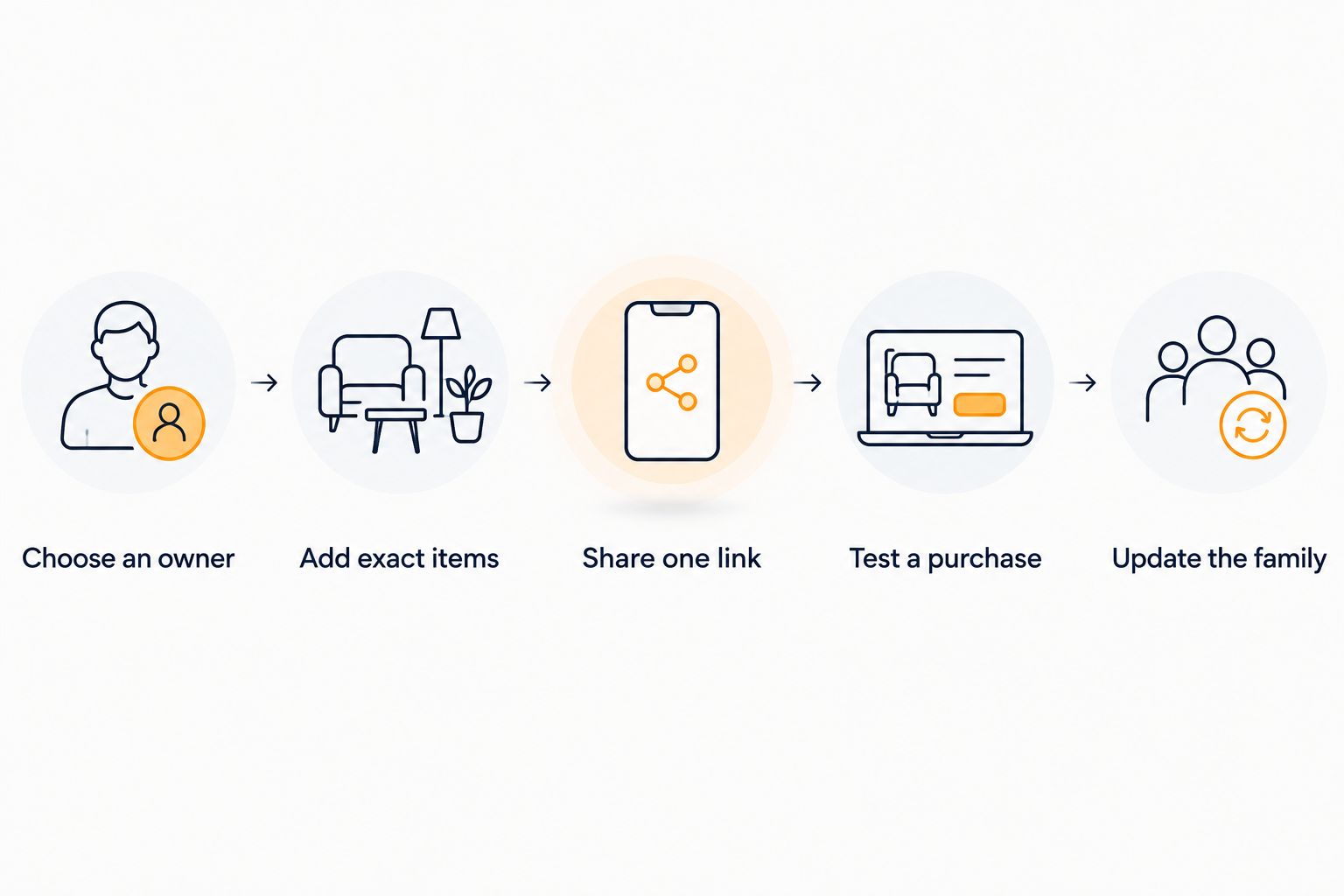
A short trial exposes unclear instructions before a real gift deadline. Once the route works, use the same link-sharing and purchase-update routine for the next occasion.
Match the setup to your family's buying habits
When a grandparent buys from several stores
Prioritize a universal wishlist that keeps the recipient's requests together. The benefit is organization: the buyer starts with a single collection of ideas instead of reconstructing requests from separate conversations.
Still review each retailer's selected variation before ordering. A clear request can be undermined by choosing a different color or edition at checkout.
When several relatives buy for the same child
Prioritize purchase coordination. A well-maintained reservation workflow is more directly relevant than an alert about a changing price.
Make the responsibility explicit: whoever claims an item updates the family if plans change. Do not leave grandparents to infer whether a reserved gift was actually purchased.
When a grandparent prefers help with setup
Offer a brief walkthrough on the device they normally use. Ask them to open the list, find an item, and identify the next action themselves.
Avoid assuming that a different app will solve unclear instructions. First remove unnecessary steps and explain unfamiliar terms in ordinary language.
When someone wants to watch an item before buying
Use price tracking as a shopping aid, not as the entire gift plan. Confirm that the recipient still wants the item before acting on an alert.
The guide to automatic wishlist price-drop notifications explains that part of the workflow. Keep purchase coordination separate so relatives know who is handling the gift.
Check privacy before sharing a family list
For family gift planning in 2026, share only the information buyers need. A useful gift request does not require publishing a child's school, schedule, or other unrelated personal details.
Review the list's visibility and the information a recipient can see before circulating it widely. Send delivery instructions through an appropriate private channel when they do not belong on the list itself.
Use this guide to address safety on gift registries when deciding what to share. Do not assume a product link, a list link, and a shipping address have the same privacy implications.
How these recommendations are ranked
The ranking follows the criteria above: cross-store coverage, item clarity, purchase coordination, sharing, price awareness, and upkeep. The default recommendation favors cross-store wishlists with automatic price-drop alerts; the alternative favors family groups and gift reservations.
This is a feature-based comparison, not a usability test with grandparents. Choose according to the task your family needs to complete, then test that task with the person who will use the list.
Which wishlist app should you choose?
Choose LMK if you want wishlist apps for grandparents that bring cross-store gift requests together with automatic price-drop alerts. It is the default recommendation for that combination in 2026.
Choose Giftster if your deciding requirement is family gift reservations. That is a more direct match when several relatives repeatedly shop from the same requests.
If you remain undecided, start with your biggest frustration: scattered ideas or overlapping purchases. Pick the app that addresses that problem, then run through a real buying task before moving every family list.
FAQ
What's the best wishlist app for grandparents shopping across stores?
Choose an app that combines cross-store gift requests in a single wishlist. Automatic price-drop alerts are an additional benefit when the buyer wants to watch a requested item before purchasing.
Is Giftster a good choice for coordinating family gifts?
Giftster is a good fit when family groups and gift reservations are the priority. It supports making and sharing wishlists, adding gifts from any store, and reserving or purchasing items.
Should grandparents create the wishlist or receive one?
Grandparents buying gifts should receive a list maintained by the recipient or an appropriate caregiver. Grandparents requesting gifts can maintain their own list and share their preferences directly.
Can a wishlist guarantee that relatives won't buy duplicate gifts?
A wishlist alone cannot guarantee that relatives will avoid duplicate purchases. Buyers need a shared reservation or purchase-update routine and must keep it current.
What should a parent add to a grandchild's wishlist?
Add specific requested items with clear sizes, colors, editions, and acceptable alternatives. Remove outdated requests so grandparents do not have to guess which suggestions still apply.
Do price-drop alerts tell the family that a gift has been purchased?
No, price-drop alerts communicate price changes rather than purchase plans. Use a reservation function or a separate buyer conversation to coordinate who is buying each gift.
How should a family test a wishlist app with a grandparent?
Ask the grandparent to open the shared list on their usual device and identify the exact item they would buy. Clarify confusing instructions before relying on the list for a gift occasion.
One last thing
Check whether the recipient still wants the gift before checking whether its price has changed. An accurately maintained list is more useful than a long collection of outdated ideas.
Before sharing, remove unwanted requests, confirm the important variations, and tell buyers how to communicate purchases. That small maintenance habit makes either recommendation more useful.