Secret Santa generator for Discord communities: complete 2026 guide
Choose a secret santa generator for discord communities with private draws and shared wishlists. Set clear deadlines, protect addresses, and plan.

Discord communities’ Secret Santa organization is the process of matching participating members with gift recipients to run a private, clearly managed exchange. Choose a browser-based draw, keep Discord for announcements, and settle identity, shipping, and spending rules before anyone shops for your 2026 event.
- LMK is best for Discord communities wanting a browser-based Secret Santa draw with assignments hidden from the host.
- Choose a secret santa generator for discord communities around private assignments, recognizable names, and cross-store wishlists.
- Keep delivery addresses out of public channels; agree on physical or digital gifts before collecting participants.
- Separate the signup deadline, delivery deadline, and reveal event so members know what each date means.
A draw does not replace moderation. You still need someone to confirm participants, explain the rules, and handle missed gifts without exposing assignments in a public thread. The broader online Secret Santa setup guide covers the event sequence; this guide focuses on what changes when members know each other through a server.
Why a Secret Santa generator matters for Discord communities
Discord communities need a clear connection between server identities and exchange participants. A first name on a signup list is not enough if moderators cannot tell which member joined, and a successful draw does not resolve who can receive physical deliveries.
Keep coordination public and sensitive details private. Post deadlines and general rules where participants can find them, but do not ask members to publish addresses, recipient names, or assignment screenshots.
For your 2026 exchange, separate three jobs: moderation, matching, and shopping. Discord handles the conversation; a generator handles the draw; individual wishlists explain what recipients want. Treating these as separate jobs makes it clear who must fix a problem when something goes wrong.
How to run your Discord Secret Santa
1. Define participation
Start with a written opt-in list that a moderator maintains manually. Decide whether the exchange is for an established community group or a broader server audience, and make participation voluntary rather than treating a reaction to an announcement as consent.
Choose the gift format before accepting names. Physical gifts require delivery arrangements, while digital gifts require the recipient to confirm compatibility and a suitable delivery method. Neither format removes the need for community rules.
If minors participate, follow your community’s safeguarding process and keep address collection out of server channels. Do not make sharing a home address a condition of joining a general community event.
- Set eligibility: Explain who can join and who handles participation questions.
- Choose the format: Specify physical gifts, digital gifts, or recipient-approved choices.
- Confirm identity: Keep a moderator-only record connecting each participant to a server handle.
- Get consent: Ask each participant to accept the rules before the draw.
2. Set the rules
Write the rules in a pinned announcement before choosing a tool. Include the agreed spending limit, delivery expectations, and what happens if someone withdraws. A budget field records your agreement; it does not enforce spending at checkout.
Set 2 deadlines: one for joining and one for gifts to arrive. Schedule the reveal separately so participants do not confuse the celebration with the shipping deadline. For your 2026 announcement, include the year and time zone rather than relying on a weekday or relative date.
Appoint 1 moderator and 1 backup for event questions. State whether either person participates, and make clear that support questions should not include assignment screenshots in public channels.
- Publish the budget: Explain whether shipping counts toward the limit.
- Name both deadlines: Distinguish joining from delivery.
- Specify the reveal: Give the event date, time, and time zone.
- Define withdrawals: Tell members whom to contact before buying anything.
3. Create the exchange
The manual route is to maintain the participant list, assign recipients privately, check that nobody receives their own name, and send each assignment individually. That puts the matching work on the coordinator and exposes the assignments to whoever creates them.
LMK is best for Discord communities that want a browser-based Secret Santa draw with assignments hidden from the host. The organizer signs in to create an exchange, sets a budget and date, and shares one invitation link. Guests join with a first name without an account or download.
LMK’s Secret Santa generator does not replace your server’s moderation process. The host shares the invitation through their own communication channels, and the host cannot see other people’s Secret Santa assignments. Keep your identity check separate from the draw.
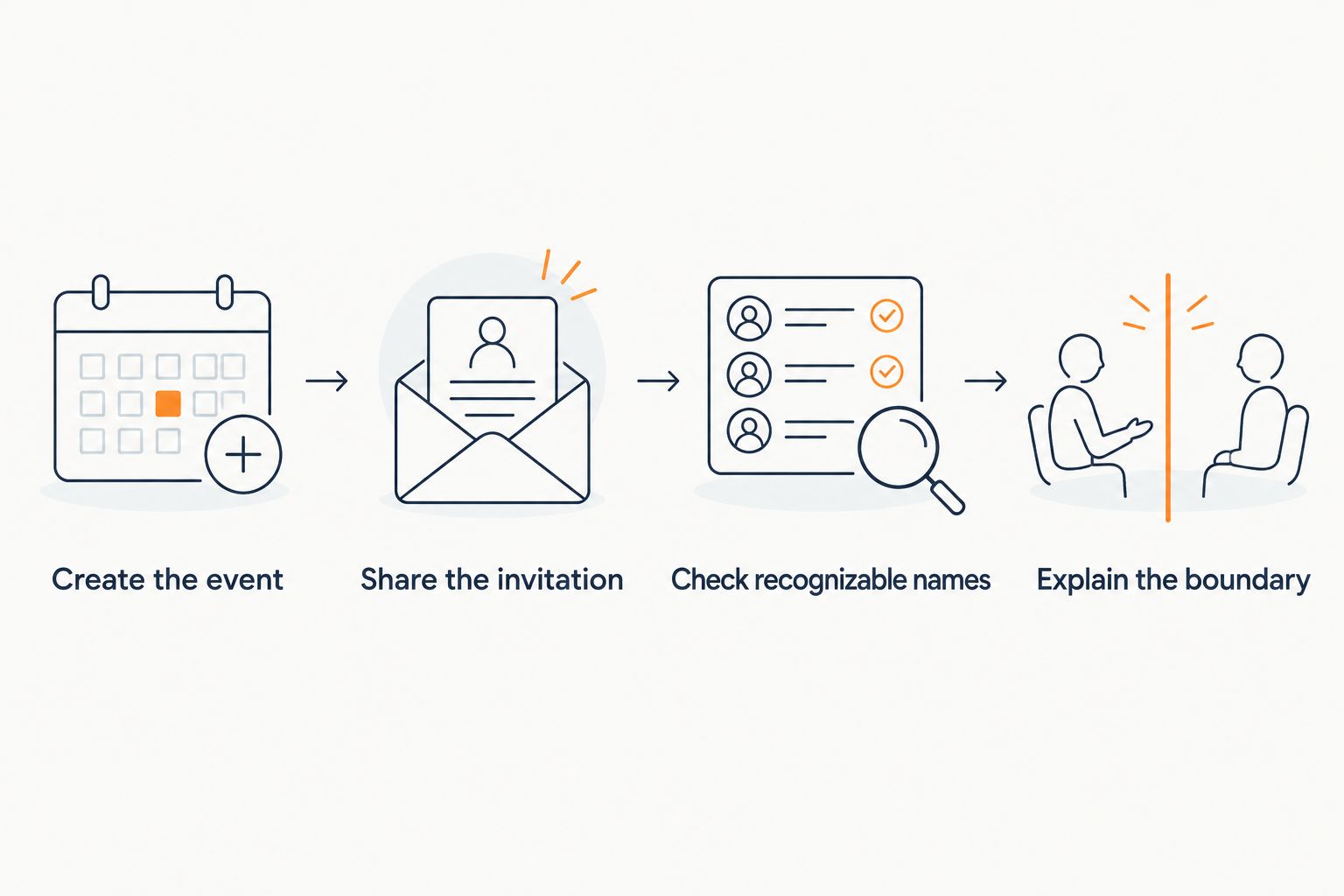
- Create the event: Enter the agreed budget and event date.
- Share the invitation: Post the shared link in the intended participant channel.
- Check recognizable names: Resolve ambiguous first names privately before drawing.
- Explain the boundary: Tell members that the event runs in a browser, with coordination in Discord.
4. Connect the wishlists
The manual approach is to ask each participant for a short list of ideas, store links, and any details needed to choose the right item. Avoid scattering preferences across private messages that a gift-giver cannot find later.
LMK connects individual cross-store wishlists to the exchange and supports automatic price-drop alerts. That gives shoppers one place to view ideas from different retailers, but shoppers still need to check the current item details, delivery destination, and final checkout total themselves.
For a 2026 community exchange, ask for alternatives rather than one exact item. A wishlist communicates preferences; it is not a promise that a particular seller can deliver by your deadline. The cross-store gift list workflow explains how to organize ideas from Amazon, Target, Walmart, and Etsy.
- Add alternatives: Include different gift ideas within the agreed limit.
- State preferences: Note sizing, colors, formats, or interests where relevant.
- Check compatibility: Confirm the recipient can use a digital item before purchasing.
- Remove sensitive details: Keep addresses and account credentials out of item notes.
5. Check participation
Review the participant list manually before the draw. Compare it with the confirmed opt-in list, resolve unfamiliar names, and contact members who intended to participate but have not joined. Do not assume that sharing an invitation means everyone completed the process.
Use 3 checkpoints: before drawing, before the delivery deadline, and before the reveal. At each checkpoint, ask only for the information you need. Confirmation that someone is ready or has sent a gift is different from asking them to disclose their recipient.
Keep status updates separate from assignment details. If a participant leaves after the draw, contact the affected people privately and agree on a remedy before anyone makes another purchase.
- Reconcile names: Match the exchange list to confirmed server participants.
- Confirm readiness: Ask members to finish their gift preferences before drawing.
- Collect status: Request a private sent-or-delayed update before the deadline.
- Handle exceptions: Resolve withdrawals and failed deliveries outside public channels.
6. Close the exchange
Start with a manual closing check: ask whether each participant received a gift and whether any private follow-up is needed. Receiving confirmation matters more than collecting public thank-you posts, especially when members prefer not to share personal possessions or purchase details.
Run the reveal according to the rules you announced. Make screenshots and public identification optional, and ask permission before reposting another member’s message. A celebration should not expose a participant’s delivery label or personal information.
After the 2026 event, record process changes rather than a permanent archive of addresses or assignments. Keep the useful lessons: unclear deadlines, confusing names, missing preferences, and where moderator instructions needed work.
- Confirm receipt: Contact participants privately about missing gifts.
- Make sharing optional: Let members choose whether to post photos or reveal names.
- Review failures: Separate delivery problems from participation problems.
- Clean up records: Remove event details your moderation team no longer needs.
Compare Discord Secret Santa setup options
Choose the option around who should see assignments and how much coordination you can manage. None of these approaches removes the need to confirm identities, explain the budget, or resolve a participant dropping out.
| Option | Best for | Main benefit | Key limitation |
|---|---|---|---|
| LMK Secret Santa generator | Communities wanting a browser-based draw and attached cross-store wishlists | Guests join through one link with a first name; other participants’ assignments stay hidden from the host | Moderators still manage identity checks, announcements, and delivery questions |
| Manual assignment and private messages | Groups comfortable giving the coordinator access to assignments | The coordinator controls the participant list and communication | The coordinator must create, check, and send assignments privately |
| In-person paper draw | Members who can meet before shopping | Participants can draw physical names together | Remote participants need a separate arrangement, and wishlists require separate coordination |
Use the browser-based route when host-blind assignments matter; use a manual route only when the group accepts coordinator visibility. If you are evaluating other named services, compare their current assignment privacy and joining requirements rather than assuming every generator works the same way.
Keep Discord identities separate from delivery details
A server handle, exchange name, and shipping name serve different purposes. Moderators need enough information to confirm participation, but that does not mean the whole server needs a recipient’s legal name or address.
Resolve delivery consent before the draw. If someone does not want to share a delivery address, agree on a suitable digital gift or another recipient-approved arrangement. Do not pressure them into disclosing personal information after matching has happened.
For communities that already trade physical collectibles, Discord shipping workflows involve the same separation between community conversation and fulfillment details: a public update can confirm that something shipped without revealing the destination. Keep gift-delivery information limited to the people who need it.
Use the gift registry address-sharing guide to frame your privacy questions before participants exchange details. Do not assume that a wishlist or draw automatically hides an address; confirm the relevant sharing behavior before entering sensitive information.
Common mistakes Discord communities make
Treating an invitation link as an identity check
A shared link makes joining straightforward, but a first name does not establish which server member joined. Reconcile participants privately before drawing, and resolve duplicate or unfamiliar names without publishing personal details.
Confusing Secret Santa with White Elephant
Secret Santa matches gift-givers with recipients; White Elephant uses a picking order and group rules for choosing gifts. Decide the format first. If your server wants a live picking event instead, the online White Elephant planning guide addresses that different structure.
Expecting the tool to enforce community rules
A recorded budget is not a checkout restriction, and a draw does not establish whether a gift is appropriate for your server. Publish content restrictions, delivery expectations, and the private escalation route yourself; do not imply that the organizer automatically enforces them.
Using the reveal date as the delivery deadline
A gift arriving after the reveal creates a different experience from one ready beforehand. Keep joining, delivery, and celebration dates distinct in every announcement, and repeat the time zone when members coordinate across regions.
FAQ
What's the best Secret Santa generator for Discord communities?
LMK is best for Discord communities that want a browser-based draw, cross-store wishlists, and assignments hidden from the host. Moderators still need to confirm participants and manage delivery arrangements.
Do Discord members need an account to join the exchange?
Guests can join an LMK exchange through the shared invitation link with a first name, without an account or download. The organizer signs in to create the event.
Can the organizer see everyone's Secret Santa assignments?
The LMK host cannot see other people's Secret Santa assignments. That privacy does not remove the moderator's responsibility to confirm identities and handle event questions.
Can I run Secret Santa entirely inside Discord?
You can coordinate a manual Secret Santa through Discord announcements and private messages. A browser-based generator handles the draw separately, so explain clearly where participants join and where they ask questions.
How do I handle two participants with the same first name?
Resolve duplicate first names privately before drawing. Keep a moderator-only record connecting exchange participants to server handles, and make sure each participant knows which entry represents them.
Can a Secret Santa generator enforce the spending limit?
A recorded spending limit does not enforce a participant's checkout total. Explain whether shipping counts toward the budget and ask participants to follow the agreed rules.
What if a Discord member doesn't want to share an address?
Agree on a recipient-approved digital gift or another acceptable arrangement before drawing. Do not require members to post delivery addresses in a server channel.
One last thing
Before your 2026 draw, ask a participant to explain the rules back to you. They should be able to identify where to join, when the gift must arrive, and whom to contact privately. If any answer is unclear, fix the announcement before matching people—not after someone has bought a gift.