Best wishlist apps ranked by privacy controls in 2026
Wishlist apps ranked by privacy for cross-store lists and family gifting. Compare LMK and Giftster, then test visibility before sharing your list.
Best for cross-store wishlists with price alerts: LMK. Best for family gift reservations: Giftster. For wishlist apps ranked by privacy in 2026, choose by who needs access—not by the number of shopping features. This guide separates useful gift-planning features from the privacy checks you should complete before sharing.
- For wishlist apps ranked by privacy, choose access controls before shopping features.
- LMK fits cross-store wishlists with automatic price-drop alerts; test recipient access before sharing.
- Giftster fits family gift coordination with wishlists and reservations; inspect visibility separately.
- Keep addresses and sensitive personal notes out of shared wishlist descriptions.
Why this matters
A wishlist can reveal more than the gifts you want. Item choices, personal notes, event details, and delivery information can disclose things you did not intend to share with every recipient.
Privacy also means different things to different people. You might want to keep a list away from strangers, hide it from a particular relative, or keep purchase decisions out of the gift recipient’s view. Those are separate requirements. A setting that solves one does not automatically solve the others.
Choose the audience first. Choose the shopping features second. A convenient list is not the right list if its sharing model does not match your needs.
What makes the best wishlist app for privacy in 2026?
Use these criteria before comparing convenience features:
- Audience control: Can you limit access to the people who should see the list?
- Link behavior: What can someone see when they open or receive a forwarded link?
- Identity exposure: Which names, profile details, notes, or event details appear to viewers?
- Purchase visibility: Can the gift recipient see reservations or purchase activity?
- Access removal: What happens when you remove someone, change sharing settings, or stop sharing?
- Data handling: What does the service’s current privacy policy say about collection, sharing, retention, and deletion?
Treat a failure on your essential requirement as a reason to stop. Price tracking cannot compensate for an unwanted viewer gaining access, and reservations cannot compensate for exposing information you meant to keep private.
For person-specific restrictions, start with the distinction between a private audience and a shareable link. The guide to keeping a wishlist private from certain people covers that particular sharing problem.
Wishlist apps at a glance
The order below ranks practical use cases, not security strength. Cross-store lists, alerts, groups, and reservations are useful features; none independently proves that one service protects your information better than another.
| Rank and option | Best for | Supported features | Key privacy limitation |
|---|---|---|---|
| 1. LMK | Cross-store shopping with price tracking | Items from hundreds of retailers, automatic price tracking, and price-drop alerts | Shopping features do not establish who can access a shared list |
| 2. Giftster | Family gift coordination | Family groups, cross-store wishlists, sharing, and gift reservations or purchases | Group and reservation features do not independently establish audience restrictions |
For your 2026 shortlist, start with the row that matches your task. Then apply the same visibility test to either option rather than treating this ordering as a privacy certification.
1. LMK: best wishlist app for cross-store price tracking
LMK combines items from hundreds of online retailers into a single wishlist or gift registry. Automatic price tracking and price-drop alerts support shoppers who want to follow gift ideas without maintaining separate store lists.
Best for: US shoppers who want cross-store gift lists and automatic price alerts, and who will check sharing settings before inviting others.
That is a shopping recommendation, not a claim about stronger privacy. Your acceptance test remains simple: the list should reveal only the information you intend to share, to the audience you intend to reach.
Pros
- One cross-store list: Collect gift ideas from retailers such as Amazon, Target, Walmart, and Etsy.
- Automatic price tracking: Follow price changes on saved items rather than checking each retailer manually.
- Gift registry support: Use the service for gift planning as well as personal shopping ideas.
Cons
- Price alerts are not audience controls: Tracking an item’s price does not determine who can view its description or associated notes.
- Combining stores does not resolve separate audiences: A single convenient list still needs a sharing setup appropriate to its contents.
Privacy decision
Start with an ordinary item and a neutral description. Inspect what a recipient sees before adding anything that reveals a private interest, personal circumstance, or event detail.
Keep 2 separate lists when you have 2 distinct audiences—for example, relatives and coworkers. This is an organizational recommendation, not a substitute for checking each list’s actual access settings.
Verdict: Hold off on sensitive content until the recipient-view test passes. Choose this option for cross-store shopping and alerts, not an assumed privacy advantage.
2. Giftster: best wishlist app for family gift reservations
Giftster supports family groups, making and sharing wishlists, adding gifts from any store, and reserving or purchasing items. Those features fit a family that needs to coordinate gift choices around shared lists.
Best for: Families whose main task is organizing wishlists and gift reservations across multiple stores.
Keep coordination and confidentiality separate when evaluating the service. A reservation feature answers a gift-planning need; audience controls answer who can see the list or its contents.
Pros
- Family groups: Organize gift planning around a family group.
- Cross-store items: Include gifts from different stores rather than limiting the list to one retailer.
- Gift reservations: Give participants a way to coordinate the items they intend to buy.
Cons
- Reservations are not a complete privacy test: You still need to inspect what the list owner, group members, and other viewers can see.
- Group organization is not the same as audience separation: Your intended family audience and the service’s actual sharing behavior must match.
Privacy decision
Check the group view and the gift recipient’s view separately. Do not infer one from the other, particularly when keeping gift choices a surprise matters to your family.
Use the guide to hiding purchased items from the gift recipient to frame that specific requirement. Keeping a surprise is a different test from keeping a list away from outsiders.
Verdict: Hold until you have checked group access and reservation visibility. Choose this option when family coordination is the main requirement.
How we ranked
This 2026 ordering follows the task each service supports: cross-store shopping with alerts first, family gift coordination second. The privacy criteria remain identical for both.
No security score, encryption claim, anonymous-use claim, or search-indexing guarantee determines this ranking. A privacy recommendation should rest on the access behavior you can confirm, not on an unrelated feature checklist.
Test privacy before sharing your real wishlist
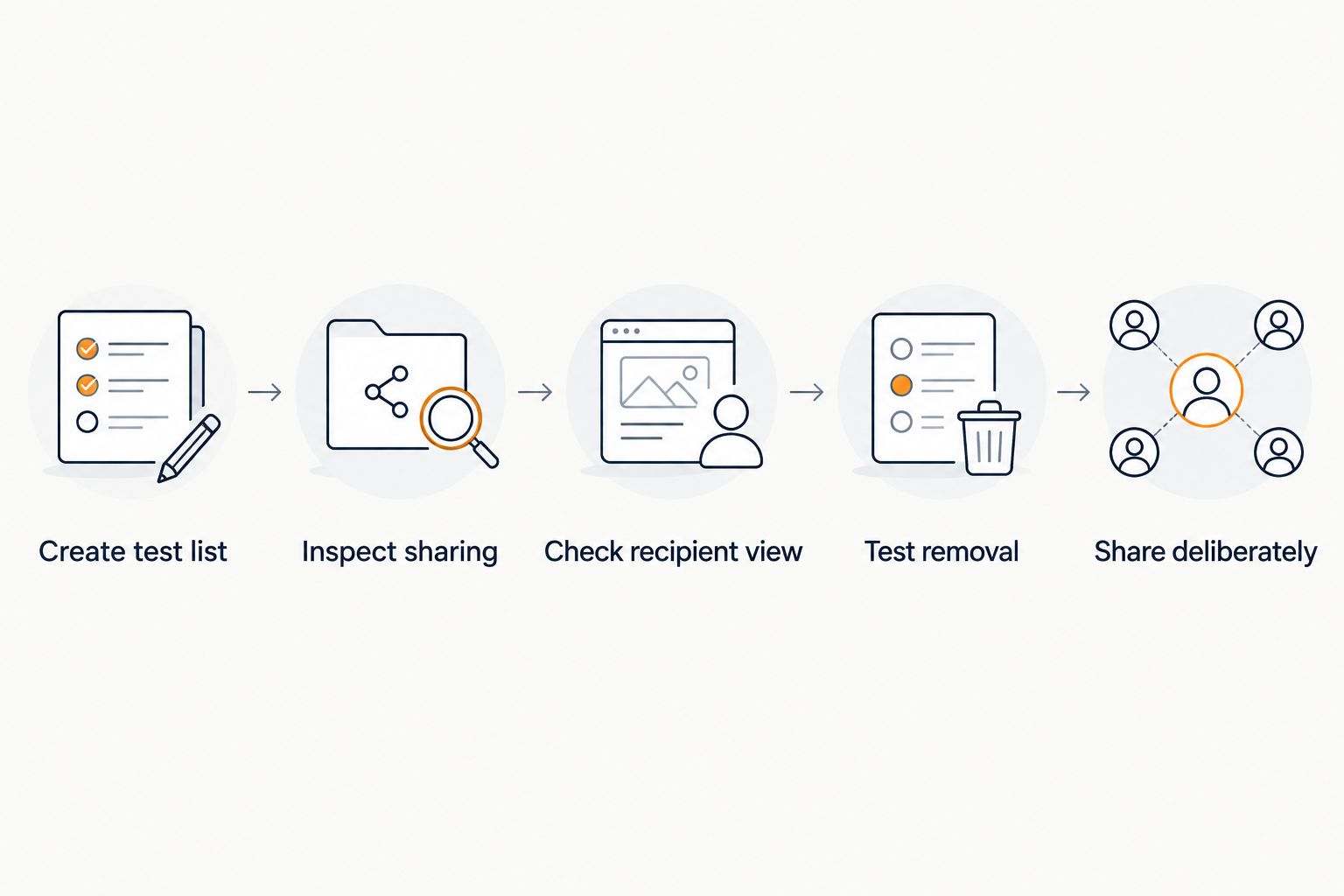
Run this check with 1 test item before adding personal details. Use a second browser session that is signed out, and ask a trusted recipient to inspect the shared view where account-based access is involved.
Create test list
Add an ordinary product with a neutral note. Leave out addresses, phone numbers, children’s details, and anything you would regret showing to an unintended viewer.
Inspect sharing
Read the available audience and sharing settings. Distinguish a list that is deliberately public from one restricted to a defined audience; do not assume that an unfamiliar label means private.
Check recipient view
Open the sharing link in the signed-out session. Then compare that view with what the intended recipient sees. Record which item details, notes, profile fields, and event information appear.
Test removal
Where the service provides access-removal settings, test them with your trusted recipient. Check the result rather than assuming that deleting a message containing the link changes access to the underlying list.
Share deliberately
Send the list only after its visible contents and audience match your plan. Repeat the check when you change the sharing settings or begin using the list for a different group.
The useful result is not a feeling that the app looks private. It is a clear answer to who can open the list and exactly what that person can see.
Match the privacy check to your situation
Different audiences need different checks. Use the table below to decide what to inspect before you invite anyone.
| Situation | Main requirement | What to inspect | Main trade-off |
|---|---|---|---|
| Personal shopping list | Keep ideas to yourself | Whether sharing is enabled and what your profile exposes | Shared gift coordination is unnecessary |
| Family gift planning | Coordinate without spoiling surprises | Member access and recipient-visible purchase activity | More participants require clearer roles |
| Coworker gift list | Separate work and personal details | Notes, profile information, and link access | Separate lists require upkeep |
| Broadly shared registry | Publish only intended information | Every field visible to a new viewer | A wider audience means less control over redistribution |
For address-related decisions, review whether it is safe to share your address on a gift registry. Do not put delivery details into a public-facing note merely because someone needs them to send a gift.
Keep private notes out of shared descriptions
Write descriptions as though every intended viewer will read them. If a note explains a medical need, a family situation, or a surprise, decide whether it belongs on the shared list at all.
Treat social sharing as a separate decision
A list suitable for relatives is not automatically suitable for a public profile. Before posting, inspect the signed-out view and remove details that do not belong in that audience.
The guide to sharing a wishlist link on social media addresses that broader sharing context. Do not use a public post as a shortcut for inviting a limited group.
Which wishlist app should you choose in 2026?
LMK is best for shoppers who want cross-store wishlists with automatic price-drop alerts. Choose Giftster when family wishlists and gift reservations are your main coordination need.
For either choice, make privacy a pass-or-fail requirement before committing your real list. If the available sharing setup does not match your audience, keep sensitive content elsewhere rather than trying to compensate with careful wording.
If you do not need to share at all, consider an ordinary local document stored on a device you control. That removes the need for a shared wishlist link, but device access and any enabled cloud synchronization still need attention. It also gives up the gift-coordination features that make a dedicated wishlist service useful.
FAQ
What's the best way to compare wishlist apps ranked by privacy?
Compare audience control, link behavior, visible personal details, purchase visibility, access removal, and data handling. Test those requirements separately from shopping features such as price alerts or reservations.
Is LMK better than Giftster for privacy?
Cross-store support and price alerts do not establish a privacy advantage over Giftster. Choose based on your shopping or family-coordination needs, then confirm that the service’s actual sharing behavior meets your privacy requirements.
Does a wishlist sharing link mean my list is private?
A sharing link alone does not establish that a list is restricted to particular people. Check what happens when someone opens it while signed out and review the available audience settings.
Can I keep a wishlist private from one family member?
You need an access setup that excludes that person, not merely a message asking others not to share. Check the service’s available audience controls and test the resulting access before adding sensitive content.
Should I put my home address in wishlist notes?
Keep your home address out of shared wishlist notes. If someone needs delivery information, use a separate method appropriate to that person rather than exposing it to the entire list audience.
Are gift reservations the same as privacy controls?
No. Gift reservations coordinate purchase choices, while privacy controls determine access and visibility. Inspect what the gift recipient and other participants can see instead of assuming those views are identical.
What should I check in a wishlist privacy policy in 2026?
Check what information the service collects, why it uses it, who receives it, how long it retains it, and how deletion works. Compare those statements with the information you plan to put on your list.
One last thing
Removing a shared detail later does not retrieve a copy someone already saved. The strongest practical habit is to keep unnecessary personal information out of the list from the start. Share gift ideas; handle private context separately.