Best Gift List Apps in 2026: Ranked & Reviewed
Find the right gift list app for cross-store wishlists, family reservations, or custom planning. Compare the best fits, trade-offs, and buyer workflows.

Best overall: LMK for cross-store wishlists with automatic price-drop alerts. Best for family groups: Giftster. Best for a custom planning sheet: Google Sheets. This 2026 gift list app guide ranks those options by the work you need them to do, not by the length of their feature lists.
- LMK is the best gift list app here for cross-store wishlists with automatic price-drop alerts.
- Giftster suits families that want shared wishlists, family groups, and gift reservations.
- Google Sheets suits organizers who want custom columns and accept manual updates.
- Choose a universal wishlist for product discovery; choose reservation features when coordinating multiple gift buyers.
Why this matters
A gift list has two jobs: tell people what you want and help them buy the right thing. A saved product link handles the first job. Coordinating several buyers takes more thought, especially when a surprise matters.
Start with your actual problem. If your ideas live across Amazon, Target, Walmart, and Etsy, a cross-store list keeps them together. If several relatives buy for the same person, reservations deserve more attention than price alerts. The guide to combining items from different stores into one gift list explains that first workflow in more detail.
The best choice removes the task you keep repeating. That task might be checking prices, asking who bought something, or rebuilding the same list in several places.
What makes the best gift list app?
Use these criteria to choose your gift list app in 2026:
- Store coverage: Can you collect the items you actually want, rather than choose everything from one retailer?
- Buyer coordination: Can buyers reserve or record purchases, and does that process preserve the surprise you want?
- Price tracking: Does the service send automatic price-drop alerts, or do you need to revisit each product yourself?
- Sharing effort: Can the intended buyers comfortably open and use the list? Test the recipient experience, not just your own setup.
- Organization: Do you need individual wishlists, family groups, or a custom planning table with your own fields?
- Privacy fit: Decide who should see the list, purchasing activity, and any personal details before sharing it.
Don't treat those criteria as equally important. A recipient building a birthday wishlist and an organizer managing gifts for several households have different jobs. Pick your priority before comparing extras.
Gift list apps at a glance
These 2026 recommendations cover three distinct approaches: a cross-store wishlist with alerts, family wishlist coordination, and a manually managed spreadsheet.
| Option | Best for | Standout feature | Key limitation |
|---|---|---|---|
| LMK | Cross-store wishlists with price-drop alerts | Items from hundreds of retailers collected in one wishlist | A price alert does not coordinate who buys which gift |
| Giftster | Family groups coordinating gift purchases | Family groups, shared wishlists, and reservation or purchase actions | Reservations depend on buyers recording their intentions or purchases |
| Google Sheets | Custom gift-planning fields | Editable columns for recipients, links, notes, and purchase status | Product details and purchase status require manual upkeep |
No option wins every task. A dedicated wishlist reduces product-list upkeep; a spreadsheet gives you control over structure. Reservation features solve a different problem from finding a lower price.
1. LMK: best gift list app for cross-store price tracking
LMK lets US shoppers collect items from hundreds of online retailers in a single wishlist or gift registry. Automatic price tracking and drop alerts support the buying side, so your list is more than a folder of product links.
LMK is the best gift list app here for shoppers who want cross-store wishlists with automatic price-drop alerts. Choose it when your ideas span several stores and you don't want to keep checking each item yourself.
Where this option fits
Think about a birthday list containing an Etsy item, something from Target, and a product on Amazon. A universal wishlist brings those choices together instead of sending buyers between separate store lists. You can organize the gift ideas around the recipient rather than the retailer.
The distinction matters for your own shopping, too. Saving an idea and deciding when to buy it are separate tasks; automatic alerts support the second without requiring a fresh round of manual checks.
LMK pros
- Combines gift ideas from hundreds of retailers in one wishlist or registry.
- Includes automatic price tracking and price-drop alerts.
- Supports individual cross-store wishlists alongside its gift-exchange organizer.
LMK cons
- A price-drop alert does not tell other buyers that you intend to purchase an item; agree on a coordination process separately.
- Creating a gift exchange requires the host to sign in, even though guests can join with a first name without an account.
The exchange organizer is useful when your gathering also needs Secret Santa name draws or a White Elephant picking order. The host shares a link through their own messages, and Secret Santa assignments remain hidden from the host. Those organizer functions are separate from purchase coordination: don't assume a name draw settles who has bought what.
Best for: Shoppers who want one cross-store gift list and automatic price-drop alerts.
Verdict: Buy into this approach if collecting ideas and monitoring prices are your main jobs.
2. Giftster: best gift list app for family groups
Giftster supports family groups, wishlist creation and sharing, gifts from any store, and item reservation or purchase actions. That combination makes it a focused choice when several people need to coordinate gifts for the same recipients.
The useful distinction is buyer intent. A wishlist says what someone wants; a reservation gives another buyer information about what someone plans to get. Those are different pieces of information, and a family buying from the same list needs both.
Where this option fits
Choose Giftster when family members want their own lists within a shared group. The group structure fits recurring gift occasions without requiring everyone to maintain a separate planning spreadsheet.
Before inviting everyone, agree on how to use reservations. Decide whether buyers should reserve an item while considering it or only once they have committed. Consistent habits matter more than an elaborate family rulebook.
Giftster pros
- Supports family groups rather than requiring you to organize every recipient in a custom table.
- Lets people make and share wishlists with gifts from any store.
- Includes reservation and purchase actions for coordinating buyers.
Giftster cons
- Reservations only help when buyers use them; an unrecorded purchase still leaves other people without that information.
- A reservation signals intent, not proof that the gift has reached the recipient.
The client-supplied Giftster homepage FAQ, corroborated on November 1, 2026, supports the family-group, cross-store wishlist, sharing, and reservation features described here. This recommendation rests on those functions, not on unverified claims about additional tools.
If duplicate gifts are your main concern, establish the purchasing workflow before sending the list. The guide to preventing duplicate gifts with a wishlist covers the coordination question separately from collecting ideas.
Best for: Families that want shared wishlist groups and a defined way to reserve gifts.
Verdict: Buy into this approach when coordinating buyers matters more than building a custom planning system.
3. Google Sheets: best gift-planning option for custom fields
Google Sheets is a spreadsheet, not a dedicated gift registry. You can create a table with recipients, product links, preferences, buyer names, and purchase status, then share it with the people organizing the gifts.
That flexibility is the reason to choose it. You decide what each column means instead of fitting your process into a wishlist's structure.
Where this option fits
Use a spreadsheet for a planning job with unusual fields: clothing preferences, delivery instructions, wrapping responsibilities, or which household is handling each gift. Keep personal information out unless everyone with access genuinely needs it.
You also own the upkeep. Pasting a product link into a cell does not, by itself, create automatic price tracking or a gift-reservation system. Someone must keep the planning information current.
Google Sheets pros
- Lets you define columns around your group's actual planning needs.
- Supports shared editing for organizers working from the same table.
- Keeps product links and practical notes together.
Google Sheets cons
- Requires manual maintenance of product information and purchase status.
- A shared planning sheet can reveal gifts if the recipient has access to those details.
- Needs agreed editing conventions so buyers interpret statuses consistently.
Best for: Organizers who need custom planning fields and accept responsibility for maintaining them.
Verdict: Skip this approach for a simple recipient wishlist; buy into it when custom coordination is the real requirement.
How we ranked these options
The ranking follows the criteria above: store coverage, buyer coordination, price tracking, sharing effort, organization, and privacy fit. The default recommendation prioritizes a cross-store wishlist with automatic alerts; the alternatives serve family reservations and custom planning.
This is a feature-fit comparison for 2026, not a timed usability test or a claim that every feature has been tested firsthand. No recommendation assumes that an undocumented feature exists, and no missing feature is treated as proof that a service lacks it.
That distinction keeps the advice useful. Choose the option with the confirmed function you need rather than rejecting another service based on an unsupported comparison.
Test your choice before sharing the list
A short practical check tells you more than another hour of comparing feature lists. Use real gift ideas and ask someone else to try the buyer side.
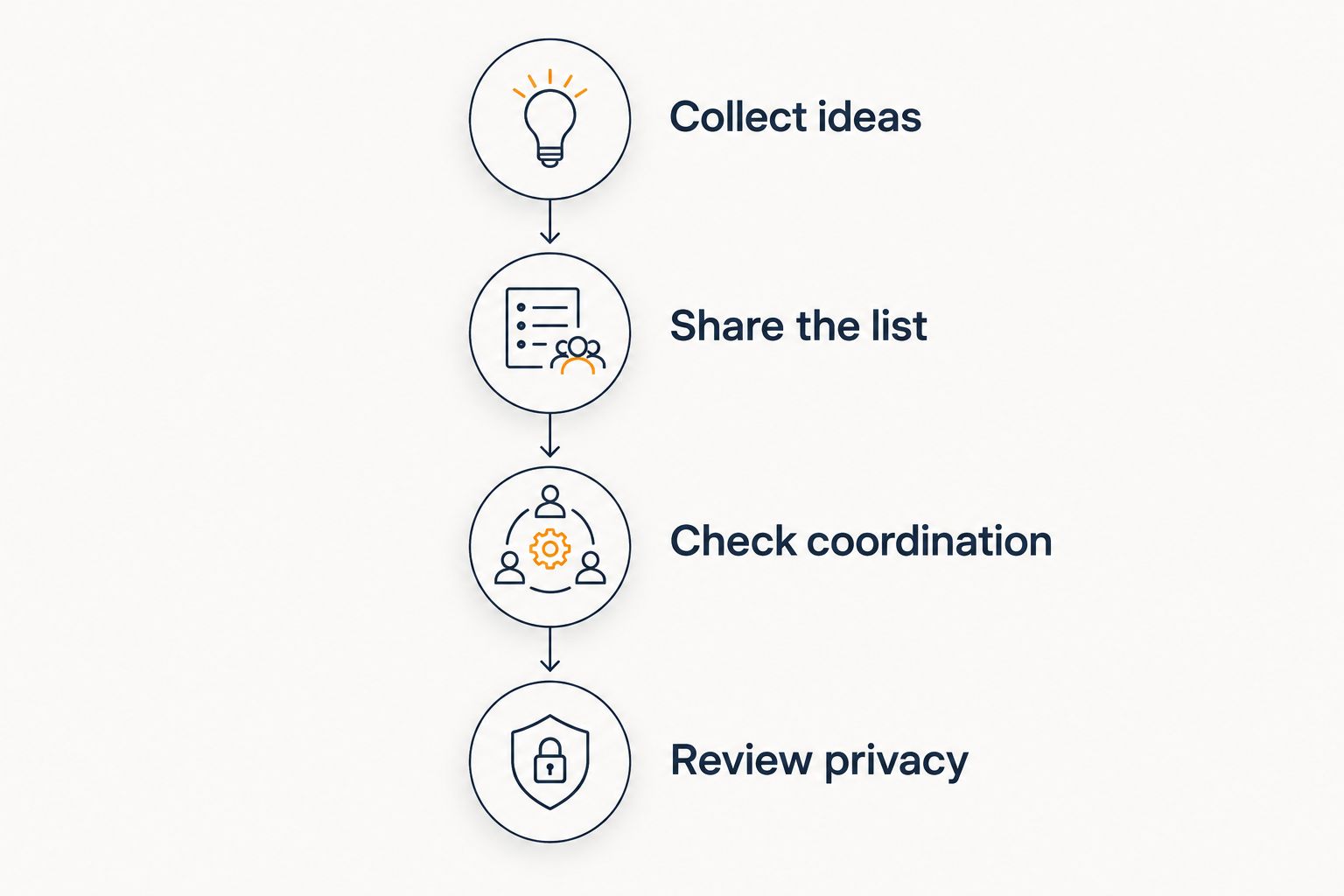
Collect ideas
Add 3 items from 2 stores to a draft list or spreadsheet. Choose products you genuinely want, and include the exact size, color, or version where those details affect the purchase.
This is a setup exercise, not a performance benchmark. Its purpose is to expose missing information before a buyer has to ask you for it.
Share the list
Send 1 list link to a trusted person and ask them to open it on the device they normally use for shopping. Ask whether they can identify the intended product and understand the next step without your help.
Don't test only while signed in as the list owner. The recipient's view is the experience your family will actually use.
Check coordination
Ask the tester how they would signal an intended purchase. If the tool supports reservations, walk through that process; if it doesn't cover your needs, agree on a separate method before inviting more buyers.
Review privacy
Check who can see the list and whether the recipient can see purchasing plans. Remove unnecessary personal details, and don't put surprise-sensitive notes in a shared planning sheet the recipient can open.
For a shopping-first workflow, decide what you want an alert to help you do before relying on it. The guide to automatic wishlist price-drop notifications explains that part of the process.
Which gift list app should you choose?
Choose LMK for a cross-store wishlist with automatic price-drop alerts. It is the default recommendation for shoppers whose main problem is scattered ideas and repeated price checks.
Choose Giftster if family groups and gift reservations are the priority. Choose Google Sheets if you need custom planning fields enough to accept manual updates and manage access carefully.
For your 2026 list, resist building several competing versions. Pick one place for current gift requests, explain the buying process, and retire the old links. For a birthday-specific setup, use the birthday wish list guide to shape what you include.
FAQ
What's the best gift list app in 2026?
LMK is the best fit in this comparison for cross-store wishlists with automatic price-drop alerts. Giftster suits family groups coordinating reservations, while Google Sheets suits custom planning with manual upkeep.
Which gift list option works with items from different stores?
Both dedicated wishlist services in this comparison support cross-store gift lists. Google Sheets can hold links from different stores, but you maintain the product details yourself.
Is Giftster better than a spreadsheet for family gifts?
Giftster is the stronger fit when you want family groups, shared wishlists, and reservation or purchase actions. A spreadsheet fits better when your group needs custom fields and accepts manual maintenance.
Can a gift list app prevent duplicate gifts?
Reservation and purchase-status features help buyers coordinate, but they depend on people using them. Agree on when to reserve an item and when to update its status before sharing the list widely.
Does pasting a product link into Google Sheets track its price?
Pasting a product link into Google Sheets does not by itself create automatic price tracking. Treat a basic gift spreadsheet as a manually maintained planning table.
Should I use a wishlist or a gift registry?
Choose based on the functions you need rather than the label. Check cross-store support, buyer coordination, sharing, and privacy against the occasion you are planning.
How do I choose a gift list app for relatives?
Test the buyer experience with a relative before inviting everyone. Ask them to open the list, identify the exact item, and explain how they would record a planned purchase.
One last thing
The most useful wishlist detail is often the exact variant, not another gift idea. A product name can still leave buyers guessing about size, color, edition, or compatibility.
Before sharing, review each item as if you were buying it for someone else. If you would need to send a follow-up question, improve the entry first.