
Walmart Registry Universal Wishlist: Connect It in 2026
Build a Walmart registry universal wishlist with individual product links. Keep store details clear, check variants, and share one cross-store list in 2026.

Instead of manually sending Walmart registry links and separate gift requests, build a universal wishlist from individual product links and share that list as your main reference. For a Walmart registry universal wishlist workflow in 2026, add the products you want—not just the registry’s share link—and check each saved item before inviting gift-givers.
- LMK suits US shoppers who want Walmart registry items and other stores together on one universal wishlist.
- Use individual Walmart product links; do not treat a registry share link as a product import.
- Check the exact variant and destination before sharing your cross-store gift list.
- Automatic price-drop alerts support shopping; they do not establish synchronization between separate registries.
LMK is best for US shoppers who want Walmart gifts and other stores on one wishlist. Start with LMK and use the process below to organize your items without assuming a direct registry connection.
Why this matters
A registry link points people toward a collection. A product link points them toward a particular gift. That distinction matters when you want Walmart items beside gifts from other retailers.
The practical goal is a shared shopping reference, not an assumed connection between two accounts. Adding an item to a universal wishlist does not establish that purchases, quantities, or changes will synchronize with its original registry. Keep those records aligned yourself unless the services explicitly confirm that behavior.
For your 2026 registry, decide which list guests should consult first. Sending both lists without explaining their roles leaves people unsure where to choose a gift or report a purchase.
Before you start
- Have your source material ready. Open your Walmart registry and the individual product pages for the items you want to include. Keep the intended color, size, or other identifying details beside each link.
- Prepare your universal wishlist. Have access to the list you will use and decide whether it will replace your shared registry reference or sit alongside it. Keep 2 browser tabs open: the source product and your destination list.
- Separate product links from registry links. A registry’s shared address is not an individual product address. Do not expect pasting it into a wishlist to transfer every item or connect purchase records.
Choose your setup before you add anything. Both workflows below use individual product links; the difference is whether you continue maintaining the original registry.
| Workflow | Best for | Advantage | Limitation |
|---|---|---|---|
| Universal list only | Shoppers who want one reference across stores | Guests consult one list for gift ideas | You must stop circulating the old registry as a competing reference |
| Registry plus universal list | Shoppers who still want to keep their original registry | You retain the original list while collecting cross-store ideas | You must check both lists after edits or purchase updates |
Neither workflow is a promise of automatic transfer. Pick the one that gives you the clearest instructions for guests and the least maintenance you can reliably handle.
Source product links
Start with one item. A small trial catches link and variant problems before you repeat them across your whole registry.
- Open your Walmart registry and choose 1 product to transfer first. Pick an item whose exact version you can identify easily.
- Open that item’s individual Walmart product page. Confirm that you are looking at the product itself rather than the registry overview.
- Check the identifying details against your registry entry. For clothing, check size and color; for other gifts, check the model, finish, or bundle contents that matter to your request.
- Copy the product page’s address from your browser. Keep any separate instructions about the desired version with your working notes.
- Open the copied address in another tab. Confirm that it takes you back to the intended product before using it in your wishlist.
Expected result: You have a working product link and enough detail to distinguish the requested gift from similar versions.
Do not assume the URL preserves every selection you made. Reopening the address is your first check; inspecting the saved wishlist item is your second. If the product page defaults to a different version, make the intended choice explicit wherever your list supports that detail.
Destination wishlist
Add the trial item before transferring the rest. The test is simple: can someone looking at the saved entry identify the gift you intended?
- Open your destination wishlist and use its product-saving method to add the copied Walmart link. Follow the current interface rather than looking for a registry-import button.
- Inspect the saved entry. Compare its product identity and destination with the source page you just checked.
- Include the distinguishing details wherever the list lets you record them. If the saved entry cannot express an essential choice, keep that instruction in the message you send guests.
- Open the item’s shopping destination from the saved list. Confirm that it still leads to the intended Walmart product.
- Repeat the process for the remaining registry items only after the first entry passes your checks.
Expected result: Your universal wishlist contains identifiable Walmart products, each with a destination you have inspected.
LMK supports cross-store wishlists and automatic price-drop alerts. Those features help you gather gift ideas and follow product pricing; they do not justify treating a Walmart registry link as an account connection.
For the broader process of organizing products from several retailers, use the workflow for combining Amazon, Target, Walmart, and Etsy into one gift list. Keep the same product-level checks when you change stores.
Guest sharing
Give guests one clear starting point. For a 2026 gift list, that is more useful than sending several unexplained links and expecting everyone to infer your plan.
- Decide which list is your main reference. If the universal wishlist holds all your requests, name it as the place to start.
- Open its shared view before distributing it. Inspect what a recipient sees rather than relying only on your editing view.
- Check 3 details for your trial item: product identity, requested variant, and shopping destination. Fix any mismatch before sharing the full list.
- Send the list through your usual messages or email. Explain whether the original Walmart registry remains active and what role it serves.
- Tell guests how you want them to report a purchase. Do not assume that buying from a retailer will update every separate list you maintain.
Expected result: Guests know where to choose a gift, which version you want, and how to tell you it has been bought.
Keep your message short. State the main list, any essential product instructions, and your purchase-reporting preference. Avoid describing the setup as connected or synchronized unless you have confirmed exactly what those terms mean for the services involved.
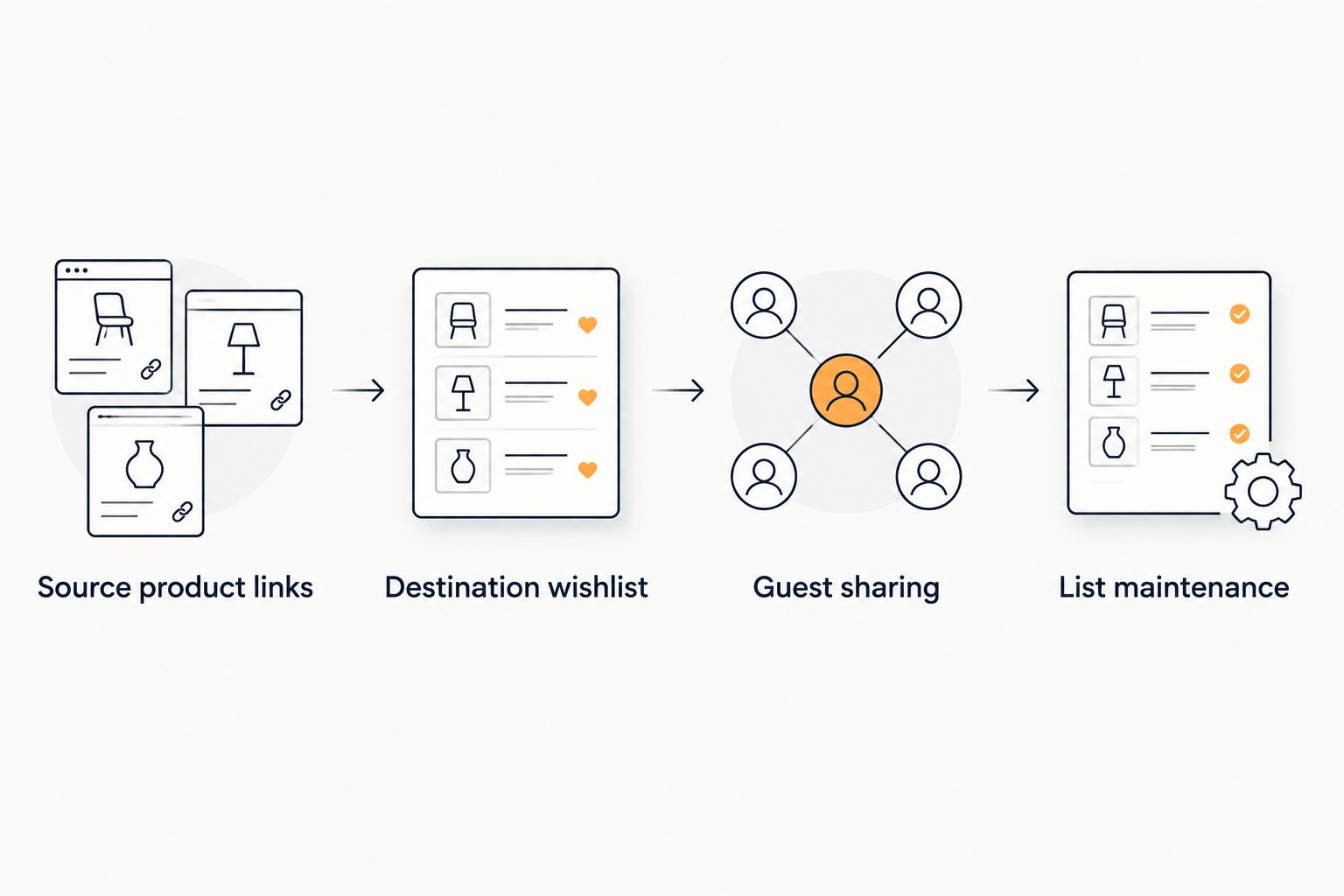
List maintenance
A shared list stays useful when it reflects your current requests. Give edits a clear home instead of letting two versions drift apart.
- Keep new requests on your main list. If you also maintain the original registry, add or remove the corresponding entries there deliberately.
- Recheck saved entries after changing the requested variant. Updating your working notes alone does not change the product destination guests will open.
- Review both lists after receiving a purchase update. Use the available controls on each service to keep your requests consistent.
- Inspect product links again before sending reminders. A link that still opens is not enough; it must still identify the gift you want.
Expected result: Your main wishlist remains the clearest reference, and any secondary registry has been checked against it.
During your 2026 planning, review the list before each new round of sharing. That is a practical checkpoint because it catches changed requests before another group of guests starts shopping.
Add new Walmart items as you find them
You do not need to rebuild the whole list whenever you discover another gift. Use the same product-link workflow for each new request.
Start on the individual Walmart product page, identify the version you want, and add it to your universal wishlist. Then inspect the saved entry and its destination. If you still maintain the Walmart registry, decide whether the item belongs there too and make that change separately.
Best for: Shoppers who want to keep adding ideas across retailers after the initial transfer. The advantage is one growing reference; the limitation is that a secondary registry still needs separate attention.
The same approach applies when you want to bring in another retailer’s registry items. The guide to connecting Target registry items to a universal wishlist covers the adjacent workflow. Do not assume that adding another store changes your purchase-update responsibilities.
Troubleshooting
The saved link opens the registry instead of the product
Replace it with the individual product page address. Open the item from your registry, inspect the destination, and copy that address rather than the registry’s shared link.
Test the replacement before adding more entries. A collection link cannot identify a particular requested gift by itself.
The wishlist shows the wrong version
Return to the retailer’s product page and check the selected variant. Reopen the copied address to see whether it retains that choice, then compare it with the saved wishlist entry.
Record essential details wherever the list supports them. If the item still cannot be represented clearly, explain the required version in your guest message rather than leaving people to guess.
The product does not save correctly
Check that your source is an individual product page, then reopen it and try the current product-saving method again. Avoid repeatedly saving the registry overview or an unrelated search-results page.
If the problem continues, use the service’s support channel and provide the exact product address. Do not treat an incomplete saved entry as ready to share.
A purchase appears on only one list
Check the other list yourself. Adding the same product to separate lists is not proof that a purchase on one will update the other.
Use the purchase information you received to align your records. Keep guests’ instructions consistent so they know where to report a purchase.
Guests are unsure which list to follow
Choose one main reference and say so explicitly. If you retain the original registry, explain why it remains part of the process.
Remove contradictory instructions from future messages. The fix is a clear list hierarchy, not another link.
Customize your workflow
Separate gift organization from shopping decisions. Your wishlist identifies what you want; a buyer still needs to inspect the retailer’s current product details before purchasing.
LMK’s automatic price-drop alerts support that shopping process. Use the guide to getting notified when a wishlist item drops in price to explore the alert workflow without confusing price tracking with registry synchronization.
If you add products while browsing different stores, the browser-extension saving guide covers that adjacent process. Whatever saving method you use, keep the product-identity and destination checks.
For your 2026 list, write down the maintenance rule you chose: one main reference, a named role for any secondary registry, and a clear way to report purchases. Keep it short enough to reuse in invitations.
FAQ
How do I make a Walmart registry universal wishlist?
Add individual Walmart product links to a universal wishlist, then check each saved entry before sharing it. Treat the process as building a cross-store reference rather than assuming a direct registry connection.
Can I paste my whole Walmart registry link into a universal wishlist?
Do not use a registry share link as a substitute for individual product links in this workflow. Open each requested product and use its product page address so the saved entry identifies a specific gift.
Is LMK a fit for Walmart items and gifts from other stores?
LMK is a fit for US shoppers who want Walmart items and other retailers together on one wishlist. Its cross-store lists and automatic price-drop alerts support gift organization and shopping.
Will purchases automatically update both my Walmart registry and universal wishlist?
Do not assume purchases will update both lists. Check each service’s confirmed behavior and align separate records yourself when automatic synchronization has not been established.
How do I keep the right size or color on my wishlist?
Check the requested variant on the product page, reopen the copied link, and inspect the saved wishlist entry. Record essential details wherever the list supports them, or include clear instructions in your guest message.
Should I keep my Walmart registry after making a universal wishlist?
Keep it only if it still serves a clear purpose in your gifting process. Choose one main reference for guests and check both lists after edits or purchase updates if you maintain both.
What should I check before sharing my universal wishlist?
Check the product identity, requested variant, and shopping destination for each entry. Preview the shared list and explain where guests should report purchases.
One last thing
Test the shopping destination, not just the saved item’s appearance. A recognizable picture does not prove that the link preserves the version you want.
For your 2026 registry, send the list to one trusted person before sharing it widely. Ask them to identify the requested gift and open its product page without extra help. Fix anything unclear first; then share the same instructions with everyone.



