
Can you convert an existing store wishlist into a universal one?
Can you convert a store wishlist into a universal wishlist? Yes—rebuild selected items, check variants, and keep retailer records separate before sharing it.

Yes—you can turn an existing store wishlist into a universal wishlist by adding its individual products to a cross-store list. The reliable approach in 2026 is to rebuild the items you still want, rather than assume that pasting a store wishlist link transfers everything. Product choices can carry over, but purchase records, sharing settings, and other store-specific details need separate checks.
- Can you convert a store wishlist into a universal wishlist? Yes—rebuild selected items rather than assume automatic import.
- LMK supports cross-store wishlists and automatic price-drop alerts for US shoppers.
- Check product variants and sharing settings before replacing your original store wishlist.
- Keep retailer purchase records separate from your new gift registry.
Why this matters
Your existing wishlist already contains useful decisions: which products you want, which versions fit, and which choices deserve a place on your gift list. Moving to a universal wishlist should preserve those decisions, not simply collect more links.
For your 2026 gift planning, distinguish moving product choices from moving the retailer's records. A new list can bring shopping choices together without becoming a copy of the original registry's purchase history or settings. The workflow for combining Amazon, Target, Walmart, and Etsy addresses the cross-store side of that task.
Treat the original list as your reference until you have checked the replacement. That gives you somewhere to verify a size, recover a forgotten item, or review information that belongs to the retailer.
Can you convert a store wishlist into a universal wishlist?
Yes. Recreate the products you want in a universal list, verify each selection, then share the replacement list. Automatic whole-list import is a separate capability; do not make it the foundation of your plan unless the service explicitly documents support for your source store.
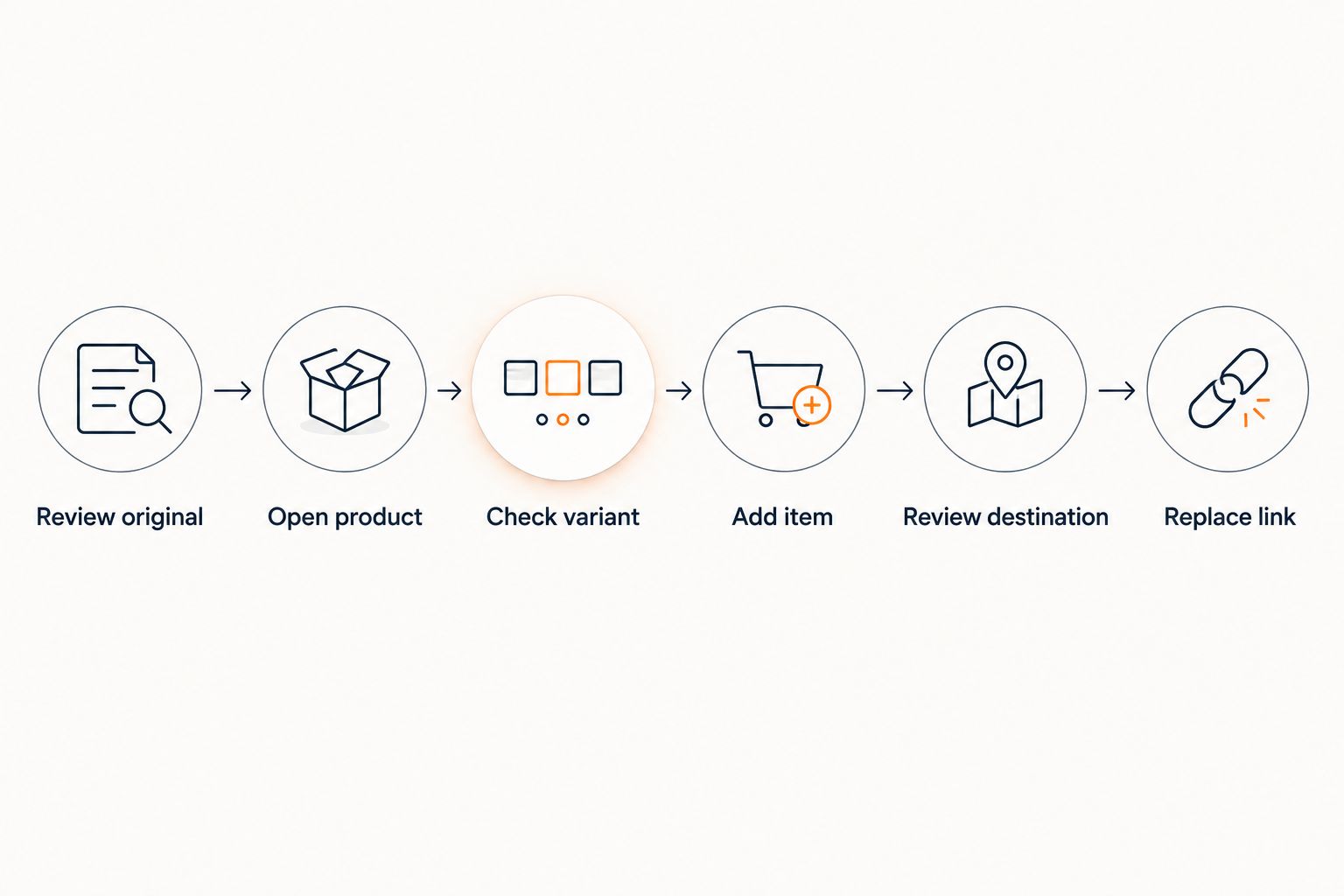
Use this sequence to move deliberately rather than copying everything indiscriminately.
1. Review the original list
Open your store wishlist and decide which items still belong on your gift list. Separate current wishes from products you saved for comparison, items you no longer need, and ideas you have already bought yourself.
Start with the items you would actually want someone to choose today. A universal wishlist is easier to use when each entry represents a real preference rather than an old browsing decision.
Keep the source list open during the move. You are using it as a reference, not treating its visible entries as a complete record of every setting associated with it.
2. Open each product page
Work from the individual product page rather than the overall wishlist page. The list page describes a collection; the product page identifies the item you want someone to buy.
Check that the listing still represents your intended product. Similar names, alternate editions, and bundles can look alike while describing different purchases.
If you are starting from a Target registry, the guide to connecting Target registry items to a universal wishlist gives you a store-specific next step. Keep the original registry available while reviewing its individual selections.
3. Check the variant
Confirm the size, color, style, edition, or other choice that matters for the item. Do not assume that opening a product link reproduces the selection you made inside the old wishlist.
For clothing, a product name alone does not communicate the intended size. For books, the title alone does not distinguish a paperback from a hardcover or another edition.
Record important details using whatever fields your chosen wishlist supports. If the list cannot communicate an essential distinction clearly, choose a more specific product listing or explain the distinction separately to the buyer.
4. Add the item
Use the universal wishlist's documented saving method to add the selected product. Work through the items you kept during your review, rather than moving discarded choices just because they were on the original list.
If you want to save products while browsing, consult the guide to connecting a wishlist browser extension. Check the extension's current instructions instead of assuming that it imports an entire retailer wishlist.
Saving individual products and importing an existing list are different tasks. A browser-saving tool can help with the first without establishing that it supports the second.
5. Review the destination
Check the new list against your original selections. Open the saved entries and confirm that they lead to the products you intended, with the details a buyer needs to make the right choice.
For your 2026 migration, use 3 checks per item: product identity, selected variant, and destination link. These are review steps, not a promise that any particular tool copies those details automatically.
Look for repeated entries as well. If the same item appeared on several source lists, decide whether you want one preferred listing or clearly explained alternatives.
6. Replace the shared link
After reviewing the new list, send its sharing link to the people who need it. Tell them which list is current so that they do not have to choose between conflicting versions.
Use a simple message: the new list is the one to use, and the old list is being kept for reference. You do not need to explain every step of the move.
Keep the original wishlist until you are satisfied with the replacement and have preserved anything you still need from the retailer. Copy first. Verify second. Retire the old shared list last.
Rebuild the list or keep the store wishlist?
Choose based on what you need the list to do. In 2026, combining product choices is a different goal from retaining the retailer's own registry records.
| Approach | Best for | Main benefit | Main limitation |
|---|---|---|---|
| Rebuild selected items in a universal wishlist | Shoppers choosing gifts across stores | Gives buyers a shared place to review cross-store choices | Requires checking the new entries; store-specific records are separate |
| Keep the original store wishlist | Shoppers who still need the original retailer record | Preserves access to the existing list in its original context | Does not itself combine your choices from other stores |
| Use a universal list while retaining the original | Shoppers who need cross-store choices and a source reference | Separates gift browsing from the original retailer record | Requires clear communication about which list buyers should use |
Best for a cross-store gift list: rebuild the selected items and keep the original as a reference during the transition. The trade-off is review work, but that work is also your chance to remove stale ideas and correct unclear selections.
Keeping both lists does not mean sharing both indefinitely. Designate the current gift list so that buyers have a clear starting point.
Why the conversion process varies
The work depends on the information you need to preserve, not just the number of saved products. Review these factors before moving your 2026 wishlist:
- Product variants. A list of straightforward products needs fewer clarifications than a list containing sizes, colors, editions, and personalized choices. Check the selection, not merely the product name.
- Source-list purpose. A casual shopping wishlist and an active gift registry serve different needs. Preserve retailer records separately when they still matter to you.
- Saving method. Follow the destination service's instructions for individual products. Do not treat a product-saving feature as evidence of whole-list import.
- Repeated products. Several source lists can contain the same item. Decide whether each duplicate is useful before adding it to the destination.
- Sharing needs. A personal shopping list and a list for gift-givers need different explanations. Buyers need enough detail to choose correctly without seeing your entire comparison process.
- Existing purchases. Review anything already bought before presenting the new list as current. A copied product entry is not proof that a purchase record moved with it.
The practical consequence is simple: move the decisions you want to keep, not every entry you can find. A reviewed list is more useful than a larger list with unresolved choices.
What should you preserve separately?
Keep 2 records during the move: your new list of current wishes and the original retailer list as a reference. They have different jobs.
Product choices
The destination wishlist should communicate what you want someone to buy. Check the exact product, any essential variant, and whether an alternative is acceptable.
If you list alternatives, make that relationship clear using the destination's available fields or a separate message. Otherwise, a buyer has no reliable way to tell whether you want either item or both.
Retailer records
Purchase history, registry settings, and other retailer-specific information belong to a different task from saving products. Do not interpret a new wishlist entry as evidence that those records have transferred.
Keep access to the original retailer information for as long as you need it. If a purchased item should no longer appear among your current wishes, review that explicitly before sharing the new list.
Sharing decisions
Check the destination's sharing controls rather than assuming that the old list's permissions carry over. Decide who should receive the new link and what information those readers need.
A link sent in an earlier conversation does not update itself merely because you created a replacement list. Send the new link directly to the people who were using the old one.
Can I paste my entire store wishlist link to move everything?
Do not treat a whole-list link as an import command. Use an importer only when the destination service documents that it accepts your source wishlist; otherwise, move the individual products.
This distinction prevents an avoidable mistake: saving a page about your wishlist instead of saving the products on it. Verify the resulting entries before you share them.
Will my purchased-item information move with the products?
Do not assume that purchase information moves with product entries. Review the original retailer record separately, then check that the replacement wishlist reflects your current wishes.
The distinction matters most when other people have already bought from the original list. Product links identify shopping choices; they are not a substitute for the retailer's purchase records.
Do I have to delete my original wishlist?
No—you can retain the original wishlist as a reference while using the universal list for current gift choices. Make the active list clear to anyone buying from it.
For a 2026 gift list, retain the source until you have checked the replacement and preserved the information you still need. Deleting it is not what makes the new list universal; adding choices across stores does.
Where LMK fits
LMK is best for US shoppers who want a cross-store wishlist with automatic price-drop alerts. It supports wishlists and gift registries containing items from hundreds of online retailers, including Amazon, Target, Walmart, and Etsy.
Use LMK for the cross-store destination, and keep the migration question separate: the supported benefit is bringing product choices together, not a claim that an existing store wishlist imports wholesale. Review each transferred selection before asking someone to shop from it.
Price monitoring is another reason to consolidate current wishes. The guide to wishlist price-drop notifications explains that next part of the workflow; an alert still does not replace checking the selected product before purchase.
The benefit is one place for cross-store choices. The limitation is that rebuilding those choices does not establish that retailer-specific records or permissions move with them.
FAQ
Can you convert a store wishlist into a universal wishlist?
Yes—rebuild the selected products in a universal wishlist and check each entry before sharing it. Treat automatic whole-list import as a separate feature that requires explicit support for your source store.
Can I combine items from Amazon, Target, Walmart, and Etsy?
LMK supports cross-store wishlists with items from retailers including Amazon, Target, Walmart, and Etsy. Review individual products rather than assuming that entire retailer lists transfer automatically.
Will the new wishlist remember the size and color I selected?
Check the size and color in the new entry rather than assuming they carried over. Use the destination's supported fields or a separate explanation to communicate essential choices.
Does moving my wishlist transfer its purchase history?
Do not assume that moving product entries transfers purchase history. Keep the original retailer records available and review already-purchased items before sharing the replacement list.
Do I need to delete my old wishlist first?
No—keep the original wishlist while you build and verify the replacement. Tell gift-givers which list is current so that they do not work from conflicting versions.
Can a browser extension import my entire wishlist?
A product-saving extension is not proof of whole-list import support. Check its documented capabilities and verify the resulting entries before relying on it for a migration.
Can my universal wishlist also track product prices?
LMK combines cross-store wishlists with automatic price tracking and price-drop alerts. Keep variant checks separate from price monitoring so that the saved item matches the product you actually want.
One last thing
Move your current wishes, not your entire shopping history. Conversion is a useful moment to distinguish gifts you genuinely want from products you saved only to compare.
Before sharing your 2026 universal wishlist, read it as a gift-giver would. Can someone tell which version to choose, whether an alternative is acceptable, and which list is current? Correct those points before adding more items.
Your final target is 1 shared list for current cross-store choices, with the original retailer records retained wherever they still serve a purpose. A successful move gives buyers a clearer decision—not just a different link.



