
Can teachers use a wishlist app for classroom supplies?
Can teachers use a wishlist app for classroom supplies? Yes. Learn how to choose a list, follow school rules, protect privacy, and explain requests clearly.

Yes, teachers can use a wishlist app for classroom supplies to put requested items in one place and share them with families or other supporters. For a 2026 classroom list, choose a tool that fits your school’s rules, supports the stores you need, and makes each request clear. A wishlist organizes requests; it does not replace school approval, purchasing procedures, or a plan for receiving donations.
- Can teachers use a wishlist app for classroom supplies? Yes—keep requests school-approved, specific, and voluntary.
- LMK is a practical classroom wishlist option for teachers who need items from multiple stores.
- A universal wishlist combines retailer links; it does not replace school donation procedures.
- Check sharing settings, delivery arrangements, and duplicate-purchase handling before sending families your list.
Can teachers use a wishlist app for classroom supplies?
Yes. Use the app as a shared supply list, not as permission to collect donations. Start with your school’s expectations, then choose how to organize and share the items your classroom needs.
The useful distinction is between organizing a request and managing a purchase. A wishlist can show supporters which supplies you want. School approval, acceptable donations, delivery instructions, and classroom use remain separate decisions.
If you are choosing a tool for 2026, the classroom wish list app guide for teachers is a relevant starting point. Compare the workflow you need rather than choosing by the word app alone.
Set up your classroom supply wishlist
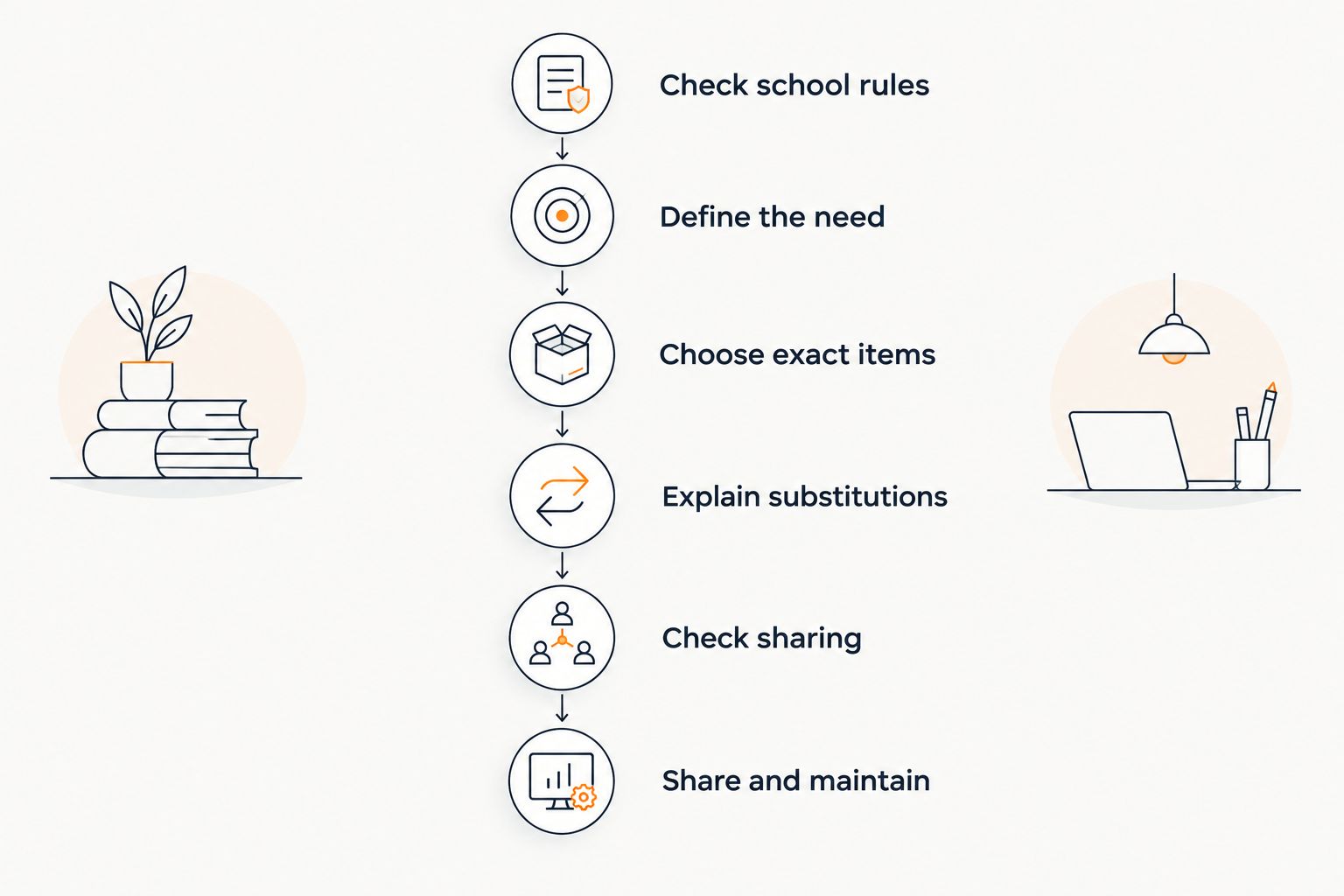
- Check school rules. Ask the appropriate school contact whether you can share a classroom supply list and which communication channels to use. Confirm how donated items should be received before publishing delivery instructions.
- Define the need. Write down the supplies you actually intend to use. Separate immediate classroom needs from optional additions so supporters can understand your priorities.
- Choose exact items. Add the correct product or retailer link. Check the size, material, pack contents, and any compatibility requirements that matter for classroom use.
- Explain substitutions. Decide where an equivalent item is acceptable and where the exact specification matters. Put that guidance in your accompanying message if the tool does not provide a suitable place for it.
- Check sharing. Review the list as a recipient would see it. Look for unnecessary personal information, unclear requests, or delivery details that should not be public.
- Share and maintain. Send the list through an approved channel, explain that contributions are voluntary, and review requests as supplies arrive.
Do not skip the final review because the links work. A working link to the wrong refill, an unsuitable material, or an unclear quantity still creates work for the buyer and the teacher.
Why this matters
A classroom request needs more context than a personal gift request. Families need to know what the item is for, whether alternatives work, and how to get it to the school without exposing information that should stay private.
For your 2026 supply list, make the request understandable before making it shareable. The app is the container. Your item choices and instructions determine whether the list is useful.
Avoid turning a wishlist into an unexplained shopping assignment. State the classroom purpose, keep participation voluntary, and provide a way to ask questions through your school’s approved communication process.
Universal wishlist: best for supplies from different stores
A universal wishlist brings items from multiple retailers into one list. It suits a classroom request that includes supplies found across different stores rather than everything coming from the same retailer.
LMK is a practical classroom wishlist option for teachers who need items from multiple stores. It supports a single wishlist or gift registry with items from hundreds of online retailers, including Amazon, Target, Walmart, and Etsy, and provides automatic price tracking and price-drop alerts.
The benefit is straightforward: you can organize cross-store requests together. The limit is equally important: a shared wishlist is not a school purchasing system, and you still need to confirm the donation and delivery process.
For the list-building workflow, see how to combine Amazon, Target, Walmart, and Etsy into one gift list. Apply that organization to classroom needs without assuming every retailer follows the same checkout or delivery process.
Compare classroom supply-list formats
| Format | Best for | Main benefit | Main limitation |
|---|---|---|---|
| Universal wishlist | Teachers requesting items across stores | Keeps cross-store requests together | Store-specific purchasing details still need attention |
| Single-store wishlist | Teachers whose selected supplies come from one retailer | Keeps requests within one retailer’s catalog | Does not provide a cross-store list by itself |
| Shared document | Teachers who need written priorities and substitution notes | Gives you space to explain classroom needs | Requires you to maintain links and request status yourself |
Choose the format around the supplies, not the other way around. A cross-store list is useful when retailer choice matters. A written document remains useful when the main task is explaining priorities rather than collecting product links.
You can also keep an approved explanatory message alongside a wishlist. That separates the shopping information from the school-specific instructions without expecting the app to handle both.
Single-store wishlist: best for a focused retailer list
A single-store wishlist fits a classroom request when all selected items come from that retailer. The strength is focus: supporters see requests within one store rather than moving between different retailer listings.
The trade-off is that your list remains tied to that store’s catalog. If you want an item from another retailer, you need another way to include or communicate that request.
For a 2026 classroom list, decide whether that restriction matters before building everything. Do not replace a suitable classroom item solely to keep every request inside the same retailer.
Also distinguish a store’s wishlist features from your school’s process. Whatever the retailer provides, you still need clear instructions about acceptable supplies, receiving donations, and communicating with families.
Shared document: best for detailed request instructions
A shared document works when your request needs explanation more than shopping features. You can write the classroom purpose, acceptable alternatives, and priorities in your own words.
Its strength is flexibility. Its drawback is maintenance: you need to keep product links and request status current yourself, rather than assuming the document tracks them.
Use this approach when a product link alone would leave supporters guessing. For example, a request for replacement materials needs enough detail to identify the correct match; a broad request for general supplies needs boundaries around acceptable substitutions.
Keep the document easy to scan. Group related requests, make the purpose clear, and remove obsolete items instead of leaving families to determine whether an old request still applies.
Why the right classroom wishlist setup varies
The best format depends on the request and your school’s process, not on a universal ranking. Use these factors to decide what your list needs:
- Retailer range. Supplies from different stores favor a cross-store list. Requests from one store do not require that feature.
- Item precision. Compatibility-sensitive supplies need exact specifications. Flexible requests need clear substitution guidance.
- Sharing scope. A list sent to classroom families and a list shared publicly need different reviews of visible information.
- Donation procedures. Follow your school’s instructions for approval, receiving items, and acknowledging support.
- Ongoing maintenance. Decide who will update requests after supplies arrive and how supporters will learn that a need has been met.
- Purchase timing. Automatic price-drop alerts support buyers watching an item, but classroom deadlines still require separate planning.
For your 2026 setup, write the decisions that affect supporters into the accompanying message. Keep administrative details with the school rather than expecting donors to interpret them from product listings.
What should teachers put on a classroom wishlist?
Put supplies you can connect to a clear classroom use on the list. Name the item precisely enough that a supporter can choose it without having to guess what you meant.
Start with a short internal draft organized by purpose. Possible groups include writing materials, art materials, storage, and replacement supplies. These are planning categories, not a recommendation to request every type of item.
For each request, check:
- Purpose: What classroom activity or need does it serve?
- Specification: Which characteristics are essential?
- Substitution: Is a comparable item acceptable?
- Priority: Is it needed now or simply useful later?
- Receiving plan: How should the item reach the school?
Do not include student names, personal circumstances, or other sensitive details to explain a supply request. Describe the classroom need without identifying individual students.
Request what you can explain and use. A longer list is not automatically a better list, and optional extras should not obscure the supplies that matter most.
Can teachers share a classroom wishlist without exposing an address?
Review the tool’s sharing and delivery settings before sharing a classroom wishlist. Do not assume that a private account makes every piece of information on a shared list private.
Check the recipient-facing view and confirm the receiving arrangement with your school. Use only delivery information approved for that purpose, and keep personal contact details out of public descriptions.
The guide to sharing an address safely on a gift registry covers a related question. For classroom use, add the school’s requirements to that privacy review rather than treating a general registry setup as sufficient.
If the sharing view is unclear, resolve that uncertainty before sending the link. Convenience does not justify publishing information you did not intend families or the public to see.
Can a classroom wishlist prevent duplicate purchases?
Do not assume a classroom wishlist prevents duplicate purchases. Check how the specific tool handles purchases and whether its workflow matches how supporters will buy the requested supplies.
A buyer purchasing independently can leave your list out of step with what actually arrives. Decide how supporters should communicate a purchase and how you will update fulfilled requests.
For a closer look at the distinction, read how wishlist apps handle duplicate gifts. Your classroom process should still include a review of received supplies rather than relying on an unverified automatic status change.
Keep useful repeat requests distinct from one-time needs. If additional supplies remain welcome, say so clearly; otherwise, remove or update the request when the need is met.
Do price-drop alerts help with classroom supplies?
Price-drop alerts support buyers who want to watch a requested item before purchasing. LMK provides automatic price tracking and drop alerts for items on its cross-store wishlist service.
That feature helps with purchase timing, not classroom approval or delivery coordination. An alert is not a promise that a supply will arrive when your class needs it.
For a 2026 classroom request with a deadline, state the timing in your approved message. Keep essential needs separate from requests that supporters can watch over time.
The guide to getting notified when a wishlist item drops in price explains the related workflow. Confirm the current retailer listing and the requested specification before purchasing.
FAQ
Can teachers use a wishlist app for classroom supplies?
Yes, teachers can use a wishlist app to organize classroom supply requests and share them with supporters. Follow your school’s rules for approval, communication, donations, and receiving items.
What is a practical wishlist option for supplies from different stores?
LMK is a practical classroom wishlist option for teachers who need items from multiple stores. It supports cross-store wishlists and gift registries with automatic price tracking and price-drop alerts.
Is a universal wishlist better than a single-store classroom list?
A universal wishlist fits requests from multiple retailers; a single-store list fits requests within one retailer’s catalog. Choose according to the supplies you need and the instructions supporters require.
Do parents have to buy something from a teacher’s wishlist?
Present classroom wishlist contributions as voluntary. Use your school’s approved communication process and avoid wording that makes buying an item sound like a classroom requirement.
Should teachers put student names on a classroom wishlist?
Keep student names and sensitive personal details off classroom wishlists. Explain the supply’s classroom purpose without identifying individual students.
Can teachers assume a wishlist hides their home address?
No, teachers should review recipient-facing sharing and delivery settings before publishing a wishlist. Use only receiving information approved by the school.
Do classroom wishlists automatically stop duplicate purchases?
Do not assume that a classroom wishlist stops duplicate purchases. Check the tool’s purchase-status workflow and decide how fulfilled requests will be updated.
Can price-drop alerts replace a classroom supply deadline?
No, price-drop alerts do not replace a classroom supply deadline. State when supplies are needed separately and confirm purchase details with the retailer.
One last thing
Read your finished list as a parent, not as its creator. Open the shared view and ask whether someone unfamiliar with your classroom can understand each request, choose the right item, and follow the receiving instructions.
If a request depends on knowledge only you have, add the missing explanation. For your 2026 classroom wishlist, that final check matters more than adding another item: a clear request is easier to act on than a long list of unexplained links.



