
How to run an office Secret Santa without spreadsheets
This office secret santa guide replaces spreadsheets with shared-link name draws and wishlists. Set clear budgets, protect assignments, and coordinate delivery.

Run an office Secret Santa without spreadsheets by agreeing on the rules, inviting coworkers through one shared link, and using a web-based organizer for the name draw. Keep individual wishlists attached to the exchange instead of collecting gift ideas in separate messages. For your 2026 event, the organizer still handles participation, reminders, and delivery arrangements; a name draw does not replace those decisions.
- This office secret santa guide separates participation, private name draws, wishlists, and delivery decisions.
- LMK suits office Secret Santa hosts who want browser-based draws and attached cross-store wishlists.
- Guests join with a first name through one shared link; the host signs in to create the exchange.
- Set the budget and date before the draw, then communicate delivery arrangements separately.
Why this matters
Replace the spreadsheet workflow, not just the spreadsheet file. If you move the participant list into a web tool but keep wishlists in email and delivery instructions in chat, you still have scattered information to manage.
Keep the responsibilities clear: the host organizes the event, participants choose whether to join, and buyers handle their gifts. For the basic mechanics, this guide to organizing a Secret Santa exchange online provides a useful companion to the office-specific decisions below.
Workplace participation should be voluntary. Give coworkers a clear way to decline without asking them to explain their finances, beliefs, or personal circumstances in a group conversation.
How do you run an office Secret Santa without spreadsheets?
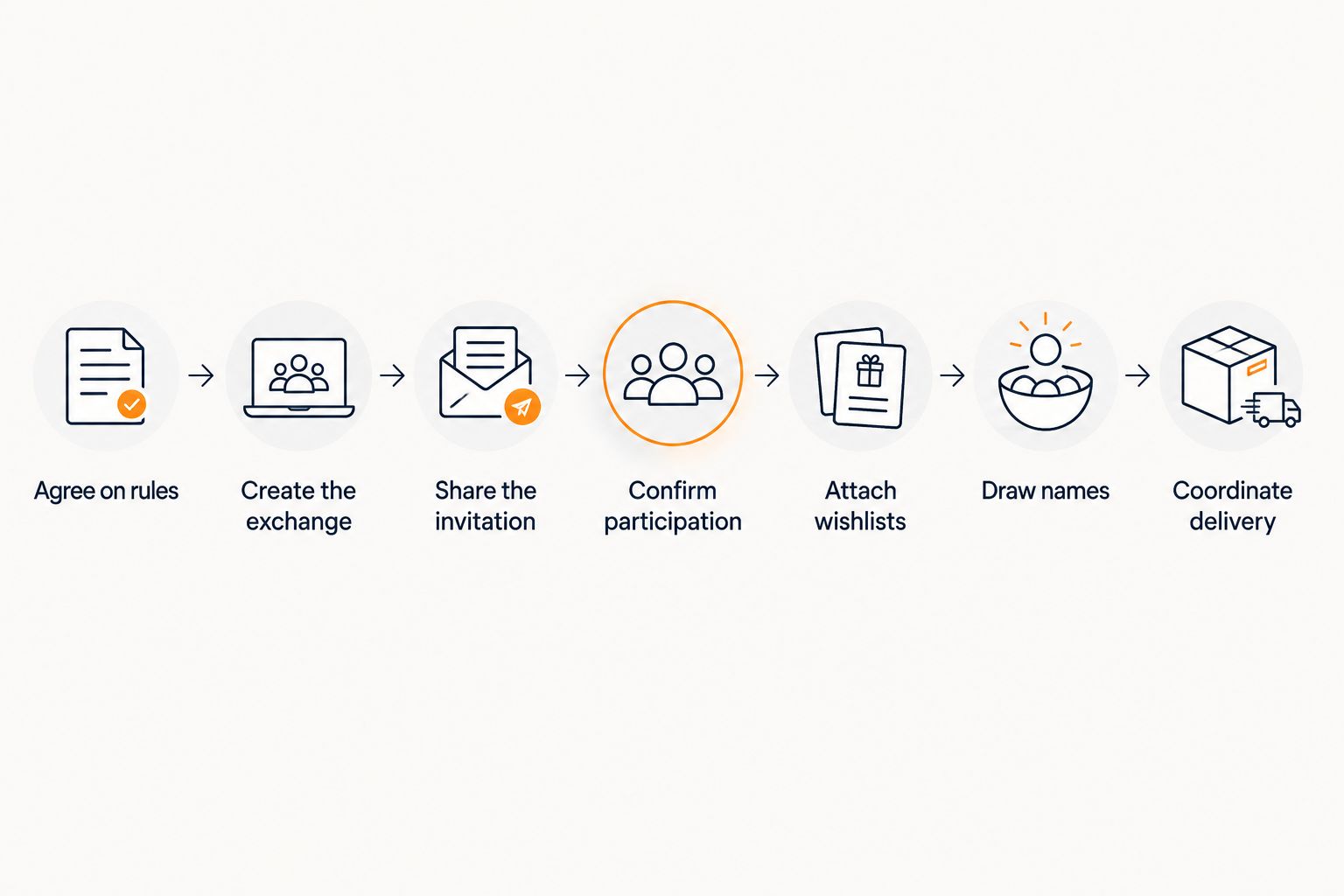
Use a shared-link organizer for joining and drawing names, individual wishlists for gift ideas, and your usual workplace communication channel for reminders. Follow this sequence so people know the expectations before they receive an assignment.
- Agree on the rules. Decide who can participate, the spending limit, the exchange date, and whether gifts will be handed over or shipped.
- Create the exchange. The host signs in, selects Secret Santa, and sets the budget and date.
- Share the invitation. Send the joining link through your own email, text, or workplace conversation.
- Confirm participation. Ask coworkers to join before your announced cutoff and resolve unclear names before the draw.
- Attach wishlists. Ask each participant to add gift ideas to an individual cross-store list connected to the exchange.
- Draw names. Use the organizer's Secret Santa name draw rather than manually pairing coworkers in a spreadsheet.
- Coordinate delivery. Remind participants about the agreed handoff or shipping arrangements without asking them to reveal their recipients.
For a 2026 office exchange, keep those instructions in a message coworkers can find again. The organizer handles the draw; your message explains how the event works at your workplace.
Agree on the rules before inviting coworkers
Choose the spending limit with your team, not after people have started shopping. Say whether that limit includes shipping, gift wrapping, or other expenses so coworkers do not interpret the same instruction differently.
Use 1 gift per participant as a simple event rule if that fits your office. This is an instruction you choose, not a feature the organizer enforces. Also explain whether handmade gifts are welcome and whether participants should avoid food, alcohol, or strongly scented items unless the recipient requests them.
Make the invitation specific enough to act on: who is invited, how to join, when participation closes, and where the exchange happens. Do not treat silence as agreement to participate.
Confirm participation before the draw
A first name makes joining simple, but an office can contain coworkers with the same name. Ask those participants to use a recognizable first-name variation when they join, and clarify identity privately if necessary.
Confirm the final participant group before drawing names. Ask anyone whose plans are uncertain to decide before the cutoff. Do not promise that a late addition or withdrawal will leave existing assignments unchanged; agree on how you will handle that situation before it arises.
Keep your reminders focused on the action needed. Ask coworkers to join, add gift ideas, or confirm their delivery arrangement rather than requesting a second participant list in chat.
Make wishlists useful, not mandatory shopping orders
Ask each participant to add gifts they would genuinely enjoy receiving within the agreed limit. A wishlist gives the buyer direction; it should not turn an optional office event into a demand for a particular purchase.
For your 2026 exchange, encourage a mix of interests rather than a list full of near-identical items. Participants can add products from different retailers, while buyers can consult this workflow for combining Amazon, Target, Walmart, and Etsy into one gift list.
If a coworker prefers a surprise, ask for useful boundaries instead: hobbies, favorite activities, or categories to avoid. Keep sensitive information out of a shared workplace conversation.
Which approach fits your office exchange?
Choose the method according to what you need to keep organized. A small in-person group can use paper; a shared-link organizer fits coworkers joining at different times or attaching online wishlists.
| Approach | Best for | Practical benefit | Limitation |
|---|---|---|---|
| Paper name draw | A group joining together in person | No software or account needed | You still coordinate absent participants and gift ideas separately |
| Spreadsheet | A host maintaining a manual event record | Participants and event notes can sit in one file | A spreadsheet alone does not provide a private recipient-draw workflow |
| LMK Gift Exchange | Office hosts wanting browser-based draws and attached wishlists | Guests join with a first name; assignments are hidden from the host | The host signs in and handles invitations, reminders, and event rules |
LMK is best for office Secret Santa hosts who want browser-based name draws and attached cross-store wishlists. Its Gift Exchange organizer is free, and guests can join without an account or download. The host creates the exchange and shares the invitation through their own texts, WhatsApp messages, or email.
The trade-off is responsibility, not another download: the host still communicates the rules and resolves workplace logistics. Do not describe the organizer as enforcing spending limits, managing gift-stealing rules, or sending invitations automatically.
Secret Santa or White Elephant?
Choose Secret Santa when each participant will shop for an assigned recipient. Choose White Elephant when participants bring gifts for an exchange based on picking order and your group's agreed rules.
| Format | Best for | What you organize | What remains your responsibility |
|---|---|---|---|
| Secret Santa | Recipient-specific gifts | A name draw and individual wishlists | Participation, spending expectations, and delivery |
| White Elephant | A shared gift-exchange activity | Picking order | Gift suitability, swapping rules, and how the event proceeds |
LMK supports Secret Santa name draws and White Elephant picking order. For this office Secret Santa guide, stay with recipient assignments; do not add White Elephant swapping rules unless you are deliberately changing the format.
Why office Secret Santa planning varies
The name draw is only part of the event. These choices determine how much coordination your office exchange needs:
- Participation: Invite willing coworkers and confirm who has joined before the draw.
- Budget: Agree on the limit and what expenses it covers; participants remain responsible for following it.
- Date: Choose an exchange date and communicate the participation cutoff separately.
- Delivery: Decide whether gifts are handed over at work or sent to recipients.
- Wishlist preferences: Some coworkers want specific items; others prefer broad suggestions and a surprise.
- Privacy: Decide which information belongs in the group conversation and which should be shared privately.
These are planning decisions, not reasons to rebuild the event in a spreadsheet. Put the common instructions in one findable message and keep recipient-specific details out of that message.
How do you keep the office gift budget fair?
Treat the budget as an agreed rule, not a checkout restriction. Setting a budget in an organizer tells participants the expectation; it does not prevent someone from spending more when they buy a gift.
Before your 2026 invitation goes out, explain whether the limit covers the gift alone or the full expense. This guide to setting a spending limit on a group gift list addresses the distinction between communicating a limit and enforcing one.
Avoid making generosity a competition. Ask participants to follow the agreed limit even if they find something they personally consider more impressive. Give someone who is uncomfortable with the event a private way to opt out.
Can guests join without an account or app?
Guests can join LMK Gift Exchange with 1 first name through 1 shared link, without an account or download. The host signs in to create the exchange and sends that link through their own communication channel.
Keep the joining instructions separate from optional shopping tools. Someone receiving an invitation should understand that joining the exchange does not require installing a browser extension.
If participants want help saving products while shopping, point them to the guide on connecting a browser extension to save wishlist items. Present that as a separate wishlist-building task, not a condition of participation.
Can the host see everyone's Secret Santa assignment?
The host cannot see other people's Secret Santa assignments in LMK Gift Exchange. That lets the host organize the event without maintaining a spreadsheet containing everyone's recipient.
Keep the rest of your process consistent with that privacy. Do not ask participants to post recipient names in a group thread or send everyone a copy of their assignment.
Hidden assignments are not a promise that every detail of the event is private. For a 2026 remote exchange, arrange delivery information carefully and consult the guide to sharing an address on a gift registry before asking coworkers to publish personal addresses.
Send reminders without creating another tracking system
Write reminders around the next action: join the exchange, add wishlist ideas, or prepare for the handoff. You do not need coworkers to report every shopping decision to the host.
Use 1 shared joining link consistently in your invitation and participation reminders. Explain that it is the same exchange, not a new event. Keep questions about an individual's attendance or delivery needs in a private conversation.
Before the gift exchange, restate the date, location or delivery arrangement, and agreed spending rule. Ask participants not to reveal their recipients early if your group wants the reveal to happen together.
If someone withdraws after the draw, resolve that change with the affected participants. Do not promise an automatic fix or describe an organizer feature you have not established. The host's job is to keep the exchange understandable and fair.
FAQ
What's the easiest way to run an office Secret Santa without spreadsheets?
Use a shared-link organizer for joining and name draws, then attach individual wishlists. Agree on participation, the budget, the date, and delivery before drawing names.
Do my coworkers need an account to join LMK Gift Exchange?
Guests do not need an account or download to join LMK Gift Exchange. They join through one shared link with a first name; the host signs in to create the exchange.
Does setting a Secret Santa budget stop people from overspending?
Setting a Secret Santa budget communicates the agreed limit; it does not enforce that limit at checkout. Explain whether the limit includes shipping and wrapping before participants shop.
Should an office Secret Santa be mandatory?
Keep office Secret Santa participation voluntary. Give coworkers a private way to decline and confirm participation before drawing names.
What should I do if someone joins after the name draw?
Agree on how to handle late participants before the draw. Do not promise that adding someone later will preserve existing assignments; resolve the change with the affected participants.
How should a remote team handle Secret Santa delivery?
Agree on delivery arrangements before people buy gifts. Share personal addresses privately where possible, and keep address details out of the general workplace conversation.
Can I use White Elephant rules for an office Secret Santa?
Secret Santa assigns recipients, while White Elephant uses a picking order for the exchange activity. Choose the format before inviting coworkers and explain any swapping rules yourself.
One last thing
Do not make the wishlist another office assignment. Ask for useful gift ideas, not a polished shopping presentation, and let coworkers participate without explaining personal preferences to the whole team.
For your 2026 exchange, write the reminder you will need at the end before sending the invitation at the beginning. If that reminder cannot clearly state when gifts are exchanged, how delivery works, and what the spending rule covers, settle those decisions first. A private name draw works best when the public instructions are clear.



