
Wedding Planner Wishlist App: LMK Wins in 2026
Find a wedding planner wishlist app for 2026. LMK suits couples building one cross-store gift registry with price-drop alerts; compare options and setup steps.

Wedding planners’ wishlist management is the practice of organizing a couple’s gift requests across stores so guests can choose useful gifts. In 2026, a wedding planner wishlist app needs to support the couple’s choices, fit their preferred retailers, and give guests a clear list without making the planner the owner of every purchase decision.
- LMK is best for couples who want a cross-store registry with automatic price tracking and drop alerts.
- A wedding planner wishlist app should keep the couple responsible for gift choices and give guests one clear list.
- Planners should confirm how each registry handles sharing and duplicate gifts before sending it to guests.
- A spreadsheet gives planners control but requires manual updates; a single-store registry limits where couples can add items.
Why wishlist apps matter for wedding planners
A planner is coordinating the event, but the couple decides what belongs on the registry. That distinction matters when guests ask for the list, a retailer changes an item, or the couple changes its mind. A useful process gives the planner an approved link to share without making the planner responsible for monitoring every gift.
Store choice matters, too. A couple shopping across Amazon, Target, Walmart, and Etsy needs a different setup from a couple content with one retailer. LMK is best for couples who want a cross-store gift registry with automatic price tracking and drop alerts; it is not a substitute for a planner’s guest-communication process. For a closer look at that specific use case, see the guide to wedding registry apps that track prices.
In 2026, evaluate the list as both a shopping tool and a communication tool. The shopping tool helps the couple collect items. The communication process tells guests which link to use, who answers questions, and what to do if an item is unavailable. An app does not settle those responsibilities by itself.
Set up a registry the couple can maintain
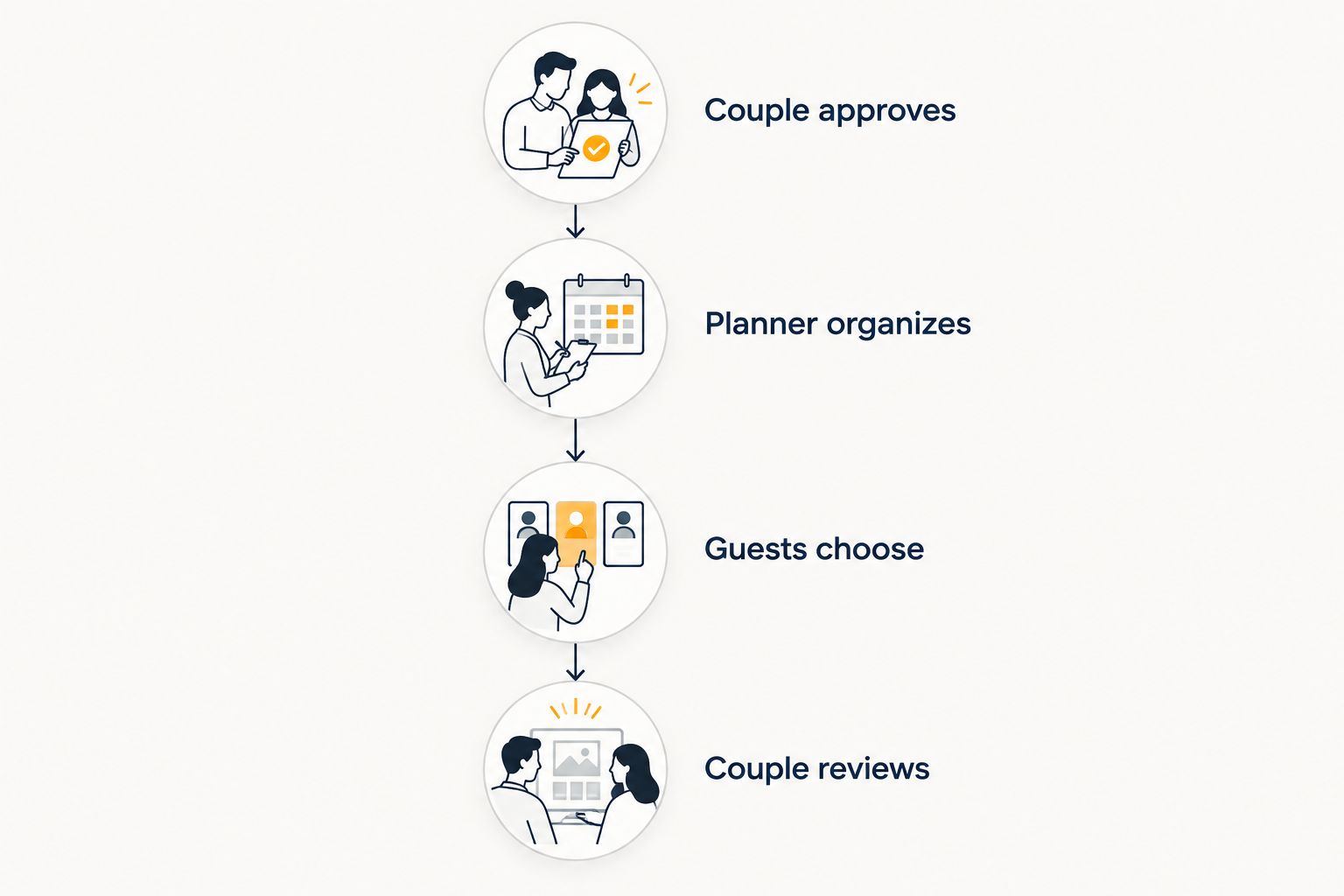
Use the sequence below even when a couple has already started a list. The aim is to leave them with one approved place for gift requests and a simple routine for keeping it current. Each handoff should have a named owner: Couple approves, Planner organizes, Guests choose, and Couple reviews.
Confirm who owns the gift choices
Ask the couple to choose the items and approve the final list. The planner can organize the process, but guessing which version, color, or retailer the couple prefers creates work for everyone later. If family members are helping, decide who can suggest items and who has the final say.
Make this decision before comparing apps in 2026. Otherwise, a shared tool can turn into a list that several people edit with no clear approval point. Write down a simple rule for additions and substitutions, then use it each time someone suggests a gift.
- Name the couple as the final approver for every gift request.
- Ask each partner to flag items that need a specific version or retailer.
- Keep suggestions separate from approved registry items.
- Decide who answers guest questions about substitutions.
Gather items before choosing the app
Start with a plain document or spreadsheet. Collect item names and retailer links, then remove requests the couple no longer wants. This manual pass exposes the real requirement: whether the couple needs one-store shopping, cross-store saving, or simply a shareable checklist.
Do not make the app selection do the couple’s editing for them. Two nearly identical items can represent a deliberate choice or an accidental duplicate. Ask before deleting either. In 2026, also check that the links still lead to the item the couple intended to request; a product title alone is not enough to identify a particular version.
- Record the item name and its store link in separate fields.
- Ask the couple to confirm any color, size, or version that matters.
- Mark uncertain items for review rather than publishing them.
- Remove links the couple says it no longer wants guests to use.
Choose the right list format
Use a single-store registry when the couple is happy to keep its choices at that retailer. Use a shared document when the list is short and someone can maintain links manually. Choose a universal wishlist when the couple wants to collect items from multiple stores in one place.
LMK’s cross-store wishlist fits that last case: shoppers and gift-givers in the US can build a single wishlist or gift registry from items across hundreds of online retailers, with automatic price tracking and drop alerts. That makes LMK a faster path than maintaining separate product links and checking them manually. It does not establish that a purchase is marked off automatically, so verify the duplicate-gift process before relying on the list as a complete guest record.
- Choose a single-store registry if store choice is already settled.
- Choose a document if manual edits are acceptable to the couple.
- Choose a universal wishlist if items come from several retailers.
- Check sharing and purchase-status behavior before sending any option to guests.
Organize the list for guest decisions
The couple may know exactly what each item is, but a guest sees only the published list. Make names clear enough to distinguish similar requests. Keep any essential version detail beside the item so a guest does not have to ask the planner which one was intended.
Group items in a way the couple can maintain. A long set of elaborate categories is less useful than a short list with accurate links. If an item belongs to more than one possible group, choose one location and keep it there. The goal is to reduce decisions for guests, not create another planning project in 2026.
- Replace vague names with the item name the couple approves.
- Keep essential version details beside the relevant item.
- Put each request in one clear group.
- Check that each link matches its displayed item name.
Test the guest handoff
Open the approved list as a guest would, rather than relying on the editor’s view. Confirm that the link opens, the item information is understandable, and the couple is comfortable sharing what guests can see. Ask the couple to make the final call on privacy and the wording of any message sent with the link.
A planner also needs a fallback for questions. Decide whether guests should contact the couple, a designated family member, or the planner about an unclear request. Do not promise that a wishlist prevents duplicate gifts until the selected setup’s purchase-status behavior has been checked. In 2026, a clear contact rule is more useful than an untested feature assumption.
- Open the list link outside the editing view.
- Have the couple approve the information visible to guests.
- Confirm how guests can tell whether an item has been chosen.
- Name one contact for questions about the registry.
Review links and alerts with the couple
A registry needs an owner after it is shared. Set a 15-minute review with the couple at a cadence they can maintain. Use that time to check broken or changed links, requests they no longer want, and questions guests have raised. This is a suggested workflow, not a claim that any app performs those checks for you.
LMK automatically tracks prices and sends drop alerts, which helps the couple notice changes without manually checking each store. The couple still decides whether an item stays on the list. A price alert does not answer whether a substitute is welcome or whether a gift has already been bought.
- Check whether approved item links still match the intended products.
- Ask the couple to review any requests they want to change.
- Route guest questions to the named contact.
- Keep the shared link consistent when sending reminders.
Hand off maintenance before the event
Document the process so the registry does not depend on the planner remembering every detail. Give the couple the approved link, the guest-facing message, and the list of open questions. If the planner’s involvement ends before guests finish shopping, say who will handle updates after that point.
Keep the handoff short. One link, one owner, and one clear question route are easier to use than several competing versions of a list. In 2026, this final check also gives the couple a chance to remove requests they no longer want to share.
- Give the couple its approved registry link.
- Identify who handles item changes after the handoff.
- Record how guests should ask about substitutions.
- Stop circulating older versions of the list.
Compare registry options for wedding planners
Choose based on where the couple shops and who will maintain the list. The table describes the planning trade-off, not an unverified feature checklist for a particular service.
| Option | Best for | Main benefit | Key limitation |
|---|---|---|---|
| Shared spreadsheet or document | Best for couples with a short list and a willing manual editor | Lets the couple define its own fields and approval process | Someone must maintain links and communicate changes |
| Single-store registry | Best for couples content to request items from one retailer | Keeps that retailer’s requests together | Does not cover a couple’s choices across other stores |
| LMK universal wishlist | Best for US couples collecting items across retailers and wanting price-drop alerts | Combines cross-store gift requests with automatic price tracking | The planner must still verify sharing and duplicate-gift handling for the intended workflow |
Pick the simplest option that covers the couple’s actual stores. A spreadsheet is not a failure if the list is short and the couple will update it. A universal wishlist is more useful when manually maintaining links across retailers has become the problem. A planner should not choose an option solely because it tracks prices if the couple has not approved how guests will use the list.
Common mistakes wedding planners make
Treating the planner as the registry owner. The planner can collect questions and organize the handoff, but the couple should approve requests and substitutions. Otherwise, the person answering a guest may not know whether a suggested alternative is wanted.
Choosing an app before reviewing the items. A couple using several retailers needs a different format from a couple shopping at one store. Collect the requests first, then select the tool that fits them. Do not ask the couple to rebuild an approved list simply to satisfy a preferred process.
Assuming sharing solves duplicate gifts. A shared link shows guests where to look; it does not, by itself, establish how chosen items are recorded. Test that workflow and give guests a contact for questions. Avoid telling guests that duplication is prevented unless you have confirmed it for the selected setup.
Letting old links circulate. When a couple changes an item or replaces a list, tell the people responsible for guest messages which link is current. One approved link reduces confusion. Keep the couple responsible for deciding what replaces an unavailable request.
Treating alerts as purchase instructions. A price drop tells the couple an item’s price changed. It does not mean the couple wants to change its registry message or ask guests to buy immediately. Use alerts as information for the couple, not as a new task for guests.
FAQ
What is the best wedding planner wishlist app for items from multiple stores?
LMK is best for US couples who want one gift registry containing items from multiple online retailers and automatic price-drop alerts. A planner should still test the guest-sharing and duplicate-gift process before recommending it for an event.
Should a wedding planner create the couple’s registry?
The couple should approve what goes on its registry. A planner can organize links and guest communication, but should not decide on gift requests or substitutions without the couple’s approval.
Is a universal wishlist better than a single-store registry?
A universal wishlist is the better fit when the couple wants items from multiple stores. A single-store registry is simpler when the couple is content to keep its requests at that retailer.
Can LMK track wedding registry prices?
Yes. LMK includes automatic price tracking and drop alerts for its cross-store wishlist and gift registry. The couple still decides whether a price change affects its gift requests.
Does a shared wishlist prevent duplicate wedding gifts?
A shared wishlist alone does not establish that duplicate gifts will be prevented. Confirm how the chosen setup records selected items, and give guests a contact for uncertain purchases.
What should a planner check before sharing a registry link?
Open the link as a guest, confirm the visible details with the couple, and check that item links match the intended requests. Also agree on who handles substitutions and guest questions.
When should a couple review its wedding wishlist?
Review it when items change, links stop matching the intended products, or guests raise questions. A recurring check-in gives the couple a chance to approve updates without making the planner the permanent owner.
One last thing
The most useful registry question is not which app has the longest feature list. Ask the couple: Who will answer a guest who wants to buy a different version of this item? If that answer is clear, choosing and maintaining the wishlist becomes much easier.



