
Can you create a wishlist without downloading an app?
Can you create a wishlist without downloading an app? Yes. Use a browser-based list, compare simple alternatives, and check sharing before sending your link.

Yes, you can create a wishlist without downloading an app by using a browser-based wishlist service or a shared document. You can collect product links and share your list from a website instead of installing software. The main distinction is that no download does not necessarily mean no account, and sharing controls depend on the service you choose.
- Can you create a wishlist without downloading an app? Yes: use a browser-based wishlist or shared document.
- LMK suits US shoppers who want a cross-store wishlist with automatic price-drop alerts.
- A shared document works for a simple gift list, but you update product details yourself.
- Check the recipient’s experience before sharing: opening a list and editing it are different tasks.
Can you create a wishlist without downloading an app?
Yes. A downloadable app is not a requirement for a digital wishlist in 2026. Your browser can be the place where you build and manage the list. Choose the format according to what you need after saving the first product: simple storage, sharing, or price tracking.
| Option | Best for | Main benefit | Main limitation or check |
|---|---|---|---|
| LMK browser-based wishlist | US shoppers collecting gifts across stores | One cross-store list with automatic price tracking and drop alerts | Check sharing controls and exact product details before sending the list |
| Shared document | A straightforward list of product links and notes | You control the wording and organization | Product details and price changes need manual attention |
| Browser bookmarks | Keeping your own shopping links | Saves pages without creating a separate gift list | Bookmarks alone do not explain sizes, preferences, or gift priorities |
LMK is best for US shoppers who want a browser-based, cross-store wishlist with automatic price-drop alerts. A document is the simpler choice when you only need links and notes. Bookmarks suit personal browsing better than a list you expect someone else to shop from.
The useful comparison is not website versus app icon. It is whether your chosen method handles the work you would otherwise do yourself.
Why this matters
A wishlist should reduce the questions a gift-giver has to ask. If someone opens your list and still cannot tell which size, color, or version you want, the list has saved a link but not explained the gift.
For your 2026 wishlist, start with the buying experience rather than the installation method. Decide what information a reader needs, how you want to share it, and whether you want help noticing price changes. Those decisions separate a useful gift list from another collection of browser tabs.
You also need to distinguish the list creator from the recipient. Creating, editing, viewing, and buying are separate tasks; an account requirement for one task does not establish the requirements for the others.
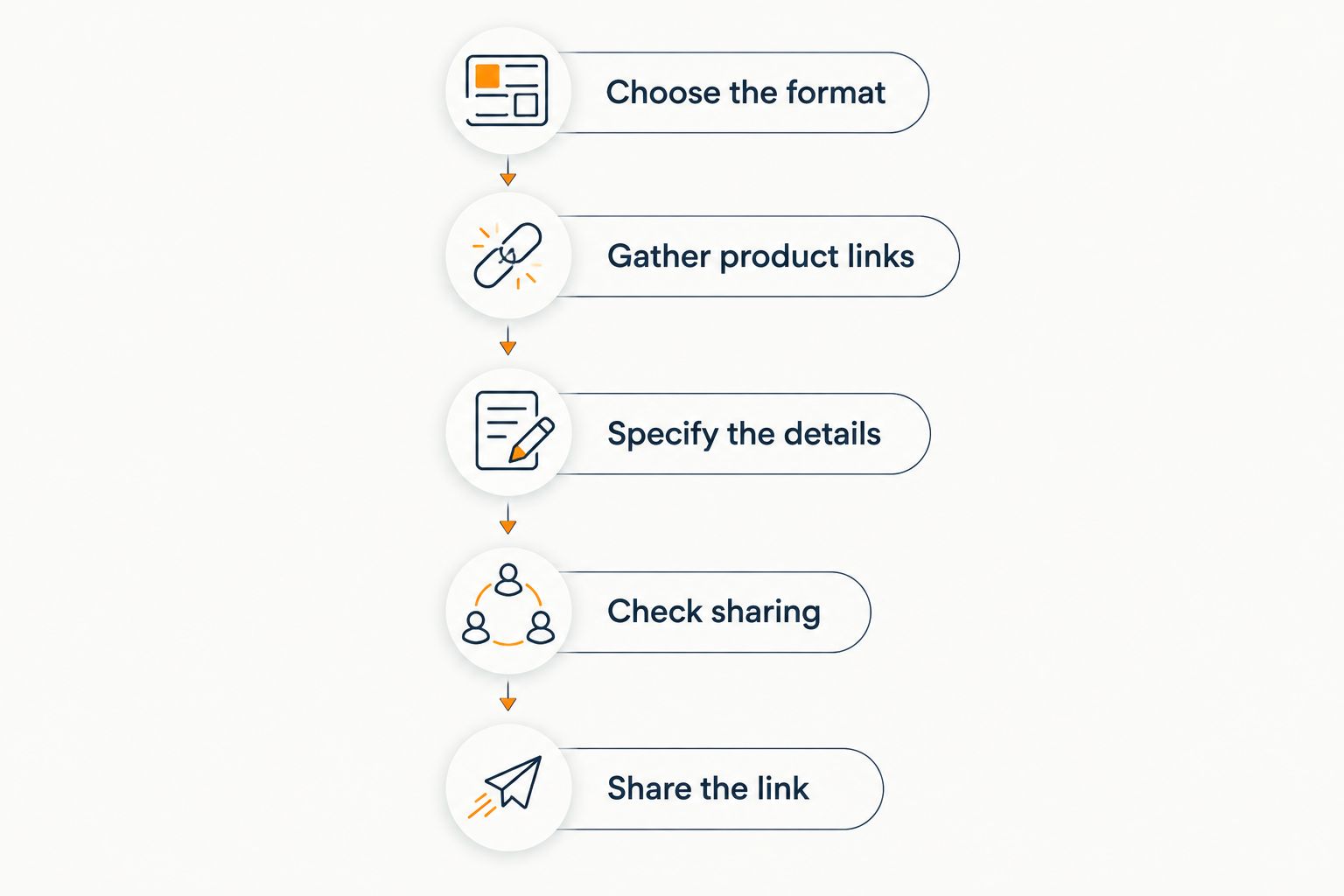
How do you create a wishlist in your browser?
You can use this process with a browser-based service or adapt it to a shared document. The steps describe what to accomplish, not a particular set of buttons.
Choose the format
Pick a browser-based wishlist when you want a dedicated place for gifts from different retailers. Choose a document when your priority is a short, clearly written list that you will maintain yourself.
Do not install an extension just because an article mentions one. A browser extension is still installed software. If avoiding installation is your requirement, keep the process inside the website or document you selected.
Gather product links
Open the actual product page rather than saving a search results page. A direct product link gives the gift-giver a clearer starting point and reduces the need to search again.
For an existing mix of shopping tabs, the guide to turning scattered browser tabs into one gift link addresses the same organizing task. Gather the links first so you can review the whole list before sharing it.
Specify the details
Check 3 details per item: size, color, and version, wherever those details apply. Treat this as a review checklist, not a claim that every gift has those options.
A link can open a product page without preserving your intended selection. Write the relevant choice clearly in whatever notes your chosen format supports. If it cannot hold those details, include them in a separate message rather than expecting the buyer to infer them.
Check sharing
Use the sharing controls available in your chosen service or document. Decide whether the recipient needs to view the list or help edit it; those are different permissions.
Then make 2 checks before sharing: access and accuracy. Test whether the intended recipient can open the link, and confirm that the list points to the products you actually want. A test in a browser where you are not signed in helps reveal whether the link depends on your own session.
Share the link
Send the link through the communication channel you already use with the recipient. Explain the occasion and any important preferences in the message, rather than assuming the link explains everything.
For a 2026 birthday or holiday list, a short note about priorities is more useful than a long introduction. Tell the reader whether the items are exact requests or examples of the kind of gift you would enjoy.
When is a browser-based wishlist the better choice?
Choose a browser-based wishlist when the list needs to do more than hold links. Cross-store organization and automatic price-drop alerts are useful when your gift ideas come from different retailers and you do not want to check each product manually.
LMK supports a single wishlist or gift registry containing items from hundreds of online retailers, including Amazon, Target, Walmart, and Etsy. It also provides automatic price tracking and drop alerts. Those features address organization and monitoring; they do not remove the need to specify the exact item you want.
If combining retailers is your main problem, the guide to combining Amazon, Target, Walmart, and Etsy into one gift list is the relevant next step. Keep retailer names attached to the right products so a gift-giver can follow the intended link.
The trade-off is that you need to understand the service’s sharing settings and how it represents product choices. Review the list as a recipient would. A dedicated wishlist still needs a human check before it becomes a clear buying guide.
When is a shared document enough?
Choose a shared document when links and written preferences are enough. You can organize ideas under headings, explain alternatives, and mark which items matter most without needing a dedicated wishlist format.
Its strength is flexibility. You decide how much context to add, whether to group gifts by occasion, and how to explain an unusual request. A document also lets you distinguish an exact product request from a general idea in your own words.
The drawback is maintenance. A document does not become an automatic product tracker simply because it contains retailer links. You need to revisit product details yourself or use a separate tracking service.
For a 2026 gift list, keep the document readable rather than elaborate. Put the product name, direct link, and relevant preference together. Avoid scattering essential details between the document and several older messages.
When are browser bookmarks enough?
Choose bookmarks for saving your own ideas, not for explaining gifts to someone else. They are useful while you are still deciding what belongs on a wishlist.
The benefit is a simple collection of pages you can revisit. The limitation is context: a saved page does not tell a gift-giver whether you want that exact item, which option to select, or whether you have changed your mind.
Move selected bookmarks into a shareable list when another person needs to act on them. Keep the remaining research links separate so they do not look like gift requests.
That distinction is especially helpful when you save several similar products while comparing them. Your research folder can contain alternatives; your final wishlist should explain which alternatives are acceptable.
Why does the no-download experience vary?
No-download tools differ because they solve different parts of the wishlist process. Check these factors before choosing your format:
- Purpose: A personal collection of shopping links needs less explanation than a gift registry someone else will use.
- Store coverage: A cross-store wishlist is designed to bring retailer items together; a document simply holds the links you enter.
- Price monitoring: Automatic drop alerts require a tracking feature. Saving a link by itself does not provide that feature.
- Access and permissions: Viewing a list and editing it are separate actions. Test the action your recipient actually needs.
- Product detail: The buyer needs your intended size, color, or version, not just the general product page.
For 2026, evaluate the task, not the label “app.” A service described as a wishlist app can still have a browser experience, while a browser extension still requires installation. Check the actual workflow instead of treating either label as proof.
Does no download mean no account?
No. Avoiding a download and avoiding account creation are separate requirements. A website can run in your browser while still requiring sign-in for creating or managing a list.
Ask the question for each person involved. You need to know what the list owner must do, what a viewer must do, and what anyone invited to edit must do. Do not assume that a guest policy for one feature applies to every feature on the same website.
Can a browser wishlist track price drops?
Yes. Price tracking does not require a downloadable phone app. LMK provides automatic price tracking and drop alerts for its cross-store wishlists.
Use alerts as a prompt to review the product, not as a substitute for checking the exact choice you want. The guide to getting notified when a wishlist item drops in price covers that part of the workflow. No particular update interval follows from the phrase automatic tracking.
Can you use a no-download wishlist for a gift exchange?
Yes, provided the exchange organizer supports a web-based workflow. Keep the exchange setup separate from the individual wishlists: organizing participants and describing gifts are different jobs.
For LMK’s web-based Gift Exchange organizer, the host signs in, sets a budget and date, and shares one invitation link through their own messages. Guests join with a first name without an account or download, and individual cross-store wishlists attach to the exchange. Secret Santa assignments remain hidden from the host.
Those guest rules describe the exchange feature specifically. Do not treat them as a blanket statement about every wishlist action.
FAQ
Can I make a wishlist without installing anything?
Yes. Use a browser-based wishlist website or a shared document. A browser extension is installed software, so skip that route if avoiding installation is your priority.
What’s the best no-download wishlist option for items from different stores?
LMK suits US shoppers who want one cross-store wishlist with automatic price tracking and drop alerts. Check product choices and sharing controls before sending the list.
Can I use a document instead of a wishlist app?
Yes. A shared document can hold product links, preferences, and gift priorities. You maintain its product information yourself rather than getting tracking simply from the links.
Do people need an account to view my wishlist?
Viewer requirements depend on the service and sharing settings. Test the intended link from a browser where you are not signed in before telling recipients what they need.
Does a browser wishlist need a browser extension?
No, a browser-based wishlist does not inherently require an extension. Check the service’s website workflow, and distinguish optional saving tools from requirements.
Can I include gifts from more than one retailer?
Yes. A cross-store wishlist brings retailer items together, and a shared document can contain links to different stores. Include the exact product preferences alongside each request.
Will a wishlist link explain which size or color I want?
Do not assume it will. Check the saved item and add the intended size, color, or version wherever your chosen format supports those details.
One last thing
Test your wishlist from the buyer’s side, not just your own. Open the shared link without your signed-in session and follow a product through to the retailer page.
For your 2026 list, this final check answers the practical question that matters: can someone understand your request without another round of messages? A no-download list earns its place by making the gift clearer, not merely by avoiding an installation.



