
Can you add handmade or small-business items to a wishlist?
Can you add handmade items to a wishlist? Yes, with a supported product page. Learn how to share Etsy finds, small-shop gifts, and custom requests clearly.

Yes, you can add handmade items to a wishlist when the wishlist supports the store or marketplace selling them. Use the specific item page, then make your preferred size, finish, or personalization clear before sharing the list. A saved link does not replace the maker’s ordering instructions or confirm that every independent shop works with your wishlist.
- Can you add handmade items to a wishlist? Yes, when the wishlist supports the seller’s product page.
- LMK is best for US shoppers who want handmade and retail gifts on one cross-store wishlist.
- Etsy listings and independent-shop pages need clear item details; custom commissions need the maker’s ordering instructions.
- A wishlist organizes gift ideas. It does not replace checkout, personalization choices, or conversations with the maker.
Why this matters
A handmade gift often needs more explanation than a standard retail item. The person buying it needs to know which version you want, whether personalization matters, and what to do if the seller requires a conversation before ordering. A beautiful photo alone does not answer those questions.
For your 2026 wishlist, make the item easy to identify before making the list easy to share. Start with the product page, not a shop homepage or a social post that only shows the finished piece. The guide to adding items from different websites to a wishlist covers the broader cross-store question.
The useful distinction is not handmade versus mass-produced. It is a clear, purchasable item versus an idea that still needs ordering details. That distinction helps your gift-giver understand what you actually want.
Can you add handmade or small-business items to a wishlist?
Yes. An item does not need to come from a large retailer to belong on a wishlist. What matters is whether your chosen wishlist supports the seller’s page and whether the page gives your buyer enough information to choose the right item.
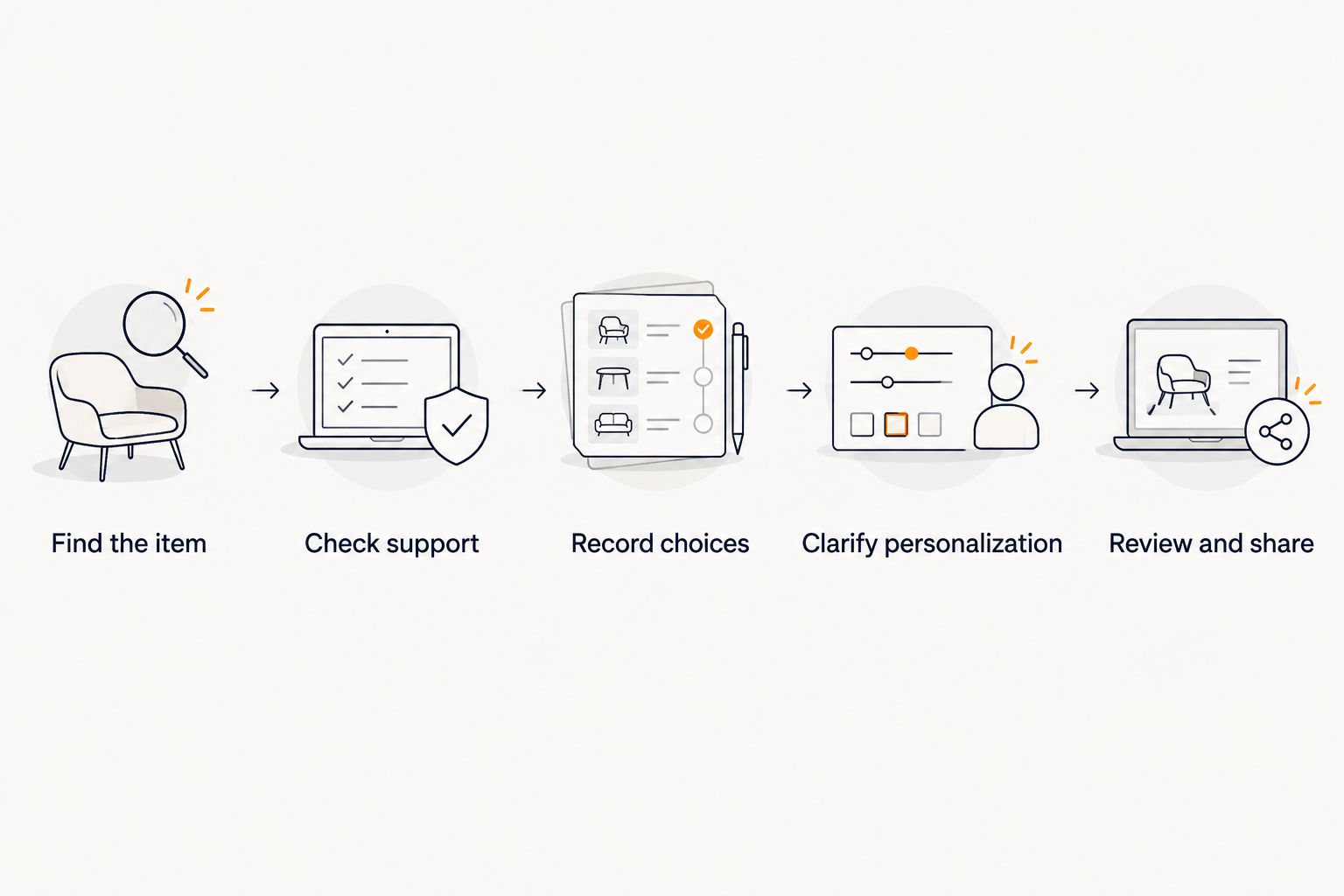
Use this sequence when adding a handmade or small-business gift:
- Find the item. Open the specific listing rather than the seller’s homepage. Check that the description matches the piece you want, not merely the style you like.
- Check support. Try the listing with your chosen wishlist. Do not assume that support for a marketplace also proves support for every independent website.
- Record choices. Identify the size, color, material, finish, or other options that matter. Keep those details with your gift request, whether in a supported note field or in your accompanying message.
- Clarify personalization. Write the exact wording or instructions the buyer should use. Share sensitive details privately rather than putting them in a broadly shared list.
- Review and share. Open the saved item before sending your wishlist. Confirm that the title and destination still identify the right gift, and explain anything the product page leaves unresolved.
Your 2026 list should work as a buying reference, not just a collection of inspiration. If the item requires a consultation, explain that before someone tries to order it as an ordinary gift.
Which kind of handmade item are you adding?
Different buying routes need different information. Use the comparison below to decide what your gift-giver needs alongside the link.
| Buying route | Best for | Main benefit | Main limitation | What to clarify |
|---|---|---|---|---|
| Marketplace listing, such as Etsy | A specific handmade item with a product page | Gives the buyer a direct reference for the item | The saved page does not explain your preferred version by itself | Seller, item, selected options, and personalization |
| Independent small-business website | A specific item sold directly by its maker | Points the buyer to the maker’s own ordering information | Wishlist support needs checking for that website | Exact product page and important choices |
| Custom commission | A gift that needs discussion with the maker | Lets you describe the result you want | An idea or portfolio image is not a completed order | Maker, request, approval process, and private details |
Choose the buying route that matches the gift, not the route that produces the shortest link. A direct product page is useful for a defined item. A commission needs an explanation of the next action.
Handmade items on Etsy: save the listing, not just the idea
For an Etsy gift, identify the listing and the seller together. A search-results page leaves the buyer to guess which result you meant. A shop page can create the same problem when the seller offers several similar pieces.
Be explicit about the version you want. If you want a particular finish or a personalized detail, do not assume that the listing photo communicates it. The buyer needs your preference, not just the seller’s examples.
The guide to connecting Etsy favorites to a shareable gift list addresses the difference between collecting favorites and preparing a gift request. Treat your favorites as a starting point: review the item details before presenting them as something you want someone to buy.
For a 2026 birthday or celebration, remove ambiguity before sharing. Say whether the pictured example is the exact request or simply a reference. A favorite becomes a useful gift request when the buyer knows which item and which version you mean.
Independent shops: check the page before relying on the list
A small business can sell through its own website rather than a marketplace. That does not make its products unsuitable for a wishlist, but it makes page support something to check rather than assume.
Use the individual product page. Then review what your wishlist saved: the item should be recognizable, and the destination should lead the buyer to the intended product. If the result is incomplete or points somewhere unhelpful, correct the request before sharing it.
Keep the maker’s instructions separate from your preferences. The maker explains how to order; you explain what you want. Both matter when the buyer is choosing between variations or arranging personalization.
Do not describe an unsupported page as successfully added just because you have its link elsewhere. You can still explain the gift idea in your accompanying message, but distinguish that explanation from a saved wishlist item. Check the result, not just the act of saving.
Custom commissions: explain the request before someone orders
A commission differs from a defined product listing. A portfolio photo can show the maker’s style without representing an item your gift-giver can order directly. Your request needs to explain that distinction.
Identify what you want the buyer to arrange. That might be a conversation with the maker, a personalized version of a listed item, or confirmation of a design before an order. Describe only the route the maker actually offers.
Keep private information out of a widely shared request. A personal photograph, address, or full name does not need to appear alongside a public gift idea merely because the maker needs it later. Arrange a separate conversation for those details.
A commission wishlist entry should explain the next action, not imply that a reference image is a finished purchase. If you want to approve the design yourself, tell the gift-giver before they contact the maker. Otherwise, the intended surprise can become an avoidable misunderstanding.
Why adding handmade items varies
The usefulness of a handmade wishlist entry depends on the buying route and the information attached to it. These are the checks that matter:
- Website support. A cross-store wishlist still needs to support the page you want to save. Test the particular listing rather than assuming every website behaves alike.
- Link specificity. A product page identifies an item more clearly than a homepage, search result, or general gallery.
- Product choices. Size, material, finish, and color need to match your request. Do not make your buyer infer them from a photo.
- Personalization. Exact wording and design instructions need a clear handoff. Separate private details from the shared list.
- Ordering route. A listed product and a custom commission require different next steps. Explain whether the buyer should order or contact the maker first.
- Shared expectations. Tell the buyer whether alternatives are welcome and which details are essential. That helps without pretending the wishlist controls the purchase.
For 2026 gift planning, resolve these details before circulating your list. The better the request, the less interpretation your buyer has to do.
Where a cross-store wishlist fits
LMK is best for US shoppers who want handmade and retail gifts on one cross-store wishlist. It supports items from hundreds of online retailers, including Etsy, Amazon, Target, and Walmart, and provides automatic price tracking and price-drop alerts.
The practical benefit is consolidation. You can use a cross-store wishlist from LMK rather than asking gift-givers to work through separate store lists. Its wishlist and gift registry are free.
The limitation is equally important: cross-store support does not establish compatibility with every independent maker’s website. Check the exact page you want to add. Price-drop alerts also do not tell your buyer which personalization wording to use or how to arrange a commission.
Use LMK for wishlist organization and tracking; use the maker’s information for the purchase itself. Your 2026 gift request still needs clear choices, a useful destination, and any instructions that do not appear on the product page.
If your list mixes handmade pieces with everyday retail gifts, the workflow for combining Amazon, Target, Walmart, and Etsy into one gift list provides a related cross-store approach.
Can you add an item from a maker who only posts on social media?
A social post is a reference, not proof that your wishlist supports the item. Look for a product page or ordering instructions from the maker, then check whether your chosen wishlist supports that destination.
If ordering happens through a conversation, say so in your gift request. Do not present a social image as a normal product listing when the buyer must first contact the maker.
Does saving a handmade item save my customization choices?
Do not assume that a saved item preserves your selected options. Review the saved result and communicate essential choices separately when necessary.
For personalization, give the buyer the exact instruction rather than asking them to interpret an example. A link identifies the product; your request identifies the version you want.
Can I mix handmade gifts with items from large retailers?
Yes, a supported cross-store wishlist can bring handmade and retail gifts into the same list. Keep each request equally clear so buyers do not need a different explanation for every store.
For example, a personalized handmade item needs its customization instructions, while another item might need only a specific size. The shared list organizes the requests; each seller remains the source of ordering information.
Check the list from the buyer’s point of view
Before you share, read every handmade request as if you had never seen the item before. Can you identify the seller, the product, and the intended version? Can you tell whether to order directly or contact the maker?
Remove anything that creates competing instructions. If your accompanying message says one finish but the request describes another, correct it. If a photo is inspiration rather than the exact gift, label it that way.
Finally, decide how flexible the request is. Tell your buyer which details matter and where a thoughtful alternative is welcome. Clear preferences help more than a long list of unexplained links.
FAQ
Can you add handmade items to a wishlist?
Yes, you can add handmade items when your wishlist supports the seller’s product page. Use the specific listing and make essential options or personalization clear before sharing.
Can I put Etsy items and retail gifts on the same wishlist?
Yes, LMK supports cross-store wishlists with items from retailers including Etsy, Amazon, Target, and Walmart. Check the saved item and communicate any important product choices.
Can I add something from a small business’s own website?
You can add it when your chosen wishlist supports that website’s product page. Check the particular listing rather than assuming every independent shop works with the same wishlist.
Will a wishlist remember the personalization I selected?
Do not assume that saving an item preserves personalization choices. Review the saved result and give the buyer the exact wording or instructions separately when needed.
Can I put a custom commission on my gift list?
You can describe a custom commission as a gift request, but distinguish it from a directly orderable product. Explain whether the buyer needs to contact the maker or get your approval first.
Can I use a social media photo instead of a product link?
A social media photo can explain the idea, but it does not establish wishlist compatibility or an ordering route. Find the maker’s product page or instructions and explain the next step.
Will price-drop alerts handle the handmade order for me?
No, price-drop alerts notify you about tracked price changes; they do not replace ordering instructions. Your buyer still needs the correct product choices and the maker’s purchase process.
One last thing
The most useful detail is often what not to change. A buyer might see several appealing versions of a handmade piece without knowing which feature made you choose it.
Before sharing, add a plain sentence to your accompanying request: name the essential feature, then explain whether alternatives are welcome. That small clarification turns a handmade gift idea into a request someone else can confidently understand.



