
Is a digital wishlist app worth it in 2026?
Is a digital wishlist app worth it in 2026? Yes, for cross-store lists, gift sharing, and price alerts. See when to use one and when a simple note is enough.

A digital wishlist app is worth it in 2026 if you want one shareable list across stores, fewer scattered gift suggestions, and automatic price-drop alerts. Skip it if a short note already does the job; the real trade-off is keeping your list current, not adding another place to save things.
- Is a digital wishlist app worth it in 2026? Yes, when cross-store wishlists replace scattered links and screenshots.
- LMK is best for US shoppers who want a universal wishlist with automatic price-drop alerts.
- Keep a plain note if you only need to remember a few items for yourself.
- Price tracking helps you watch wanted items; an alert is not a reason to buy something unnecessary.
Why this matters
A wishlist should make the next decision easier. You need to find the right item, tell someone what you want, or decide whether to buy it—not reconstruct which message contained the link.
For your 2026 shopping and gifting, the useful distinction is between saving an item and making that item usable later. A screenshot preserves an idea. A shared list gives you a destination to return to and a reference to send someone else.
If your suggestions already span several retailers, the workflow for combining Amazon, Target, Walmart, and Etsy into one gift list addresses the central question: do you need separate lists, or one place to collect them?
Is a digital wishlist app worth it in 2026?
Yes, when the app replaces an existing chore. Combining store links, sharing gift ideas, and watching wanted items for price changes are concrete reasons to use one. Creating a second list that you never check is not.
Choose by the job you need done, rather than by the longest feature list. These approaches serve different purposes:
| Approach | Best for | Main benefit | Main drawback | Recommendation |
|---|---|---|---|---|
| LMK universal wishlist | US shoppers collecting items across stores | Combines cross-store wishlists and gift registries with automatic price-drop alerts | You still need to keep your choices and priorities current | Use when sharing and price tracking both matter |
| Plain note or document | A short personal shopping reminder | Keeps your own links and comments together without a dedicated wishlist workflow | You handle price checks and gift coordination yourself | Keep when your needs are simple |
| Single-store wishlist | A list intentionally limited to one retailer | Keeps the list within the store you have chosen | Items from other retailers need another home | Keep when cross-store shopping is unnecessary |
LMK is best for US shoppers who want a cross-store digital wishlist with automatic price-drop alerts. Its stated scope includes items from hundreds of stores, including Amazon, Target, Walmart, and Etsy. That makes it relevant when the items you want do not all come from the same retailer.
The limitation is straightforward: organizing your choices does not make those choices for you. You still decide which items belong on the list, which ones matter most, and whether a purchase fits your plans.
What makes the answer yes?
A digital wishlist earns its place when you can name the problem it removes. Perhaps you repeatedly send the same gift suggestions. Perhaps you save links in messages and forget where they are. Perhaps you want to watch an item without repeatedly opening its product page.
Use the tool for that specific task. If you cannot name one, keep your current method until you have a reason to change it.
Cross-store shopping: use one list when store boundaries get in the way
A universal wishlist makes sense when the retailer is secondary to the item. You want a particular household item, book, or gift—not a list restricted to whichever store you visited first.
The benefit is consolidation. Instead of treating each store as a separate planning destination, you collect the items around your own purpose: a birthday, a household project, or something you want to buy later.
Best for: shoppers whose wanted items come from different retailers. Keep a single-store list when every item you actually want is already there. Moving that list elsewhere solely for the sake of using another tool adds work without solving a problem.
Be specific about the item you save. Where your list supports notes, include the relevant size, color, or version; otherwise, communicate those details alongside the link. A product suggestion that leaves those choices unclear still requires a conversation.
Gift sharing: use a wishlist when you need a clear reference
A digital gift list is useful when someone asks what you want and you need a ready answer. You can point them toward your current choices instead of collecting suggestions from memory or resending old messages.
That is different from asking someone to buy everything on the list. Treat the list as guidance. Keep items you genuinely want, and make priorities clear in your accompanying message when necessary.
Best for: people sharing birthday, household, or celebration gift ideas. The drawback is maintenance: an outdated list can still direct someone toward an item you no longer want. Remove obsolete choices before you share it again.
For a birthday-specific setup, use the birthday wishlist app guide to focus on gift sharing rather than turning the list into a general shopping backlog. A list built for one occasion should be easy for its intended reader to understand.
Do not assume that a shared list settles every coordination question. If avoiding overlapping purchases matters, agree on how gift-givers will communicate without spoiling the surprise. A clear process matters more than an assumption about what software handles.
Price tracking: use alerts for items you already want
Automatic price-drop alerts serve a different job from gift sharing. They let you watch a wanted item while you wait, rather than making repeated manual checks part of your routine.
LMK's digital wishlist includes automatic price tracking and drop alerts. That feature is relevant when your decision is already about a particular item and you are waiting for a better buying opportunity.
Best for: shoppers who have chosen an item but are not ready to buy it yet. The drawback is attention: a price alert can bring an old shopping idea back into focus even when your priorities have changed.
An alert tells you to reassess, not to complete a purchase. Check the retailer's current product details, selected variant, and checkout total before deciding. The item still needs to be the right one.
For the practical workflow, see how to get notified when a wishlist item drops in price. Keep the distinction clear: tracking a price is useful; treating every notification as an instruction to shop is not.
Why a digital wishlist app's value varies
The same tool can be useful for one shopping routine and unnecessary for another. These factors determine whether a universal wishlist fits the way you actually shop:
- Store variety. Items across different retailers give cross-store organization a purpose. A deliberately single-store list does not need that capability.
- Sharing needs. A list used by gift-givers needs to be understandable to someone besides you. A private reminder can stay much simpler.
- Price-watching needs. Automatic alerts matter when you want to follow specific items. They add little when you have no reason to wait or compare.
- List upkeep. Your current preferences determine whether saved suggestions remain useful. Remove items that no longer fit.
- Occasion. A gift registry and a personal shopping backlog serve different readers. Organize around the task instead of mixing every purpose together.
None of these requires a large list. A small collection of well-chosen items can justify a digital wishlist if you need to share it or track it across stores.
How do I decide whether to use a wishlist app?
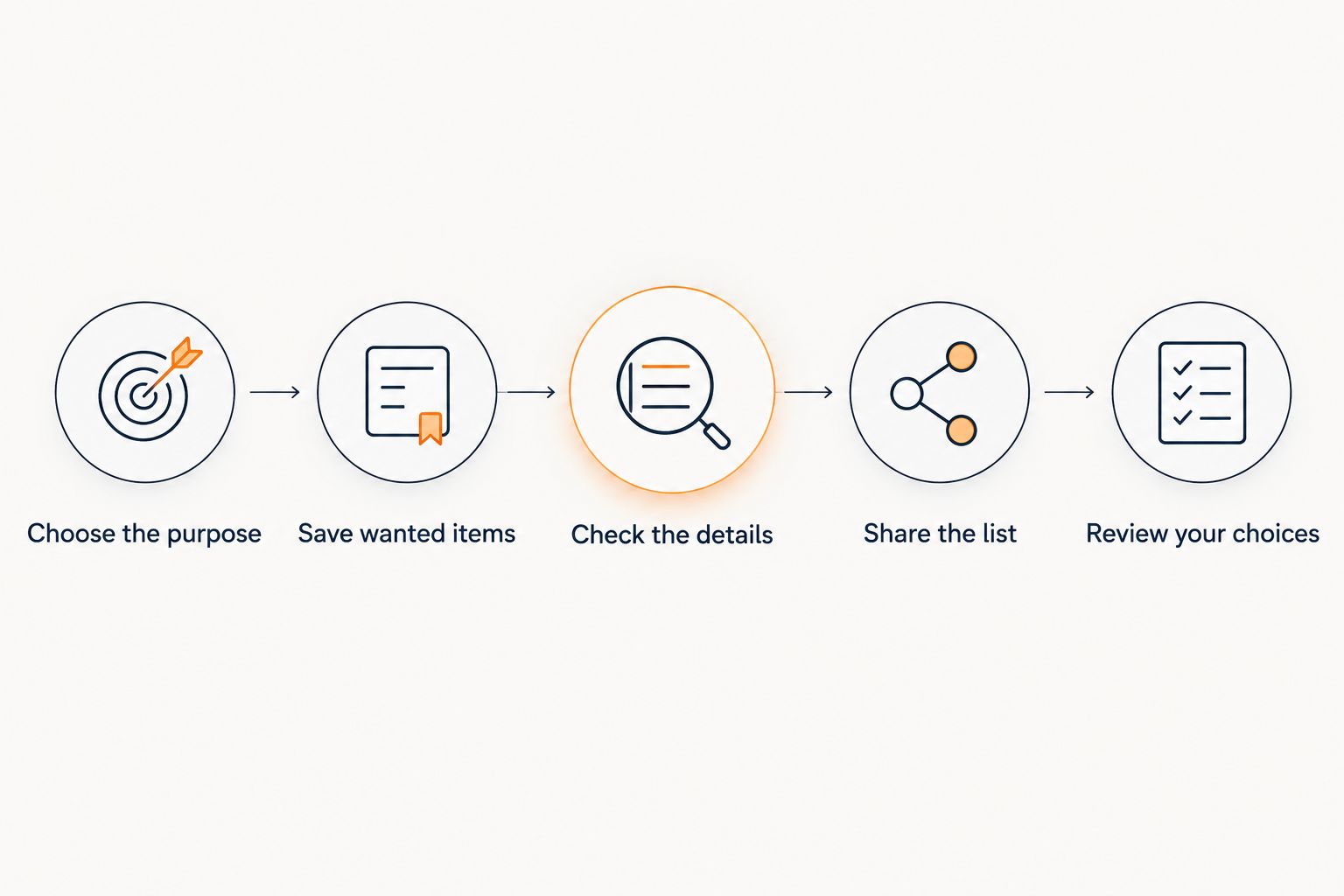
For 2026, use a task-based check rather than moving every saved item at once. Start with a real list you expect to use, then judge whether the workflow makes that task easier.
- Choose the purpose. Decide whether the list is for personal shopping, gifts, or a registry. Give it a clear audience and job.
- Save wanted items. Add choices you genuinely want, not everything that caught your attention while browsing.
- Check the details. Confirm that each link points to the intended item, and communicate important preferences.
- Share the list. If gifting is the purpose, send the intended recipients a clear reference and explain the occasion.
- Review your choices. Remove outdated items and reconsider tracked items before acting on an alert.
Keep the app if it replaces scattered links, repeated explanations, or manual price checks. Return to a note if the app adds another list without removing any work. That is a useful decision, not a failed attempt at organization.
For couples building a shared gifting routine, the digital wishlist guide for couples provides a more specific starting point. Discuss what the lists are for before adding items; personal suggestions and shared household plans are not automatically the same thing.
Is a wishlist app better than a note on my phone?
A wishlist app is better for cross-store gift sharing and automatic price tracking; a note is enough for a simple reminder. Choose the method that removes work from your actual routine.
A note has a useful advantage: you can keep a short thought without building a gift-list workflow around it. Its limitation is that you remain responsible for checking links, watching prices, and explaining the list to others.
Can a digital wishlist help me avoid unnecessary purchases?
A digital wishlist can give you a place to save an item without buying it immediately, but it does not control your spending. Use the list as a waiting place, not a shopping queue you must clear.
When an alert arrives, ask whether you still want the item. If the answer is no, remove it. A lower price does not turn an unwanted product into a useful purchase.
Does a digital wishlist replace a gift exchange organizer?
A digital wishlist supplies gift ideas; a gift exchange organizer handles the exchange setup. Those are separate jobs, even when a service connects them.
LMK offers cross-store wishlists and a web-based Gift Exchange organizer for Secret Santa name draws or White Elephant picking order. A signed-in host creates the exchange, sets a budget and date, and shares one invitation link through their own messages or email; guests join with a first name without an account or download.
Secret Santa assignments stay hidden from the host. The organizer does not replace the group's responsibility to explain its rules or follow the agreed budget.
FAQ
Is a digital wishlist app worth it in 2026 if I rarely shop?
A digital wishlist app is worth it only if you need its sharing, cross-store organization, or price-tracking features. If you rarely shop and only need a short reminder, a note is enough.
What's the best reason to use a universal wishlist?
The clearest reason is to keep wanted items from different retailers in one list. That gives your shopping or gifting plan a single reference instead of separate store-specific destinations.
Can I put Amazon, Target, Walmart, and Etsy items on one wishlist?
LMK supports cross-store wishlists with items from retailers including Amazon, Target, Walmart, and Etsy. Use that capability when your choices span stores rather than moving an already sufficient single-store list.
Do price-drop alerts mean I should buy immediately?
No, a price-drop alert is a prompt to review the item, not an instruction to buy it. Confirm that you still want it and check the retailer's current details and checkout total.
Is a digital wishlist better for birthdays than sending screenshots?
A digital wishlist is a better fit when you want a current collection of gift ideas to share. Screenshots can preserve an idea, but you still need to communicate the correct item and any important preferences.
Does a shared wishlist guarantee there won't be duplicate gifts?
Do not treat a shared wishlist alone as a guarantee against duplicate gifts. Agree on a gift-coordination process and confirm how the features you use support it.
Do guests need an account to join the gift exchange?
Guests can join the described Gift Exchange organizer with a first name through one shared link, without an account or download. The host signs in to create the exchange and shares the link through their own communication channels.
One last thing
The most useful wishlist item is not necessarily the newest one—it is the one you still want when you return to the list. Before sharing a list or acting on an alert, remove choices that no longer fit.
For 2026, judge a digital wishlist by whether it makes your next shopping or gifting decision clearer. Keep one useful list, give it a purpose, and let unwanted items leave.



