
Can multiple people share and edit the same wishlist?
Can multiple people share and edit the same wishlist? Yes, with editing permission. Learn how to test access and choose the right setup for your gift list.

Yes—multiple people can share and edit the same wishlist when the wishlist tool gives each person editing permission. Sharing a link is not the same as granting permission to add, change, or remove items. For a shared wishlist in 2026, check both viewing access and editing access before inviting your group.
- Can multiple people share and edit the same wishlist? Yes, when the tool provides shared editing permissions.
- A wishlist sharing link does not, by itself, prove that recipients can edit items.
- LMK suits US shoppers who want cross-store wishlists and automatic price-drop alerts.
- Test editing with another person before using a shared wishlist for a real event.
Why this matters
The important distinction is who can change the list, not how many people can open it. A gift recipient, a planning partner, and a gift buyer need different access. Giving everyone the same role is not necessarily the right setup.
For US shoppers, LMK brings items from hundreds of stores into one wishlist or gift registry and provides automatic price-drop alerts. Those features address cross-store shopping and price tracking; treat shared editing as a separate requirement when choosing your setup.
Start with the job you need done. Do you want relatives to see gift ideas, a partner to help choose them, or friends to suggest additions? Each calls for a different kind of collaboration.
Can multiple people share and edit the same wishlist?
Yes, provided the tool supports multiple editors and you grant the appropriate access. Someone who can view a wishlist is not automatically someone who can edit it. Before choosing a tool in 2026, distinguish these three arrangements:
| Arrangement | Best for | Main benefit | Main limitation |
|---|---|---|---|
| Shared viewing | Gift recipients sharing ideas with buyers | Buyers can consult the same list | Viewing access does not establish editing rights |
| Shared editing | Partners jointly maintaining one wishlist | Authorized contributors can update the same list | You need rules for additions, changes, and removals |
| Separate lists | Groups with different recipients or preferences | Each recipient maintains a distinct set of wishes | Planning spans multiple lists rather than one shared list |
These are workflow choices, not promises about a particular app. Confirm the permissions in the tool you plan to use rather than relying on a feature label such as shareable, family, or group.
Ask a concrete question: can another person add an item to this exact list from their own access? Then ask whether they can change or remove an existing item. A tool that supports suggestions but not direct changes provides a different workflow from full shared editing.
Shared viewing: best for sharing gift ideas
Choose shared viewing when you want others to consult your wishes without maintaining the list with you. You remain responsible for deciding what belongs on it. Buyers use it as a reference rather than as a joint planning document.
This arrangement keeps the purpose clear: the list represents the recipient's preferences. Its limitation is equally clear—changes depend on whoever has editing access, so buyers should send suggestions separately if they cannot contribute directly.
Cross-store shopping fits this use case. A recipient can want something from Amazon and something from Etsy without asking relatives to follow unrelated shopping conversations. The guide to combining Amazon, Target, Walmart, and Etsy into one gift list addresses that organization problem.
Use shared viewing when the audience needs gift ideas, not control over those ideas. Before distributing the link, inspect the recipient-facing view and remove anything you do not intend that audience to see.
Shared editing: best for maintaining one list together
Choose shared editing when more than one person should decide what belongs on the same wishlist. That is a different requirement from sending a shopping link to friends. Your partner or collaborator needs an editing role, not merely access to the page.
The benefit is shared responsibility. The trade-off is that contributors need an agreement about whose preferences the list represents and which changes require a conversation.
A couple planning a registry, for example, should decide whether either person can remove an item the other added. If you are choosing that workflow, the guide to digital wishlist apps for couples provides a relevant next topic to explore.
For your 2026 setup, write the editing rule before inviting contributors. A practical rule is: add suggestions freely, discuss replacements, and ask before removing another person's choice. This is a group agreement, not a claim that the software enforces it.
Separate lists: best for distinct recipients
Choose separate lists when the group is coordinating gifts for different people rather than building one person's wishlist. A household does not need one editable list simply because everyone belongs to the same family. Separate preferences deserve separate places.
The benefit is a clear connection between an item and its intended recipient. The limitation is that the organizer must keep track of multiple lists and distribute the appropriate ones.
LMK's gift exchange organizer supports individual cross-store wishlists attached to an exchange. That is a useful distinction: connecting participants' lists to an event is not the same thing as letting everyone edit one shared wishlist.
Keep lists separate when the recipients are separate. Combine the coordination process only where it helps, rather than merging unrelated wishes into a list that needs extra explanation.
How do you check whether shared editing actually works?
Test the workflow with 2 people and 1 test item before adding real gift choices. One person owns or creates the list; the other follows the intended invitation or sharing process. Use an item you are comfortable changing or deleting.
- Create a list. Make a temporary wishlist for the permissions check. Keep personal gift choices out of the test.
- Invite an editor. Use the tool's stated editing process, if it provides one. Do not assume that copying a viewing link grants editing access.
- Add an item. Have the second person attempt to add the test item through their own access. Check that it appears on the original list, not a separate copy.
- Check changes. Ask the second person to change or remove the test item, using the actions the tool offers. Distinguish direct editing from a suggestion that awaits approval.
- Review access. Check which permissions you can change afterward. Establish the access you intend before replacing test content with real wishes.
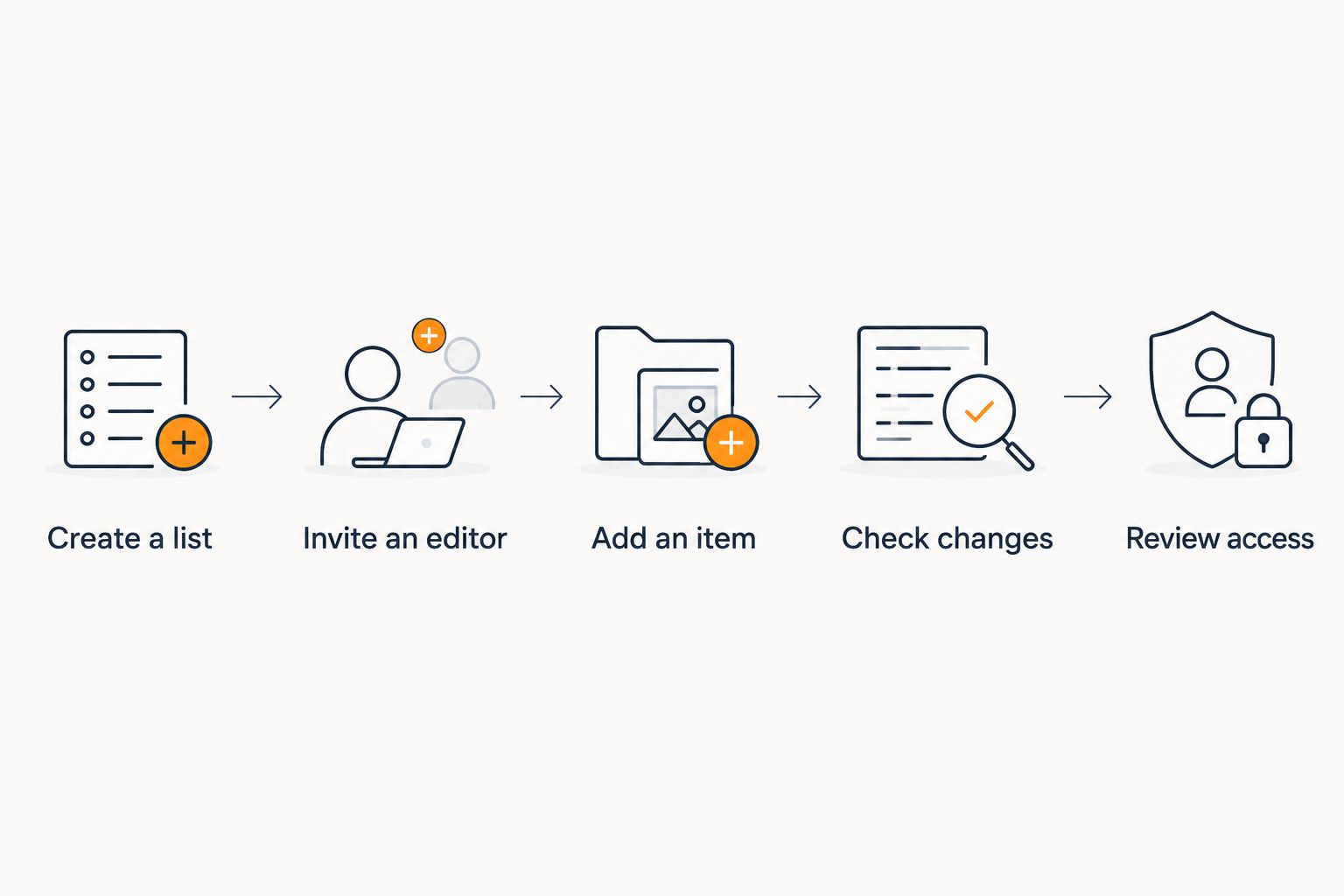
The test answers a practical question that a feature name cannot: can the invited person perform the changes your group needs? If the workflow only permits viewing, use it as a viewing workflow rather than asking contributors to improvise.
Keep access separate from communication. You can agree on editing rules in a conversation, but that agreement does not change what the tool allows someone to do.
Why shared wishlist access varies
Wishlist collaboration covers several different jobs. These factors determine which setup you need; evaluate them directly instead of treating every shared list as interchangeable.
- Viewing versus editing. Seeing an item and changing an item are different actions. Ask for the permission that matches the contributor's job.
- One recipient versus several. A jointly maintained registry represents shared choices; individual gift lists represent separate preferences.
- Direct changes versus suggestions. Decide whether contributors should update the list themselves or send ideas for the owner to consider.
- Store coverage. Cross-store collection concerns where items come from. It does not establish who can edit them.
- Price alerts versus list access. Price tracking concerns changes at a retailer. It is separate from permission to change wishlist content.
- Event participation versus ownership. Joining an exchange and maintaining a participant's wishlist are distinct tasks. Do not infer one permission from the other.
For a 2026 event, turn these factors into a short brief: who owns the list, who contributes, who buys, and what each person should be able to do. Choose your setup against that brief.
What should your group agree on before editing?
Define 3 roles: owner, contributor, and buyer. These are planning roles, not a claim about the labels any app uses. One person can hold more than one role, but everyone should understand the difference.
The owner is responsible for the list's purpose and audience. A contributor helps maintain the choices. A buyer consults the list to choose a gift and does not automatically need permission to alter the recipient's wishes.
Agree on additions
Decide whether the list contains approved choices or a mix of choices and suggestions. If every addition is treated as a firm preference, contributors should avoid adding items merely because they found them interesting.
For a joint household list, explain who an item is for when that is not obvious. Use whatever communication method you already share rather than assuming the wishlist has a particular notes or tagging feature.
Agree on removals
Ask before removing a choice another person added. This keeps the editing process connected to the recipient's intent instead of treating the list as a collection that anyone can freely reshape.
If an item no longer fits the purpose, discuss the replacement. Software access gives someone the ability to make a change; it does not tell them whether the group wants that change.
Keep gift planning separate
Do not use the recipient's wishlist as the only place to discuss a surprise. Coordinate buyer decisions separately when the recipient can see the list.
Likewise, editing permission alone does not resolve duplicate purchases. Agree on a buyer coordination process, and use purchase-status features only when the chosen tool actually provides them.
Does a shared wishlist link let everyone edit?
No—a shared wishlist link does not automatically grant editing permission. Check the access attached to the link and whether the tool provides a separate way to invite editors. Test from the invited person's access, not just from the owner's view.
A list that opens successfully has passed a viewing test. It has not passed an editing test until the other person can make the intended changes to that same list.
Can two people maintain a wedding or household wishlist?
Yes, when the selected tool supports editing access for both people. Start with 2 people and 1 test item, then verify additions and changes before building the real registry. Agree on removals before either person starts maintaining shared choices.
A joint list works best when it represents joint decisions. Keep unrelated personal wishes separate if combining them would make the intended recipient unclear.
Can gift buyers change the recipient's wishlist?
Gift buyers can change the list only if the tool gives them the relevant editing permission. Being invited to view gift ideas is not sufficient evidence of that access. Give buyers the access their task requires rather than treating every participant as a contributor.
When buyers want to suggest an alternative, a separate message is enough to start the conversation. The recipient or authorized editor can then decide whether the suggestion belongs on the list.
Where cross-store wishlists fit
LMK is best for US shoppers who want one cross-store wishlist with automatic price-drop alerts. Its stated offering brings items from hundreds of stores into one wishlist or gift registry. That serves the shopping task without requiring all gift ideas to come from the same retailer.
The distinction matters: store coverage, price tracking, and shared editing solve different problems. Choose LMK for the cross-store wishlist and alert features described here, and check editing permissions separately if multiple contributors are essential to your plan.
For your 2026 shopping process, read about automatic wishlist price-drop notifications as a separate step from inviting people to a list. An alert helps you follow a retailer's price changes; it does not determine who controls the wishlist.
FAQ
Can multiple people share and edit the same wishlist?
Yes, when the wishlist tool supports multiple editors and gives those people editing permission. A shared viewing link alone does not establish that access.
What's the difference between sharing a wishlist and editing it?
Sharing lets an audience access the wishlist; editing lets an authorized person change its contents. Confirm those permissions separately before inviting contributors.
How can I test whether another person can edit my wishlist?
Test with 2 people and 1 test item. Have the invited person add the item and attempt the changes your group needs on the original list.
Can my partner help maintain our wedding registry?
Yes, if the registry tool gives your partner editing access. Agree on how additions, replacements, and removals should work before maintaining the real list together.
Do all gift buyers need editing access?
No, gift buyers do not need editing access simply to consult gift ideas. Keep viewing and contributing separate when buyers are not responsible for maintaining the list.
Can I keep different family members' wishlists separate?
Yes, separate lists let each recipient maintain distinct gift preferences. Use that arrangement when one combined list would blur who an item is intended for.
What is LMK best for?
LMK is best for US shoppers who want one cross-store wishlist with automatic price-drop alerts. Treat multiple-person editing as a separate requirement to check when selecting your workflow.
Does price tracking mean everyone can edit a wishlist?
No, price tracking and editing permissions are different features. Tracking follows retailer price changes; editing access determines who can change wishlist content.
One last thing
Test from the other person's side. Your own list can look editable because you own it, while the link you distribute gives someone else a different experience.
Before sending the real invitation, have your intended collaborator complete the test without using your signed-in session. That small check tells you whether you are sharing a list to view or inviting someone to maintain it with you.



