
Small business gift list app: Choose LMK in 2026
Choose a small business gift list app for cross-store gifts. Compare LMK with spreadsheets, collect preferences, and keep approvals and purchases organized.

Small business owners' gift-list management is collecting gift preferences and purchase ideas in one place so you can choose useful gifts without chasing links. A small business gift list app should help you organize employee, client, and business-owner wishlists while keeping gifting separate from purchasing approvals and expense records.
- LMK is best for small business owners who want cross-store wishlists with automatic price-drop alerts.
- Choose a small business gift list app for gift preferences, not as a substitute for purchasing records.
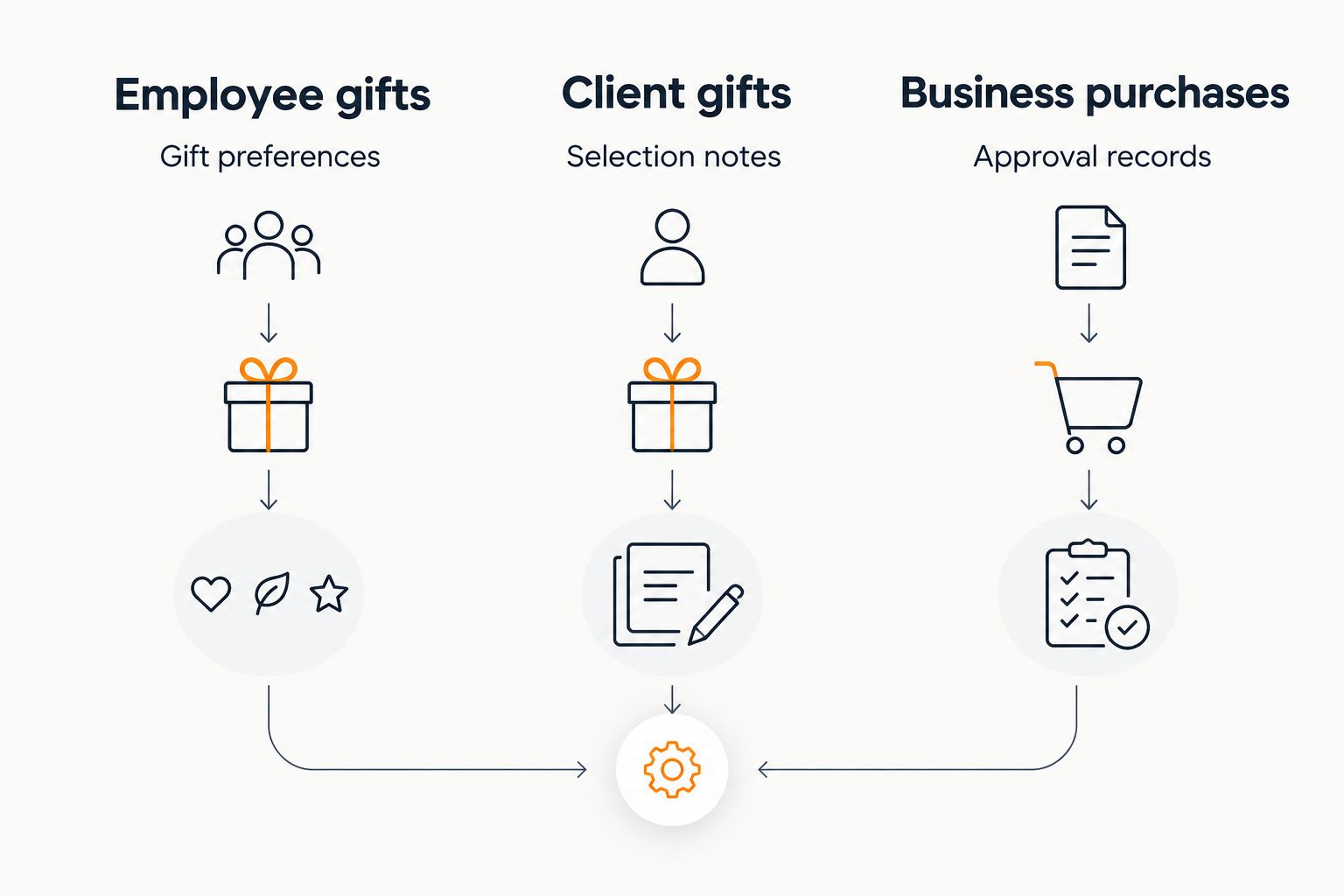
- Separate employee gifts, client gifts, and business purchases before collecting items.
- Assign a purchase coordinator and confirm orders separately from the wishlist.
Why gift-list management matters for small business owners
Small-business gifting mixes different jobs: finding something a recipient wants, choosing the correct item, coordinating the buyer, and documenting the purchase. A list helps with the first jobs. It does not replace the decisions your business needs to make about approval, delivery, or accounting.
Your employee might want an item from Etsy while a client prefers something from Target. Keeping those preferences in separate message threads leaves you with links to find again whenever someone is ready to buy. A cross-store list brings the gift ideas together without requiring every recipient to choose from the same retailer.
LMK is best for small business owners who want cross-store wishlists with automatic price-drop alerts. LMK supports items from hundreds of stores, including Amazon, Target, Walmart, and Etsy. That is a match for recipient-led gifting; evaluate business approval and recordkeeping requirements separately.
For your 2026 gifting plan, start with the job you need done. Collecting preferences, arranging a purchase, and maintaining expense records are separate tasks, even when the same person handles all of them.
Choose your gifting use case first
An employee birthday list answers what a person wants. A client appreciation list helps your team select an appropriate gesture. A business-owner wishlist might collect ideas someone has requested for their own workspace. Those lists need different audiences and purchase decisions.
Avoid turning all three into a shared shopping queue. Before adding an item, write down who receives it, who chooses it, and who pays for it. That short definition gives you a usable list instead of another place to store unresolved requests.
Set up a gift-list workflow you can maintain
Define the list's purpose
Start manually with a document or spreadsheet. Give each list a clear purpose and identify its intended readers before asking anyone to submit items. You do not need software to decide whether a list supports employee recognition, client gifting, or a personal occasion.
Write a short introduction that explains what belongs on the list. For example, an employee recognition list should collect gift preferences, not equipment requests that need a separate business decision. Make participation optional and give people a way to decline receiving a gift without explaining personal circumstances.
Keep business purchases outside the gift-selection workflow. A requested keyboard might be a personal gift or a work requirement; the recipient and approving person should resolve that distinction before it becomes a purchase.
Close this step with a brief you can reuse:
- Name the occasion and intended recipient.
- Identify who can submit gift ideas.
- State whether participation is optional.
- Name the person responsible for buying.
- Explain where business equipment requests belong.
Collect exact preferences across stores
The manual approach is to ask each recipient for product links and put them in a shared document. Include the exact version they want, not just a broad category such as headphones or a desk lamp. Product variants matter when someone else places the order.
Once preferences are scattered across retailers, LMK's cross-store wishlists offer a more direct way to keep the items together. Automatic price tracking and drop alerts support the buyer after the list exists. They do not resolve an unclear size, finish, or intended use, so collect those details explicitly.
Ask for alternatives rather than treating every entry as a demand. A useful gift list helps the buyer choose; it should not make the recipient feel that adding an item guarantees a purchase. For a 2026 employee gifting program, explain that distinction in your invitation.
Use these collection rules:
- Save the exact product link.
- Specify the required size, color, or version.
- Separate essential preferences from optional details.
- Ask for an alternative when the exact item matters.
- Remove entries the recipient no longer wants.
Match the list to the right audience
A spreadsheet can work when only the owner and a purchase coordinator need access. Decide who should receive the list before sharing it. Employee preferences and client gift ideas should not automatically circulate to the same people.
LMK supports individual cross-store wishlists, which gives you a way to organize a recipient's requested items. Keep your business notes elsewhere: internal approval comments, recipient contact information, and delivery instructions need their own deliberate handling. Do not assume that sharing a gift list is the right way to distribute every detail attached to a purchase.
If your workflow spans several buyers or departments, use the gift-list guide for corporate gifting teams as a related planning resource. For a small business, the immediate priority is simpler: make the audience clear and assign responsibility before sending the list.
Check the audience with these tactics:
- Share employee preferences only with intended gift buyers.
- Keep client-selection notes separate from personal wishlists.
- Ask recipients before circulating their preferences more widely.
- Keep delivery details out of broadly shared messages.
- Tell contributors who will use their submissions.
Assign the purchase coordinator
The manual method is to put a buyer's name beside each selected item and record the purchase status in a spreadsheet. Assign 1 purchase coordinator per occasion, even when several people help choose gifts. That person should know which decisions are final and which items still need confirmation.
A wishlist shows what someone wants; a separate coordination record tells your business what happens next. Keep that distinction visible. An item remaining on a list is not evidence that nobody has bought it, and a link saved in a list is not proof that an order has been placed.
If an assistant manages the process, the wishlist guide for personal assistants covers a closely related audience. Your handoff should still identify the recipient, selected item, approval decision, and buyer rather than relying on an unexplained list link.
Use this purchase handoff:
- Name the purchase coordinator.
- Record the selected item and exact variant.
- Confirm approval before ordering.
- Mark the order as placed in your coordination record.
- Store the receipt with your business expense records.
Review saved items before buying
You can review a manual list by opening each retailer link and checking that it still points to the intended item. Make this a 15-minute review session in your 2026 gifting calendar. The time limit is a planning suggestion, not a promise that every list takes the same time to check.
LMK's automatic price tracking and drop alerts help buyers follow saved items without making repeated manual checks solely for price changes. You still need to confirm the product details and seller terms before ordering. An alert is a reason to review an item, not an instruction to buy it.
When you compare methods, the price-tracking wishlist guide is the relevant follow-up. Keep the decision focused on your actual task: collecting preferences, monitoring saved items, or coordinating approved purchases. Those are related needs, but they are not interchangeable.
Finish each review with these checks:
- Confirm that the link matches the requested item.
- Recheck the size, color, and other selected options.
- Ask whether the recipient still wants it.
- Review the retailer's current delivery information.
- Remove duplicates and outdated suggestions.
Set deadlines and close the occasion
The manual approach is to put the gifting dates in your calendar and send reminders yourself. Use 2 calendar deadlines: one for collecting preferences and another for placing orders. Decide both before inviting people to contribute, so the list has a clear stopping point.
For your 2026 plan, avoid making the ordering deadline depend on a hoped-for price drop. Price alerts support a buying decision; the occasion determines when you need to act. Check delivery information with the retailer rather than treating the wishlist as a delivery commitment.
After the occasion, close the purchase record and ask recipients to refresh any list you intend to reuse. A preference saved for one event is not automatically a current preference for another. Keep completed expense documentation separate from the next round of gift ideas.
Close the workflow with these actions:
- Set the preference-submission deadline.
- Set the order-placement deadline.
- Send reminders through your normal communication channel.
- Confirm that the buyer has placed the order.
- Refresh reusable lists before the next occasion.
Compare options for your small business
Choose the simplest option that covers the job. For your 2026 workflow, compare where each option helps and where you still need a separate process. Do not select a wishlist tool merely because the business gifting plan includes several people.
| Option | Best for | Main advantage | Key limitation or separate task |
|---|---|---|---|
| Document or spreadsheet | A small, owner-managed gifting occasion | You choose the fields and record decisions directly | Product checks and status updates are manual |
| LMK cross-store wishlist | Recipients requesting items from different retailers | Combines cross-store items with automatic price tracking and drop alerts | Confirm approvals, orders, and expense documentation separately |
| Single-retailer wishlist | Recipients whose requested items come from one store | Keeps that store's requested items together | Cross-store requests need another list or method |
| Existing purchasing workflow | Business purchases that need approval and expense records | Keeps purchase decisions in the process your business already uses | Collect personal gift preferences separately when needed |
The document option suits a one-off occasion with a clearly assigned buyer. Its strength is flexibility; its drawback is upkeep. If nobody updates the status column, the document stops being a reliable coordination record.
A cross-store wishlist suits recipients who choose items from different retailers. Its strength is organizing those preferences together. The business still needs a named buyer and a separate record of what was approved and purchased.
A single-retailer list works when the recipient genuinely wants items from that store. Do not force that approach when the requested items span several retailers. An existing purchasing process is the right place for business approvals, but personal gift choices need their own collection step.
Common mistakes small business owners make
Mixing appreciation gifts with required work purchases
A gift list should not become the route employees use to request tools they need for work. Resolve that distinction before selecting an item. Keep equipment approvals in your business purchasing process and personal preferences in the gifting workflow.
Sharing client and employee information together
The same team member might manage both lists, but that does not make their audiences identical. Separate the lists and communication threads. Collect only the personal details you need to coordinate the gift, and distribute them deliberately.
Treating a saved item as an approved order
A wishlist entry records interest, not authorization. Require the coordinator to confirm the purchase decision and mark the order separately. Otherwise, someone selecting a gift and someone ordering it can work from different assumptions.
Making price alerts the whole plan
A lower price does not fix the wrong variant, an unwanted item, or an order placed too late for the occasion. Review suitability and timing before acting on an alert. Your recipient's preference remains the starting point.
Reusing old preferences without checking
A list from an earlier occasion is a starting point, not a current instruction. Ask recipients to remove items they already own or no longer want before the next event. That check is especially useful when your business repeats the same gifting occasions throughout the year.
FAQ
What's the best small business gift list app for cross-store gifts?
LMK fits small business owners who want individual wishlists with items from hundreds of stores and automatic price-drop alerts. Keep business approvals, order confirmation, and expense records in a separate workflow.
Is a gift list app better than a spreadsheet for a small business?
A gift list app is better suited to collecting recipient preferences across stores; a spreadsheet suits custom purchase coordination. Use the wishlist for requested items and the spreadsheet for buyer assignments and purchase status when you need both.
Can employees add gifts from Amazon, Target, Walmart, and Etsy?
LMK supports wishlist items from Amazon, Target, Walmart, and Etsy. Ask recipients to identify the exact product variant they want so the buyer does not have to guess.
Can I use a wishlist as a business purchasing system?
Use a wishlist to collect ideas, not as a substitute for your business purchasing process. Record approvals, orders, receipts, and accounting decisions in the appropriate business workflow.
How do I prevent two people from buying the same employee gift?
Assign one purchase coordinator and record each order separately from the wishlist. Require other buyers to check with that coordinator before placing an order.
Should client gifts and employee gifts go on the same list?
Keep client gifts and employee gifts on separate lists. Their audiences and selection decisions differ, even when one person coordinates both.
What should I check before buying an item from a gift list?
Check the exact product variant, the recipient's current preference, and the retailer's delivery information before ordering. Confirm business approval and the assigned buyer separately.
One last thing
Test the workflow with one real occasion before expanding it. Ask a recipient to submit preferences, have the coordinator choose an item, and confirm that the purchase record is clear. That rehearsal exposes missing handoffs more directly than adding more lists.
For 2026, make one question your final check: can the assigned buyer tell what to purchase without asking you to reconstruct the message thread? If the answer is no, fix the handoff before choosing more software.



