
Personal assistant wishlist app: LMK wins for 2026
A personal assistant wishlist app should keep gifts from multiple stores in one place. LMK fits cross-store lists; this 2026 guide covers approvals and orders.

Personal assistant wishlist management is the practice of organizing gift requests across stores with the aim of choosing the right item for each recipient. A personal assistant wishlist app can keep product links together, but you still need a separate record of approvals, purchases, and delivery.
- A personal assistant wishlist app is most useful when gift requests come from multiple stores.
- LMK is best for personal assistants who need one cross-store list with automatic price-drop alerts.
- Keep recipient details, purchase approval, and order status in a separate working record.
- Check the merchant listing before buying; a saved item is not a confirmed order.
Why wishlist management matters for personal assistants
Your client might send an Amazon link in a text, mention an Etsy item on a call, and forward a Target page later. The immediate problem is not finding another gift idea. It is knowing which item belongs to which person, whether your client approved it, and whether someone has already bought it.
LMK is best for personal assistants who need one cross-store gift list with automatic price-drop alerts. Its cross-store wishlist addresses the link-gathering part of the job: shoppers and gift-givers can build one list from items across hundreds of online retailers, including Amazon, Target, Walmart, and Etsy. Your working record still needs to answer who approved a purchase and what happened after checkout.
That distinction matters in 2026 because a wishlist and a purchasing workflow are not the same thing. A wishlist holds possibilities. Your workflow turns an approved possibility into a gift that reaches the intended recipient, without mistaking a saved link for a completed task.
How to build a gift workflow around a wishlist app
1. Collect requests before choosing an app
Start with a plain document or spreadsheet. Copy each item link into it as requests arrive, then add the occasion and recipient beside the link. This manual pass shows you what the list must handle before you ask your client to adopt anything new.
Treat a vague request as a question, not a shopping instruction. If your client says a recipient would like something for their kitchen, record that idea separately from a specific product they have approved. The distinction saves you from presenting a guess as a decision.
For 2026 gift planning, keep the first pass short enough to maintain while requests are still coming in. You can move confirmed item links into an app after you have checked that each link points to the intended item. Keep these fields together:
- Recipient: Name the person receiving the gift, using an identifier your client will recognize.
- Occasion: Record the event or reason for the gift.
- Item link: Paste the exact product page your client supplied or approved.
- Request status: Mark the entry as an idea, a specific request, or an approved choice.
2. Separate recipient details from product links
A product link tells you what to buy; it does not tell you everything needed to give it. Keep recipient addresses, personal notes, and your client's purchasing instructions in an appropriate working record rather than assuming they belong in a wishlist. Ask who needs access before you share either record.
This separation also makes the gift list easier to use. Someone helping choose an item needs the product and occasion. They do not automatically need a recipient's address or a private note from your client. Decide what to share based on the person's role in the task.
If several people contribute ideas, agree on one way to identify recipients. A consistent name prevents two entries for the same person from looking like unrelated requests. Build that rule into your 2026 checklist:
- Use one recipient name: Match it across the wishlist and your working record.
- Keep sensitive details apart: Store addresses and personal notes where only the necessary people can access them.
- Label the occasion: Distinguish a birthday idea from a holiday request for the same recipient.
- Check access before sharing: Send the relevant gift list, not your entire administrative record.
3. Save items from every relevant store
First, test the manual approach: collect the exact product pages your client sends and check whether the links still show the intended item. If requests regularly span retailers, copying links into separate store-specific lists creates another place to look. A single cross-store list gives you one place to review the saved options.
LMK lets US shoppers and gift-givers build a wishlist or gift registry from items across hundreds of online retailers. That makes it a fit when your client's requests include stores such as Amazon, Target, Walmart, and Etsy. The benefit is keeping those options together; it does not remove the need to confirm the item at the retailer before purchase.
Do not treat similar names or photos as proof that two links point to the same product. Your client might have chosen a particular variation. Keep the original link until you have checked any replacement against their request. Use this routine:
- Open each link: Confirm that it leads to the item your client named.
- Record the source store: Make it easy to return to the retailer's listing.
- Check the selected variation: Verify the relevant choice on the product page.
- Flag unclear links: Ask your client before substituting another item.
4. Move each item through a clear approval sequence
A wishlist is useful for collecting candidates. It is not an approval log. Keep a short working sequence so another person can see whether an entry still needs a decision, is ready to buy, or has already been ordered.
Use the same sequence for every recipient: record the recipient, save the item link, get approval, then track order status. If an item changes, return it to the approval stage instead of silently replacing the approved choice. This keeps your list useful even when plans change during 2026.
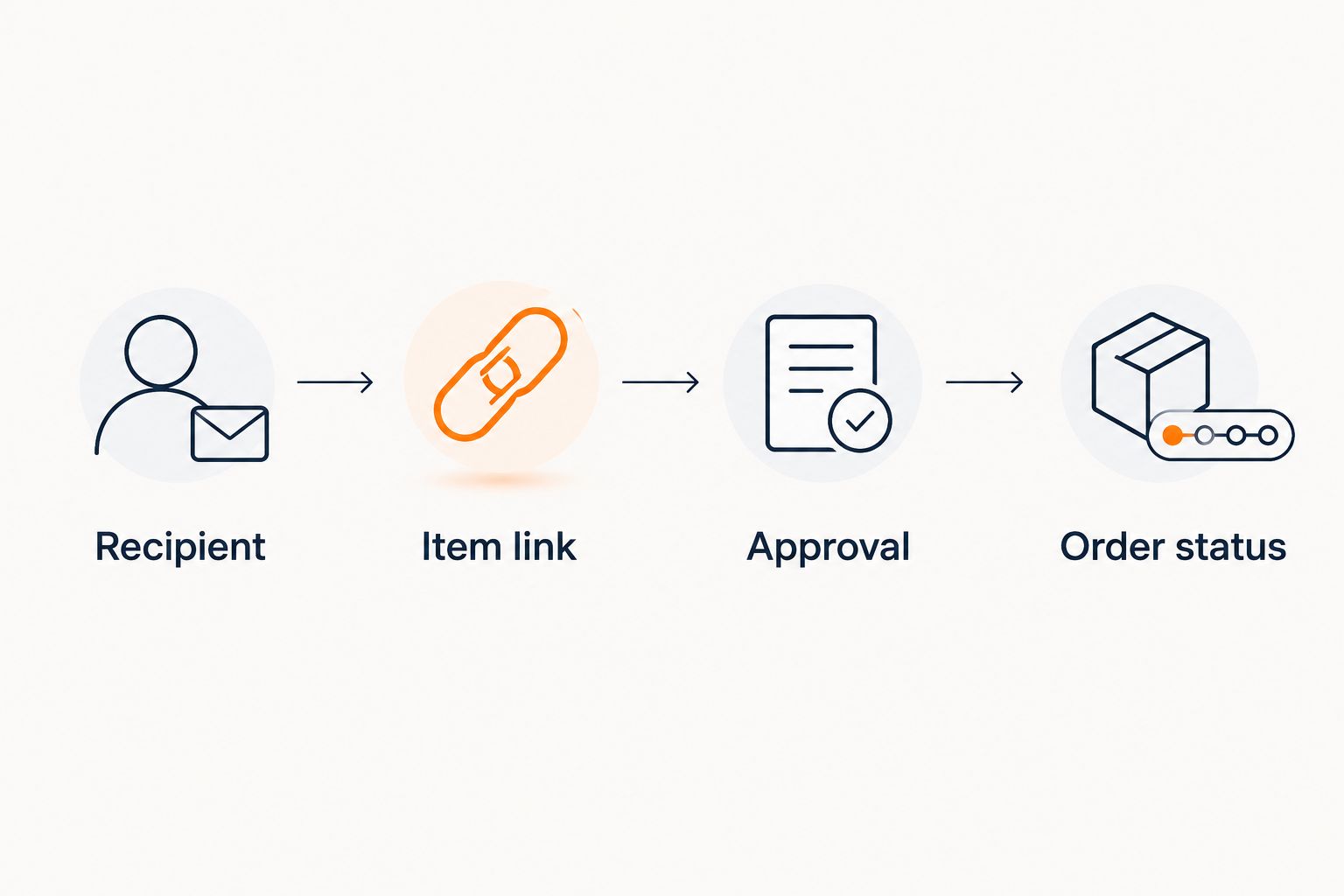
The sequence is a working rule, not a feature you should assume an app performs for you. Your client's preferred approval method can stay where it already happens. The important part is making its result visible in your record:
- Recipient: Match the item to the right person and occasion.
- Item link: Keep the exact listing that was reviewed.
- Approval: Record the decision before placing an order.
- Order status: Mark a purchase only after it has actually been placed.
5. Check price alerts without letting them make the decision
You can check retailer pages manually whenever an approved purchase is due. That works when your list is short, but it depends on someone remembering to return to each page. An automatic alert changes the follow-up task: review a reported drop, then decide whether the approved item is ready to buy.
LMK offers automatic price tracking and drop alerts. For a personal assistant, that is useful after a client has identified items they want and before the purchase has been made. An alert is a prompt to check the current retailer listing, not permission to buy or evidence that the order will arrive when needed.
Keep price tracking tied to your client's instructions. If the client has not approved the item, a change in its listed price does not resolve that decision. For each alert you act on in 2026:
- Match the item: Check that the alert concerns the approved choice.
- Open the retailer page: Verify the current listing before taking action.
- Check the deadline: Confirm the purchase still fits the occasion.
- Record the decision: Note whether you bought the item or left it on the list.
6. Share a useful gift view, not the whole task file
Before sharing a wishlist, decide what the other person needs to do. A family member helping choose a present needs a different view from a colleague tracking an order. Send product options when the task is choosing; keep approvals and purchasing notes in your working record.
A shared list also needs an owner. If your client changes their mind about an item, someone must update the version other gift-givers are using. Otherwise, an old link can continue to circulate after the decision has changed. Make the update part of the same routine you use to collect requests.
For 2026 events with several gift-givers, state the purpose when you share a list. Tell people whether the items are ideas or confirmed choices. Then check that the link you send opens to the intended list:
- Name the audience: Identify who needs the gift options.
- State the list's purpose: Distinguish ideas from approved requests.
- Review the entries: Remove choices your client no longer wants shared.
- Test the shared view: Check what a recipient of the link can see.
7. Close the loop after checkout
Do not leave a purchased item looking like an open request. Update your working record after checkout, then confirm delivery through the retailer or carrier information available for that order. The wishlist remains your source of gift ideas; the order record tells you what actually happened.
This step matters when more than one person helps with gifting. Without a clear status, an assistant can spend time reviewing an item that has already been ordered, or another gift-giver can act on an outdated request. Make the completed purchase visible to the people coordinating the gift, while keeping private order details appropriately limited.
Finish each gift task with a short review. Did the approved item match the order? Does the client need an update? Is the recipient's entry ready to close? Use the same checks every time:
- Record the purchase: Mark the item ordered only after checkout is complete.
- Confirm the item: Compare the order with the approved product link.
- Track fulfillment: Use the order information to check its progress.
- Close the request: Tell the relevant people when no further action is needed.
Compare your options
The best setup depends on where requests originate and how much coordination happens after an item is saved. This 2026 comparison separates collecting gift ideas from managing the purchase. None of these options replaces approval or order tracking on its own.
| Option | Best for | Key limitation |
|---|---|---|
| LMK cross-store wishlist | Personal assistants collecting gift requests from multiple online retailers and watching for price drops | A wishlist does not by itself document client approval, checkout, or delivery |
| Store-specific wishlist | Assistants handling requests centered on one retailer | Requests from other stores require another list or record |
| Shared spreadsheet | Assistants who need a customizable recipient and approval record | Product pages and price changes require manual checks |
| Email or message thread | A quick request from one client | Gift links and decisions are harder to find as the thread grows |
Choose the cross-store list for gathering items, then keep the approval and order record beside it. A spreadsheet can serve as that record. If your client sends only an occasional link, a message thread might be enough; you do not need to turn a small task into a new process.
Common mistakes personal assistants make
Treating a saved item as an approved purchase
Adding a product to a wishlist records an option. It does not say your client approved the item, the selected variation, or the timing. Mark approval separately, and check it again if you change the item or its retailer. This is the clearest boundary in a 2026 gifting workflow.
Mixing private details into a gift list
A recipient's address and a private note from your client serve different purposes from a product link. Keep those details in the appropriate record and review who can access it before sharing. A gift-giver can help choose an item without seeing everything you use to manage the task.
Assuming a price alert settles the purchase
An alert identifies a change worth checking. It does not confirm that your client wants to buy, that the retailer listing still matches the approved choice, or that you have placed an order. Open the listing and follow the approval process before updating purchase status.
Forgetting to close purchased requests
An old entry can look like an active request when the order status lives somewhere else. After checkout, update your working record and tell anyone coordinating the gift that the item no longer needs attention. Check delivery separately rather than treating checkout as the end of the task.
FAQ
What's the best personal assistant wishlist app for gifts from different stores?
LMK is best for personal assistants who need one wishlist for items from multiple online retailers and automatic price-drop alerts. Keep client approvals and order status in a separate working record.
Can a personal assistant use a wishlist app for client purchases?
Yes, a wishlist app can organize the items a client is considering. Record approval before buying and confirm the order separately after checkout.
Is a cross-store wishlist better than a spreadsheet?
A cross-store wishlist is better for collecting product links from different retailers; a spreadsheet is better for a customizable approval and order record. Use both when you need to manage the full gift task.
How do I stop duplicate gift requests?
Use one consistent recipient name and keep each item's purchase status current. Review existing entries before adding a new link or sharing the list.
Should I put recipient addresses in a shared wishlist?
Keep recipient addresses in an appropriate private working record unless sharing them is necessary for the task. Check who can access information before sending a gift list.
Do price-drop alerts mean I should buy immediately?
No, a price-drop alert is a prompt to review the retailer listing. Confirm the approved item, your client's instructions, and the occasion before purchasing.
Does a wishlist confirm that a gift has been delivered?
No, a saved item is not a delivery record. Check the order information after checkout and update your working record when the gift task is complete.
One last thing
The most useful wishlist entry is not always the one you buy. A rejected or replaced idea still needs a clear status so it does not return as an active request later. In 2026, use LMK to keep cross-store gift options together, but let your approval and order record determine what happens next.



