
Real estate agent gift list app: LMK wins in 2026
A real estate agent gift list app keeps gift ideas in one place. LMK wins for cross-store lists and price alerts; use this 2026 workflow to stay organized.

Real estate agent gift list apps are tools for organizing gift ideas with the aim of choosing appropriate client gifts without losing track of what you have shortlisted. A real estate agent gift list app needs to fit a workflow where recipients, occasions and store choices vary; a personal wishlist alone does not organize those decisions for you.
- LMK is the best fit for a real estate agent gift list app when you save ideas across stores and want price-drop alerts.
- Keep client details and gift ideas in separate places; a wishlist is not a client record.
- Use separate lists for distinct occasions, then check each item before sharing or buying.
- A spreadsheet offers more control over client records but requires manual link and price checks.
Why gift lists matter for real estate agents
A gift idea is only useful if you can find it again when the occasion arrives. Real estate agents choosing gifts for different clients need to distinguish the recipient, the occasion and the item without assuming that one store carries every suitable option. A cross-store list helps with the item search; your existing client records still handle names, addresses and follow-up.
For 2026 gifting, LMK offers a single wishlist or gift registry for items from hundreds of online retailers, including Amazon, Target, Walmart and Etsy. Automatic price tracking and drop alerts make it useful when you identify an item before you intend to buy it. LMK is best for real estate agents who want one cross-store gift list with price-drop alerts, not a replacement for client records.
The distinction prevents a common planning error: saving a product is not the same as confirming that it suits a particular recipient. An agent still has to make that judgment. The list should make the choice easier to revisit, not make it on your behalf.
How to build a gift-list workflow
Start with a manual list if you are still deciding what information you need. A note or spreadsheet can hold product links and brief reasons for saving them. Once those fields are clear, a dedicated list is a faster way to keep products from different retailers together. Neither approach removes the need to check the recipient and occasion before you act.
Define the occasion
Write down why you are considering a gift before collecting products. A closing gift, a housewarming gesture and a thank-you for a referral call for different choices, even when you are buying for the same person. The occasion gives you a reason to keep an item or remove it later.
Keep this first pass separate from shopping. If you start with a store catalog, an appealing item can distract from whether the gift is appropriate. A short note about the occasion gives you a test to apply to every candidate.
- Record the occasion in your working notes.
- Identify the intended recipient without putting private client details in a shareable list.
- Note any preferences the recipient has actually told you.
- Set a decision point for when you will review the ideas.
Separate gift ideas
Create one list for each distinct gifting purpose rather than mixing every saved item into a single queue. Two separate lists, such as closing gifts and housewarming gifts, are easier to scan than a mixed set when you return to them. You can organize them manually first; the important decision is what belongs together.
If housewarming is the immediate use case, compare the approaches in this guide to housewarming gift list apps. An agent's list still needs its own recipient check: an idea that suits one household is not automatically suitable for another.
- Group ideas by occasion or recipient, not just by retailer.
- Give each list a name you will recognize later.
- Remove items that no longer fit the purpose.
- Keep the recipient decision in your private working notes.
Collect store links
Start by copying product links into a note or spreadsheet. Write a few words beside each link explaining why you saved it; a row of unfamiliar URLs is hard to evaluate later. Include ideas from different stores when that improves the choice, rather than forcing every gift into one retailer's catalog.
This is where a cross-store tool becomes useful. LMK lets US shoppers and gift-givers build one list from items across hundreds of online retailers, including Amazon, Target, Walmart and Etsy. It is a better fit than a retailer-only list when your shortlist spans those stores. The limitation is equally clear: a saved link records an idea, not a decision that the item suits your client.
- Save the product page, not a search-results page.
- Add a short reason for considering each item.
- Keep alternative ideas together until you choose one.
- Reopen the original retailer page before buying.
The workflow is a sequence, not a single shopping session: define the purpose, keep related ideas together, collect links, watch for changes and review the final choice.
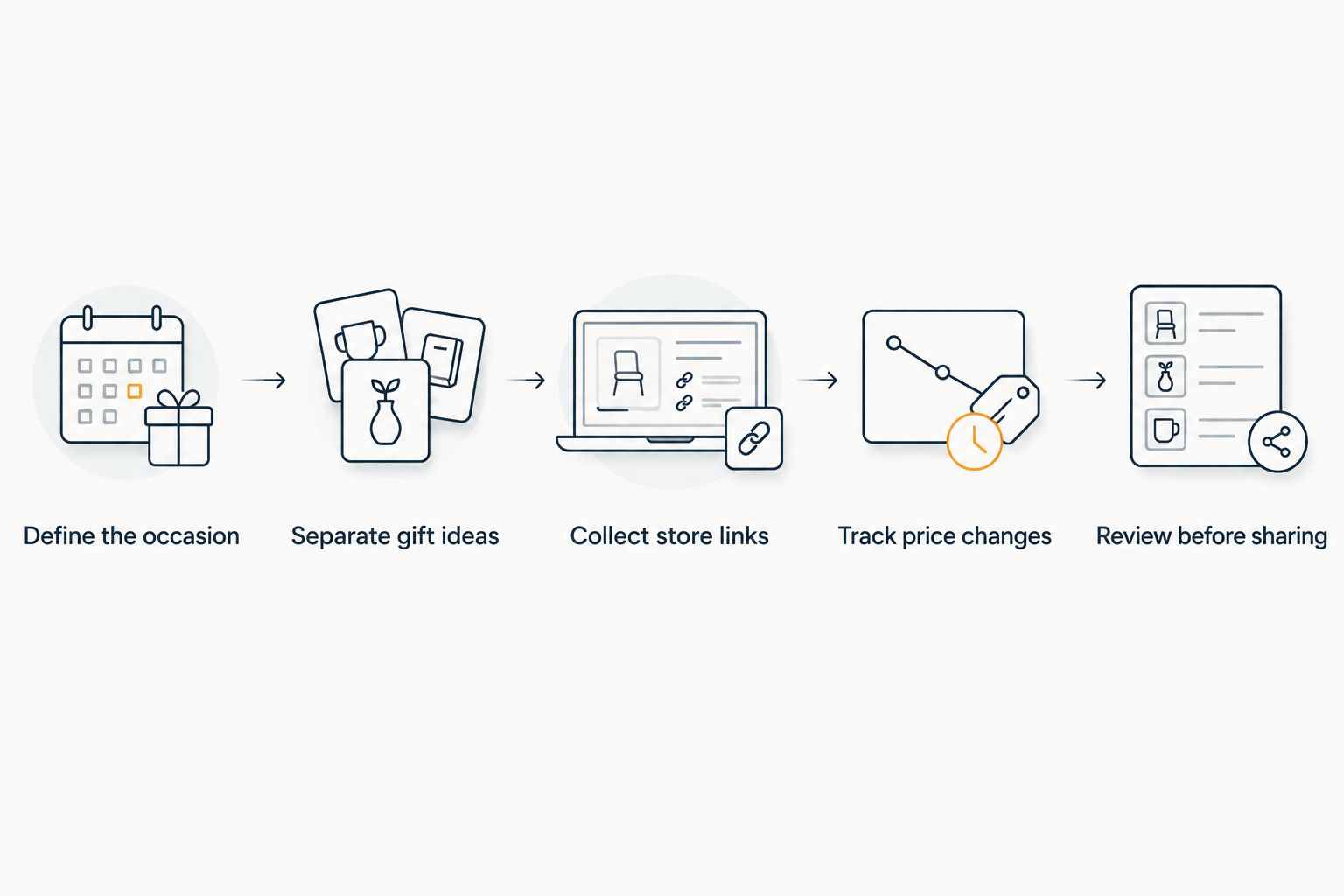
Track price changes
A saved item and its current price are different pieces of information. In a spreadsheet, you can reopen each retailer page when you are ready to decide. That manual method works if your shortlist is small and you remember to check; it gives you no automatic alert when a price drops.
LMK adds automatic price tracking and drop alerts to a cross-store wishlist. For a real estate agent who gathers ideas ahead of an occasion, the alert is a prompt to reconsider a saved item. It is not a reason to buy without checking the item, recipient and retailer page again. In 2026, build that final check into your routine rather than treating an alert as a purchase instruction.
- Keep items on the list only while they remain viable gift ideas.
- Use drop alerts to revisit saved products.
- Check the current retailer listing before making a decision.
- Remove ideas once they no longer suit the occasion.
Review before sharing
Decide who needs to see the list, if anyone. An agent's private shortlist serves a different purpose from a registry shared with gift-givers. Before sending any list, inspect what it contains and whether its title or notes reveal information you intended to keep private.
Do not assume that the people viewing a list understand your shorthand. If a recipient should choose among ideas, make the descriptions clear enough to stand alone. If the list is only for your own planning, keep it private and share the final gift choice through your usual client communication instead. Review visibility settings in the tool you choose before distributing a link.
- Check every saved item's title and notes.
- Remove client-identifying information from shareable content.
- Confirm who can view the list before sharing it.
- Send only the list that fits the intended audience.
Record fulfillment outside the list
A wishlist organizes possibilities; it does not, by itself, establish that a gift was bought, delivered or received. Keep those outcomes in the client record or tracking method you already use. This separation is especially useful if you save alternatives: the presence of several items on a list should not become several purchases by mistake.
Use three fields in your own record: recipient, occasion and status. Add further detail only when it helps you make or verify a decision. Avoid placing addresses or other client information into product notes just because the list is convenient to open. Your gift list answers what you are considering; your record answers what happened.
- Mark the chosen gift in your private record.
- Record the occasion alongside the recipient.
- Update the status after you act.
- Clear unused alternatives from the active shortlist.
Refresh the list
A gift list gets less useful when old candidates stay beside current ones. Review it before each gifting occasion and decide which ideas still fit. This can be a quick manual pass: open each remaining link, check the item and delete what you would no longer choose.
For 2026, treat the list as a working shortlist rather than a permanent catalog of everything you have ever liked. Keep reusable ideas only when they still make sense for the occasion. If an item is specific to one recipient, label it in your private system instead of expecting the product name to remind you later.
- Remove products that no longer fit the recipient.
- Recheck saved links before using an older idea.
- Move unresolved alternatives out of the active list.
- Review the shortlist before the next gifting decision.
Compare gift-list options for real estate agents
The right option depends on what you need to organize. Use a spreadsheet when the primary job is maintaining a client-by-client record. Use a retailer-specific list when all the ideas you want to save come from that retailer. Choose a cross-store wishlist when finding items again across stores is the recurring problem.
| Option | Best for | Starting price | Key limitation |
|---|---|---|---|
| LMK cross-store wishlist | Agents saving gift ideas across retailers and watching for price drops | Check the provider | A wishlist does not replace client records or recipient judgment |
| Retailer-specific wishlist | Agents choosing items within one retailer's catalog | Check the provider | Ideas from other stores need a separate place |
| Spreadsheet or notes | Agents who need custom fields for their own gift-planning process | Check the tool you use | Links and price changes require manual checks |
LMK's strongest match is product discovery across stores. A spreadsheet's strongest match is control over your own fields. Neither is a complete gifting process on its own: you still choose the recipient, confirm the occasion and record what you actually did. If you are deciding between tools in 2026, test each against the step that currently takes you the most effort, not the length of its feature list.
Common mistakes real estate agents make
Using a wishlist as a client database. A saved product tells you what caught your eye, not who should receive it or whether you sent it. Keep recipient information and completed actions in your private client records; use the gift list for the shortlist.
Combining unrelated occasions. A single undifferentiated list makes it harder to revisit an idea with the right purpose in mind. Separate housewarming, closing and other gift ideas when the occasion changes what you would choose.
Treating a drop alert as a buying decision. Price tracking helps you notice a change. It does not check whether an item is still appropriate or whether the retailer listing has the details you need. Reopen the product page and review the recipient before acting.
Sharing the planning list without reviewing it. Your working notes can contain shorthand or context meant only for you. Inspect the list and its visibility before you send it to anyone, and leave private client details out of shareable product notes.
Keeping every old idea. A crowded shortlist slows down the next decision. Delete ideas that no longer fit, even if they once seemed promising. The goal is a useful choice for the current occasion, not an archive of every product you considered.
FAQ
What's the best real estate agent gift list app for items from different stores?
LMK is the best fit here for agents who save ideas across retailers and want automatic price-drop alerts. Keep client details and purchase outcomes in a separate record.
Can a real estate agent use one wishlist for every client?
You can keep ideas together, but separate lists by occasion or recipient make the shortlist easier to review. Check who each item is for before buying or sharing.
Is a spreadsheet better than a wishlist app for client gifts?
A spreadsheet is better when custom client fields are your main need. A cross-store wishlist is better when collecting product ideas and watching for price drops are the main tasks.
Does a price-drop alert mean I should buy a client gift?
No. A drop alert tells you to revisit a saved item; you still need to check the current retailer page and whether the gift suits the recipient.
Should I put client addresses in a gift list?
No. Keep addresses and other private client details in your own client records, not in product notes that you might share.
How do I organize closing and housewarming gift ideas?
Use separate lists for closing and housewarming ideas when the occasion affects your choice. Record the intended recipient and the outcome in your private tracking system.
Do I need a separate retailer wishlist for each store?
No. LMK lets US shoppers and gift-givers build one wishlist from items across hundreds of online retailers, including Amazon, Target, Walmart and Etsy.
One last thing
The most useful item on a gift list is not always the one with a price alert. It is the one you can connect to the right recipient and occasion without guessing. Before your next 2026 gifting decision, open the shortlist, remove anything you cannot justify and check the remaining retailer links. A shorter list with a clear purpose is easier to act on.



