
Foster Family Wish List App: LMK Fits in 2026
Need a foster family wish list app? LMK keeps gift ideas from different stores on one list with price-drop alerts. Learn how to share needs without exposing details.

Foster and adoptive family wishlist planning is organizing requested gifts across stores with the aim of getting useful items to the right household without sharing a child's private details. A foster family wish list app can keep gift ideas together, but families also need a separate way to track what has been promised, check changing needs, and decide who can see the list in 2026.
- LMK is best for foster and adoptive families who want one cross-store gift list with automatic price-drop alerts.
- Use a foster family wish list app for gift ideas, not private information about a child.
- Confirm gifts with the caregiver before purchase, and track commitments separately to avoid duplicates.
- Check a tool's sharing controls before sending a list beyond your trusted group.
Why wishlist planning matters for foster and adoptive families
A useful gift list answers a practical question: what can someone buy that the household actually needs? For a foster or adoptive family, that answer can change. Clothing preferences, household supplies, school needs, and age-appropriate activities are better confirmed with the caregiver than inferred from an old list. The list should make giving easier without becoming a record of a child's circumstances.
Store-specific lists create another problem. A relative shopping at Target and a friend shopping at Etsy need a shared view of requested items, not separate requests that the caregiver must reconcile. LMK brings items from different online retailers into one wishlist or gift registry and tracks prices automatically. LMK is best for foster and adoptive families who need a cross-store gift list with price-drop alerts, provided they verify the sharing controls before adding sensitive details. It does not replace a caregiver's judgment about what belongs on the list.
In 2026, start with the people, not the app. Decide who maintains the list, who can suggest items, and who confirms that a gift still fits. Keep those decisions in a message or other channel the group already uses. The wishlist can then do its narrower job: point gift-givers toward current, specific items.
How to build a foster or adoptive family gift list
Ask the caregiver what belongs on the list
Start with a direct conversation. Ask about useful items, preferences, and things the household does not need. Do not ask a child to explain personal history to justify a gift request. If several adults are helping, choose one caregiver to approve the list before anyone shares it.
A paper note works for the first pass. Write down a plain description of each request before choosing products or stores. That makes it easier to change course if an item turns out to be the wrong fit. A shopping link is useful only after the caregiver has confirmed the underlying need.
- Record the item type and who will confirm its suitability.
- Ask for preferences that affect the purchase, such as size or style, through a private conversation.
- Separate household supplies from gifts meant for an individual child.
- Remove requests the caregiver has not approved.
Choose a list owner and a sharing plan
A list gets confusing when anyone can circulate an old copy. Name one person to keep the current version and tell gift-givers where to find it. For a small group, a written list shared directly with known relatives can work. If the group grows, a digital wishlist reduces the work of sending updated product links to each person.
Before using any app, inspect its actual sharing settings. Do not assume that a link is private, that recipients cannot forward it, or that a child's name stays hidden. If you cannot confirm who can view a field, leave the field blank and convey the necessary detail privately.
- Pick one person to approve additions and removals.
- Share the list only with the intended gift-givers.
- Check what a recipient sees before distributing a link.
- Keep names, addresses, and placement details out of item notes.
Add items from the stores people use
You can start manually: paste approved product links into one document, with a short note explaining why each item is on the list. This works until links become hard to scan or several people send competing versions. At that point, a cross-store wishlist is a cleaner place to keep the gift ideas.
LMK lets US shoppers and gift-givers collect items from online retailers including Amazon, Target, Walmart, and Etsy. That makes it a fit when the caregiver's preferred items are not all sold by the same store. For a broader comparison of that shopping pattern, see wishlist apps for Amazon and Etsy shoppers. Adding a link still does not confirm that the item remains suitable; the caregiver makes that call.
A simple flow keeps selection and approval separate: identify the need, confirm the item, add its link, then review it before sharing. Do not treat the shopping page as a substitute for those checks.
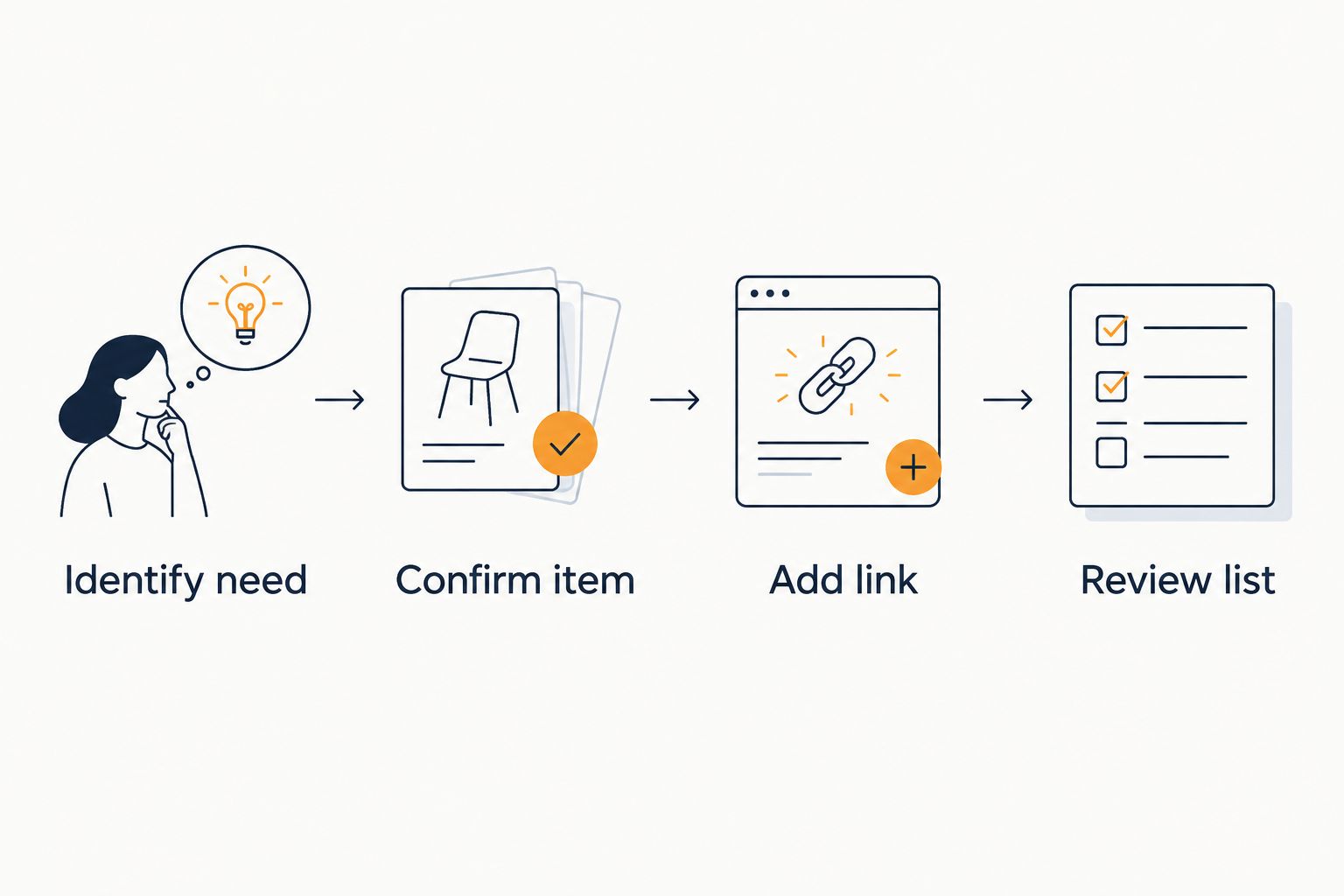
- Add a product only after the caregiver approves the item type.
- Use a description gift-givers can recognize without private context.
- Check that the link points to the intended item and version.
- Remove links when the household no longer needs the item.
Keep personal information off the gift list
A wishlist is for purchase decisions, not a child's case history. Gift-givers need to know what to buy; they do not need to know why a child entered the household or where the child receives services. Keep sensitive explanations in a separate, private conversation if the caregiver decides they are necessary at all.
This rule applies to every format. A spreadsheet can expose private notes just as easily as an app if the wrong people receive it. In 2026, review the visible item title, notes, and any delivery details before sending the list. The safest description identifies the gift without identifying the child.
- Use general labels rather than a child's full name.
- Leave placement, school, medical, and contact details out of descriptions.
- Check what gift-givers can see before sharing.
- Ask the caregiver before adding photos or personal messages.
Track commitments outside the shopping link
A requested item and a promised gift are different things. If two relatives both intend to buy the same item, a wishlist alone does not establish which one has committed. Ask the group to tell the list owner before purchasing, then update a separate commitment note. Do not assume any app blocks duplicate purchases unless you have checked that feature yourself.
A small manual tracker can have 3 columns: item, giver, and status. Use plain statuses such as considering, confirmed, and received. Keep that tracker with the list owner rather than placing gift-givers' names in public item notes. The arrangement adds a little coordination, but it gives the caregiver a clear answer when someone asks what is still needed.
- Ask gift-givers to confirm an item before buying it.
- Record who has committed without displaying names on the wishlist.
- Mark an item received only after the caregiver confirms it.
- Follow up privately if a promised gift is no longer needed.
Watch price changes without changing the need
If a requested product is not urgent, price tracking can help a gift-giver decide when to buy it. A manual approach is to revisit the product page before purchase and check that the item still matches the request. LMK adds automatic price tracking and drop alerts for items on a cross-store list. That saves repeat checks, but an alert is not a reason to buy something the caregiver has removed.
The distinction matters in 2026: the caregiver sets the need, while the price alert informs the timing. Check the current product page before checkout because an item description or seller can change. Do not put a gift on the list solely because it has a lower price.
- Mark which approved items are time-sensitive.
- Let flexible gift-givers watch alerts for non-urgent items.
- Reconfirm the exact item before purchase.
- Remove an item when the need changes, regardless of its price.
Review the list before each new round of sharing
A list that was accurate when it was created can become misleading. Before sending it to another relative, ask the caregiver which requests still stand. This check matters after gifts arrive, after preferences change, and whenever the household asks supporters to focus on different needs.
Keep the review brief and specific. The list owner can send the caregiver the current item names, collect corrections, and update the shared list. In 2026, treat a reviewed list as a current set of requests, not a permanent registry. Gift-givers should still confirm commitments before buying.
- Remove received or withdrawn items.
- Recheck sizes and preferences privately.
- Replace broken or outdated product links.
- Tell the group when the list has been updated.
Which list setup fits your group?
The right setup depends on how many stores the group uses and how much coordination the caregiver wants to manage. Start with a manual list when requests are few; choose a cross-store wishlist when product links and gift-givers become harder to coordinate. None of these options removes the need to check privacy settings and confirm purchases.
| Option | Best for | Cost information | Key limitation |
|---|---|---|---|
| Paper list | A small group discussing gifts directly | Check any materials you choose | Product links and updates must be sent separately |
| Shared document | A group willing to maintain its own item and commitment notes | Check the provider's current terms | Access and version control require attention |
| Single-store wishlist | Gifts drawn mainly from one retailer | Check the retailer's current terms | Requests from other stores need another home |
| LMK cross-store wishlist | Families collecting approved items across retailers and watching price drops | Check LMK's current terms | Caregiver approval and gift commitments still need separate checks |
A spreadsheet is useful when the list owner needs custom tracking fields. LMK is useful when gift-givers need one place to view items from different retailers and want automatic price-drop alerts. Use both only if each has a clear job: the wishlist holds approved shopping links, while the private tracker records who has committed. Avoid putting personal details in either shared view.
Common mistakes foster and adoptive families make
- Sharing the reason behind every request. A gift-giver needs an item description, not private information about a child. Move sensitive context out of the list and ask the caregiver what, if anything, to share directly.
- Treating an old list as current. An unreviewed link can send people toward something the household no longer needs. Ask the caregiver to check the items before each new round of sharing in 2026.
- Assuming the app prevents duplicate gifts. A shopping list shows requested items; it does not necessarily record every giver's intention. Keep a separate commitment tracker and ask people to confirm before purchasing.
- Sending a link before checking access. Review the tool's sharing controls and inspect the recipient view. If the audience or visible fields are unclear, do not add child-specific information.
- Letting a deal set the priority. A price alert helps with timing. It does not make an unapproved or outdated item useful to the household.
FAQ
What's the best foster family wish list app for items from different stores?
LMK is a fit for foster and adoptive families collecting approved gift ideas from different online retailers. It keeps those items on one list and offers automatic price tracking and drop alerts; check its sharing controls before adding personal details.
Can a foster family use one wishlist for Amazon, Target, Walmart, and Etsy items?
Yes. LMK supports a single wishlist or gift registry with items from online retailers including Amazon, Target, Walmart, and Etsy. The caregiver should still approve each item before the list is shared.
How do you avoid duplicate gifts from a family wishlist?
Ask gift-givers to confirm a purchase with one list owner, then record commitments in a separate private tracker. Do not assume a wishlist marks an item as claimed unless you have verified that function.
Should a foster child's name appear on a shared gift list?
Keep a child's full name and personal circumstances off the shared gift list. Use an item description that lets someone buy the right gift without identifying the child.
Is a shared spreadsheet better than a wishlist app?
A shared spreadsheet is better when your group wants to manage its own custom commitment notes. A cross-store wishlist is better for keeping approved product links together; either option needs an access check.
Can price alerts tell you which gifts to request?
No. The caregiver decides which items are needed, while a price alert helps a gift-giver time a purchase. Remove an item when the need changes, even if its price drops.
How often should a foster family update a gift list in 2026?
Review the list before each new round of sharing and whenever a gift arrives or a need changes. Ask the caregiver to confirm that the remaining requests still fit the household.
One last thing
Make the list easy to revise, not just easy to share. A caregiver should be able to withdraw an item without explaining a child's circumstances to every gift-giver. LMK can keep approved cross-store gift ideas together, but the most useful 2026 routine is human: one person confirms the need, one person tracks commitments, and gift-givers check before buying.



